Month: May 2026
If you are budgeting for custom software development cost in 2026, you’ve probably seen quotes that vary by 2–3x for what appears to be “the same” scope. Meanwhile, you keep hearing that the real cost is not the initial build but everything that comes after.
This article breaks down what you are actually paying for when you hire a dev team, why “cheap” builds often become the most expensive, and how to structure your budget so your product stays financially healthy over its entire lifecycle.
Custom Software Development Cost in 2026: What to Expect
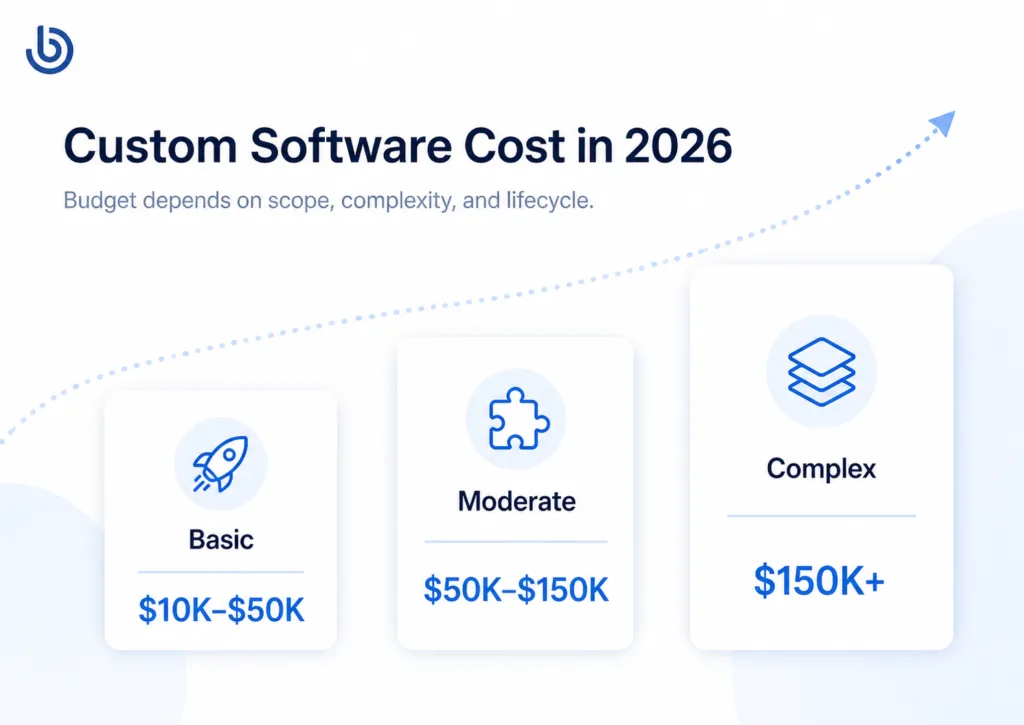
There is no universal price tag, but most projects fall into several categories:
| Product type | Approximate budget | What it usually includes |
| Prototype / clickable MVP | $10,000–$30,000 | UX concept, limited screens, basic user flow validation |
| Simple custom app / MVP | $25,000–$80,000 | Core functionality, backend, basic integrations, QA, first release |
| Growth-stage mobile or web product | $80,000–$250,000+ | Scalable architecture, analytics, payments, admin panel, advanced UX |
| Complex SaaS / marketplace / AI platform | $150,000–$500,000+ | Multi-role systems, integrations, automation, AI features, DevOps, security |
| Enterprise-grade system | $300,000+ | Complex workflows, compliance, integrations, high availability, long-term support |
The important point: the development invoice is only one part of the product’s total cost. The real cost includes discovery, architecture, UX, development, QA, integrations, cloud infrastructure, release management, analytics, maintenance, and post-launch optimization.
What you’re actually paying for when you hire a dev team
When founders compare custom software development cost, they often focus on hourly rates.
That is understandable, but misleading.
The main cost drivers that sit behind any proposal include:
- Scope and complexity. The more complex your product (real‑time features, AI, heavy analytics, multi‑tenant permissions, deep integrations), the more hours you are buying across engineering, QA, DevOps, and product. A basic MVP might land in the lower tens of thousands, while complex SaaS or enterprise platforms can easily run into the hundreds of thousands or more.
- Team location and rate bands. In 2025–26, software development rates range from roughly 25–60 USD/hour for many offshore regions up to 100–300+ USD/hour for premium onshore consultancies, depending on specialization and seniority.
- Platform strategy. Maintaining separate native iOS, Android, and web codebases significantly increases both build and maintenance costs; cross‑platform frameworks we use, like Flutter, let one team ship to all platforms from a single codebase, which can reduce timelines and ongoing maintenance by 30–60% in many cases.
- Team structure and seniority mix. Hourly rates jump as you move from junior to mid‑level to senior and architect roles, but senior people unlock better architecture, faster decisions, and fewer costly reworks later. How you balance that mix has a major impact on the total cost of ownership.
- Lifecycle, not just launch. Total cost of ownership (TCO) includes the full lifecycle: build, run, maintain, improve, and eventually retire or rebuild the system. For most serious products, your ongoing operating and change costs over several years will exceed what you spent on the initial build.
With that context, let’s zoom in on what your budget is really paying for when you hire a dev team.
What you’re paying for when you hire a dev team
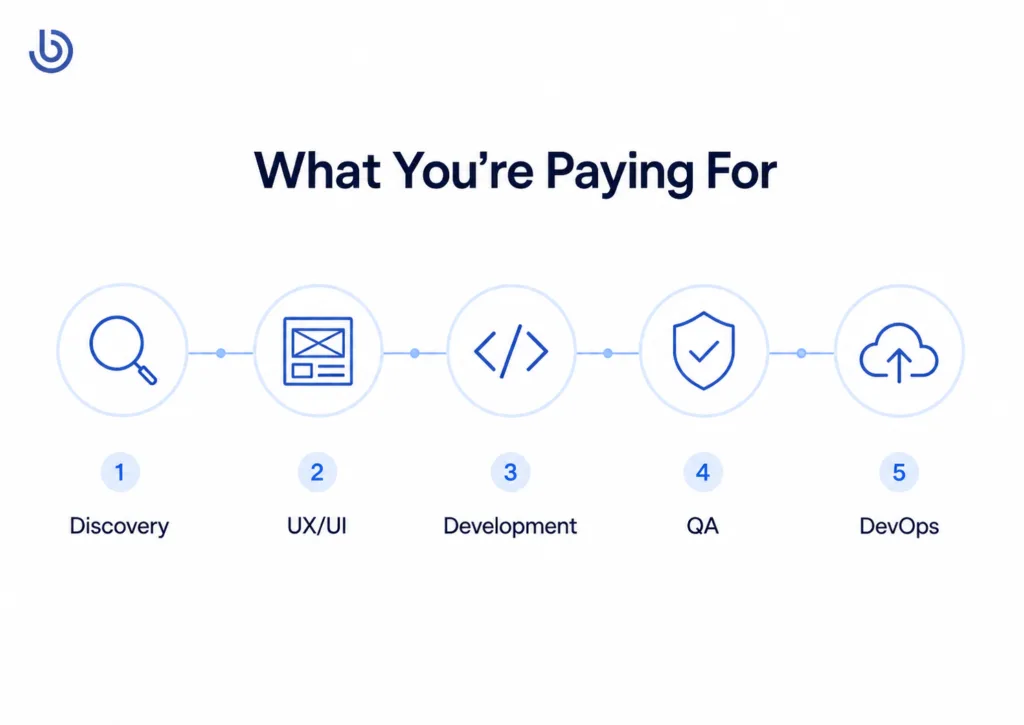
When you see an hourly rate or a blended “per sprint” price, it’s not just “coding time.”
1. Discovery and product shaping
Good teams start by clarifying business goals, user journeys, and constraints instead of jumping straight to Jira tickets. This includes stakeholder interviews, process mapping, user story workshops, and prioritization. Done well, this phase cuts out wasteful features that would otherwise eat a big chunk of your budget later.
Dreambit works more as a technology partner rather than a pure coding company: we help businesses clarify the product vision and define an MVP that can be shipped in a 2–3 month window. That reduces time‑to‑market and avoids building features nobody uses.
2. UX/UI design
You’re paying for people who can translate business flows into usable interfaces, states, and interactions that work across devices. This includes wireframes, hi‑fi designs, design systems, and interaction patterns. Poor UX is expensive: it leads to abandoned sign‑ups, higher support overhead, and slower adoption — costs that rarely show up in the initial quote but hit your P&L later.
For example, in healthcare products Dreambit has worked on, design decisions around flows for appointments were critical to adoption and engagement, not just aesthetics. That has direct revenue and retention implications.
3. Architecture and technical decisions
You are also paying for someone to choose your tech stack, design system boundaries, and decide how modular, scalable, and testable your codebase will be. These early choices drive:
- How quickly new features can be added.
- How hard it is to swap vendors or grow your team.
- How often you hit scaling or reliability limits that require expensive refactors.
Total cost of ownership frameworks consistently show that architectural shortcuts and accumulated technical debt are some of the biggest hidden cost drivers over a system’s lifetime. Dreambit’s cross‑platform focus aims to keep architecture unified, so you are not paying for parallel stacks that drift apart.
4. Development and integration
This is the actual “writing code” part, covering:
- Implementing features across mobile and web.
- Integrating external APIs (payments, messaging, analytics, identity).
- Handling edge cases, data validation, and error states.
Rates vary significantly by region and firm size. Small to mid‑market custom development companies around the world typically charge 90–250 USD/hour in 2026 for mixed teams, while specialized offshore teams in Eastern Europe can deliver strong work at 25–75 USD/hour, depending on seniority and complexity.
5. Quality assurance and test automation
You’re also paying for the invisible work that makes your app actually reliable:
- Manual testing across devices and platforms.
- Automated tests (unit, integration, end‑to‑end).
- Performance and security checks.
Companies that skimp on QA often “save” in the short term but incur higher bug‑fixing costs, downtime, and reputational damage later. In regulated or trust‑sensitive domains (healthcare, fintech, dating), that can be catastrophic.
6. DevOps, infrastructure, and observability
Finally, you are paying for pipelines and infrastructure that keep your product shippable:
- CI/CD pipelines.
- Cloud infrastructure setup (compute, storage, networking).
- Monitoring, logging, and alerting.
TCO analyses highlight that ongoing hosting, monitoring, and operations regularly dwarf one‑time setup costs over the lifetime of the system. A solid DevOps foundation means smaller incremental changes are cheaper and less risky to deploy, which matters once you reach the optimization phase.
The hidden price of technical debt in “cheap” offshore builds
On paper, going with the lowest hourly rate looks irresistible, especially when proposals all promise the same feature list. But technical debt turns “cheap” builds into some of the most expensive software you will ever own.
Technical debt is the gap between the system you have and the system you should have built if you had more time, better skills, or fewer shortcuts. It includes tangled architectures, missing tests, outdated dependencies, and “temporary” workarounds that never got fixed.
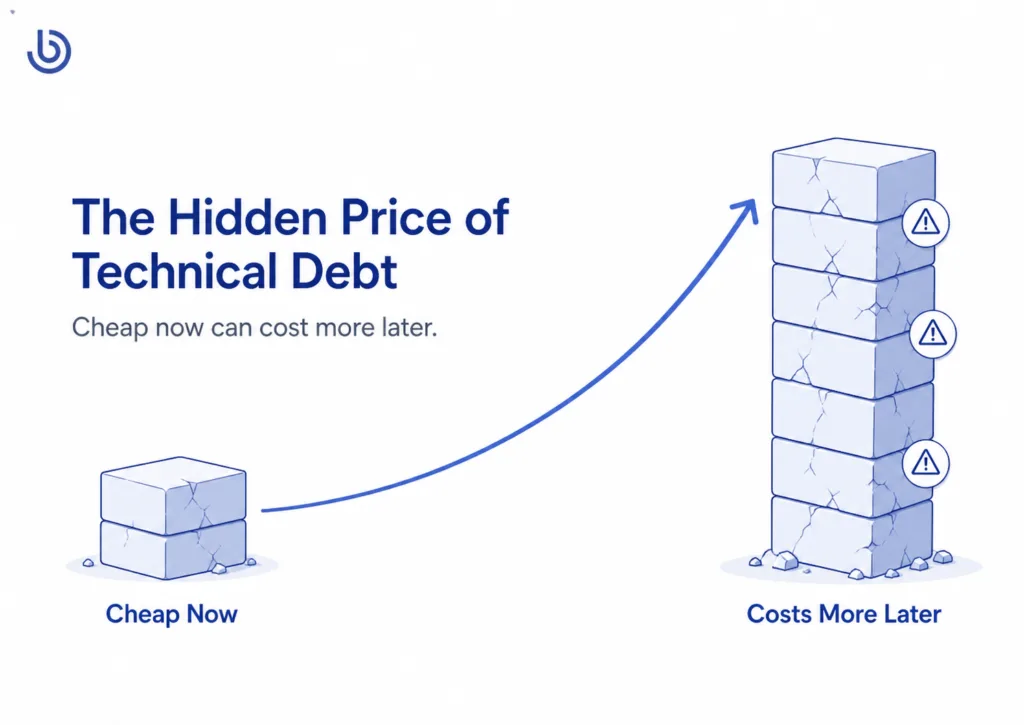
A small feature takes weeks because the codebase is fragile. A payment integration breaks after an API update. The app crashes on specific devices. The admin panel cannot support new business logic. Developers are afraid to touch old modules because one change creates five bugs. Eventually, the company faces a painful choice: keep patching a weak foundation or rebuild the product.
Software Improvement Group notes that technical debt can consume up to 40% of an IT budget and that 10–20% of budgets intended for new product development may be redirected to dealing with technical debt.
For a startup, technical debt delays growth. For a scaling business, it increases the total cost of ownership. For an enterprise, it can become a serious operational and security risk.
In custom software development, cheap code often becomes expensive code when it lacks:
- clean architecture;
- automated testing;
- documentation;
- security thinking;
- scalable backend structure;
- analytics;
- maintainable integrations;
- senior code review.
Dreambit’s App Quality Audition service is built around this exact issue. The audit evaluates app performance, usability, security, code, architecture, integrations, code quality, and potential technical debt.
That is the smarter way to manage cost: not by ignoring technical debt, but by detecting it early enough to fix it before it becomes a rewrite.
How seniority ratios influence your total cost of ownership
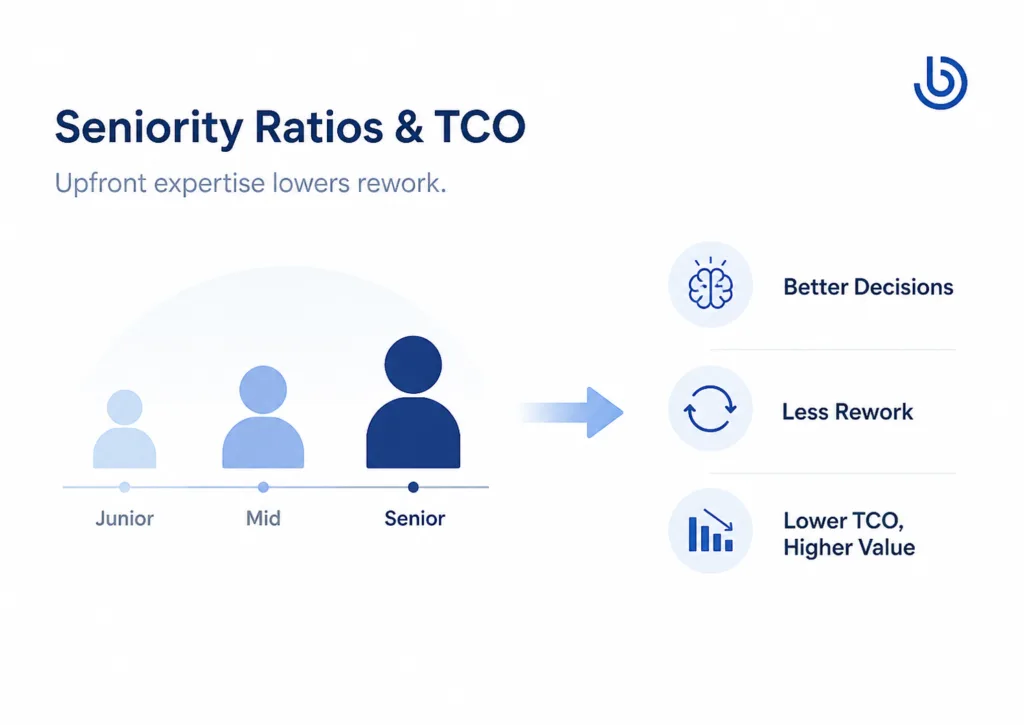
Another cost lever is your team’s seniority mix. A development team with more senior engineers usually costs more per hour. But the hourly price is not the same as the total cost.
A junior-heavy team may look cheaper on paper, but complex products need senior people to make decisions that affect the entire future of the system: architecture, database structure, security model, cloud setup, code standards, integration strategy, and scalability.
A senior-heavy team can often reduce waste because it needs fewer people to make better decisions faster. Senior developers are also more likely to prevent rework, spot risks early, and design the system so that future features are easier to add.
This matters even more in 2026 because AI tools are now part of everyday development. Stack Overflow’s 2025 Developer Survey found that 84% of respondents use or plan to use AI tools in their development process, while 51% of professional developers use them daily.
But AI does not remove the need for senior oversight. DORA’s 2025 research found that AI can accelerate code generation, but the saved time is often reallocated to auditing and verification. DORA also warns that AI acts as an amplifier: strong teams benefit from it, while teams with fragmented tooling or fragile infrastructure may generate technical debt faster.
In other words, AI can make a good team faster. It can also make a weak architecture messy at scale.
A healthy team structure usually includes:
- a senior tech lead or architect;
- one or more middle/senior developers;
- QA engineer;
- UX/UI designer;
- project/product manager;
- DevOps or cloud specialist when needed.
For early MVPs, a lean team is often enough. For marketplaces, SaaS platforms, fintech products, healthcare apps, AI-powered tools, or systems with many integrations, seniority becomes a cost-control mechanism, not a luxury.
You pay more for senior judgment upfront, so you do not pay more for rework later.
Budgeting for the post‑launch “optimization phase” is often ignored by sales
Most sales conversations focus on getting you to launch: features, timelines, and the initial project budget. But the real financial risk often hides in what comes after: the optimization phase.
Why “launch” is not the finish line
From a TCO perspective, your costs don’t stop when version 1 goes live — they usually start accelerating. After launch, you will:
- Fix real‑world bugs and UX friction that only surface with real users.
- Optimize performance as traffic grows.
- Add features to meet customer feedback or competitive pressure.
- Handle platform changes (OS updates, browser changes, third‑party API shifts).
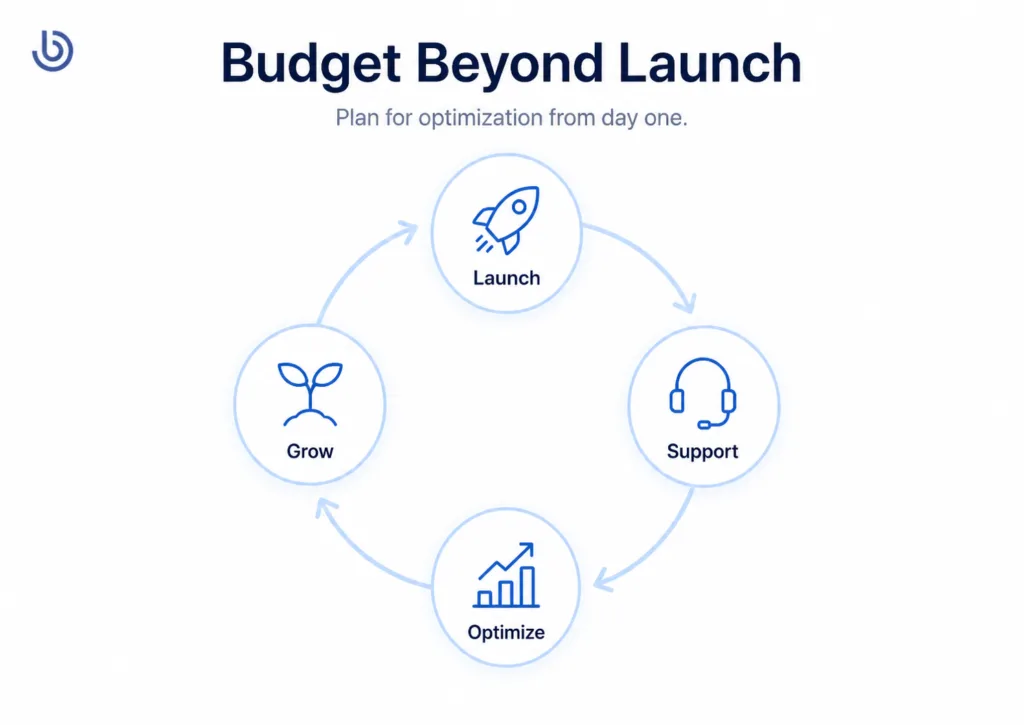
Dreambit’s Priority Maintenance Support service includes bug fixes, performance monitoring, compatibility updates, technical support, health checks, emergency support, UI/UX enhancements, and monthly reports.
This is not “extra.” It is part of the software lifecycle.
ISO/IEC/IEEE 14764:2022 describes software maintenance as a technical process in the life cycle of a software product and classifies maintenance into reactive and proactive work, including corrective, adaptive, preventive, perfective, and additive types.
So, when planning custom software development cost in 2026, companies should not ask only, “How much does it cost to build version one?”
They should ask:
“How much should we reserve to make version one successful?”
A practical rule is to plan a post-launch budget from the beginning. For many products, this means reserving budget for at least three to six months of optimization after release.
How to plan your optimization budget
Instead of treating post‑launch work as “we’ll figure it out later,” bake it into your financial model from day one:
- Assume a meaningful optimization phase. Expect at least several months of follow‑on work after launch for a serious product, focused on stability, UX refinements, and the first wave of feature improvements triggered by real usage.
- Allocate ongoing capacity. Decide whether you want a small, continuous team (e.g., a retained squad that ships improvements every sprint) or periodic “burst” engagements (e.g., 2–3 focused sprints each quarter). The first option is gentler on your roadmap; the second gives more budget flexibility.
- Track the right metrics. Tie optimization work to measurable outcomes: reduced support tickets, improved conversion, higher retention, lower infrastructure costs, or increased average order value. For example, in e‑commerce and service apps, UX improvements after launch have been linked to higher order values and new customer growth in real projects.
In case studies of apps like HealthPoint (healthcare) and HeartMatch (dating), Dreambit’s work did not end with the initial version: ongoing collaboration focused on refining flows, improving reliability, and enhancing engagement features based on live usage. That kind of partnership mindset is what you want to budget for.
Closing the financial loop with your vendor
When you discuss proposals, explicitly ask:
- How do you structure post‑launch support and optimization?
- What does the team look like during that phase?
- How do you prioritize improvements based on data rather than opinions?
Vendors who talk confidently about TCO, technical debt management, and post‑launch optimization are signaling that they are thinking beyond the initial invoice. This is where transparent communication and a long‑term relationship, which Dreambit focuses on, become a real financial asset.
Final Thoughts on Managing Custom Software Development Cost
In 2026, the cost of custom software development depends on much more than features and hourly rates.
It depends on how clearly the product is defined, how experienced the team is, how well the architecture is planned, how much technical debt is avoided, how the product is tested, how releases are managed, and how seriously the team treats post-launch optimization.
The cheapest estimate may help you start faster. But the smartest estimate helps you build something that can survive real users, real growth, and real business pressure.
That is the difference between paying for code and investing in a product.
For companies planning a mobile app, SaaS platform, marketplace, AI-powered tool, or digital product ecosystem, the best cost-management strategy is simple:
- Build only what matters first.
- Build it on a strong foundation.
- Measure what users do.
- Improve continuously.
- Choose a development partner who can think beyond launch day.
Dreambit helps companies control total software cost by building scalable, cross-platform products, validating them through measurable releases, auditing quality, and supporting optimization after launch.
The biggest mistake founders make in multi-vendor marketplace development is thinking they are building a store with many sellers.
They are not.
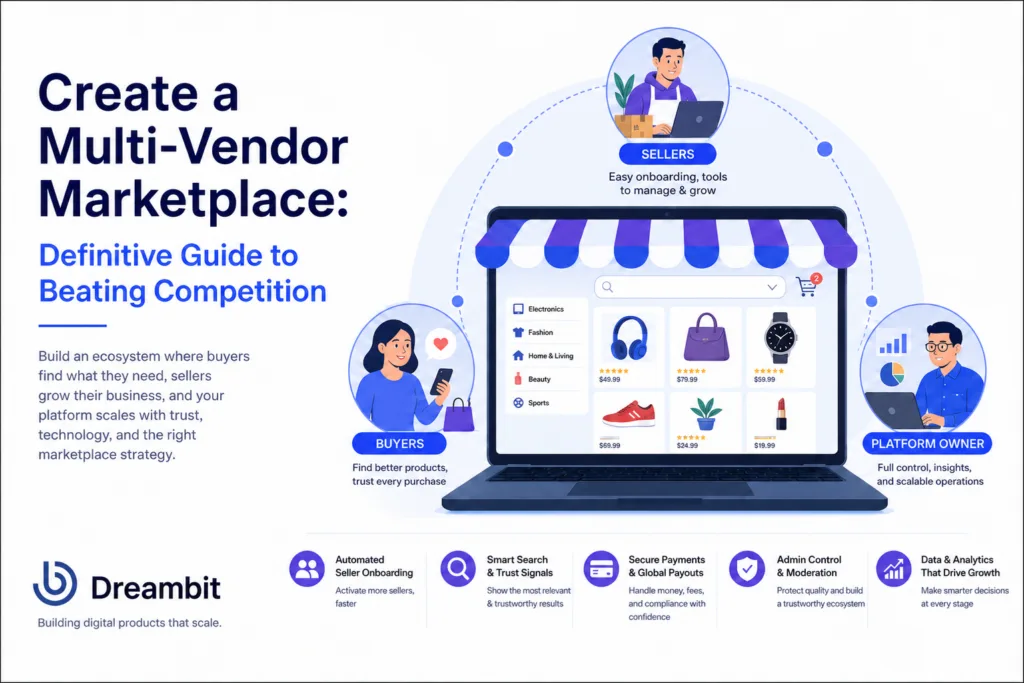
A multi-vendor marketplace is a living ecosystem where three groups must trust the platform at the same time: buyers, sellers, and the business running the marketplace. Buyers need relevant products, fair prices, secure payments, and confidence that the seller will deliver. Sellers need fast onboarding, visibility, predictable payouts, and clear rules. The platform owner needs control over quality, commissions, disputes, fraud, logistics, and compliance.
Therefore, competition in marketplace development is not only about who has more vendors or a nicer interface. It is about who builds better infrastructure for trust, speed, and scale.
The opportunity is huge. According to the 2025 Global Online Marketplace Landscape report, online marketplaces generate 62% of global retail e-commerce sales, reaching USD 2.4 trillion.
However, this also means the market is crowded. To beat competition, your marketplace cannot be just “a product catalog plus checkout.” It must be a system designed to solve the hardest marketplace problem: getting supply and demand to grow together.
What makes a multi-vendor marketplace different from a regular e-commerce app?
A regular e-commerce product has one merchant, one inventory logic, one pricing strategy, one fulfillment process, and one owner of the customer experience.
This is why multi-vendor marketplace development should start with architecture, not screens
A multi-vendor marketplace has many.
As a result, that changes everything.
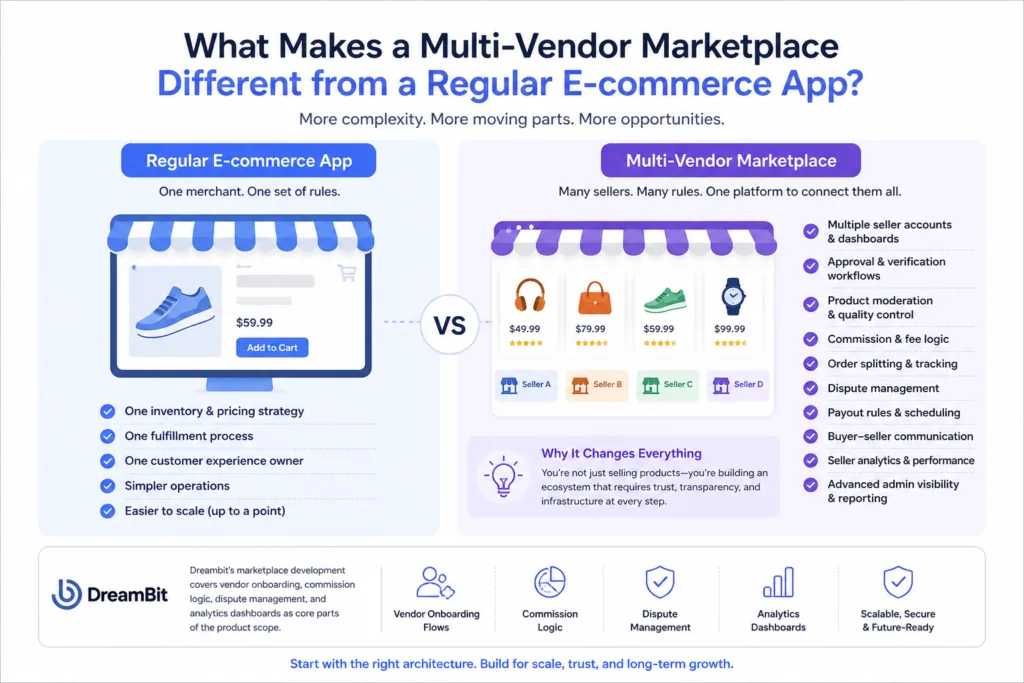
Your platform needs seller accounts, vendor dashboards, approval workflows, product moderation, commission logic, order splitting, dispute management, payout rules, buyer-seller communication, seller analytics, and admin visibility. Dreambit’s e-commerce development service reflects this difference: for marketplace development, the team highlights vendor onboarding flows, commission logic, dispute management, and analytics dashboards as core parts of the product scope.
Therefore, marketplace development should start with architecture, not screens.
Before you design the homepage, you need to define:
- Who owns the buyer relationship?
- How are sellers verified?
- What happens when one order includes products from multiple vendors?
- How are commissions calculated?
- When is money released to the seller?
- What makes one listing rank above another?
- How are fake, low-quality, or risky sellers detected?
- What data does the admin team need every day?
The marketplace that answers these questions early has a competitive advantage before the first user signs up.
Solving the “Chicken and Egg” problem with technology
Every multi-vendor marketplace development project faces the same uncomfortable question:
How do you attract buyers without enough sellers – and how do you attract sellers without enough buyers?
This is the classic “chicken and egg” problem. In practice, many founders try to solve it with marketing spend alone: they run ads, recruit vendors manually, offer discounts, and hope liquidity appears.
But mature marketplaces solve this with product mechanics.
The goal is not simply to “get more sellers.” The goal is to shorten the distance between seller interest and seller activation, then make every new seller improve the buyer experience instead of making the catalog messier.
Automated seller onboarding as your primary growth lever
Seller onboarding shouldn’t be just admin work. It should become your supply growth engine.
A strong onboarding flow should move a seller through five stages:
Identity and Business Verification
The platform should collect the right seller information based on seller type, geography, risk level, and payout method. This matters not only for fraud prevention, but also for marketplace transparency. For example, in the U.S., the INFORM Consumers Act requires online marketplaces to collect, verify, and disclose certain information about high-volume third-party sellers, including bank account, tax ID, and contact information.
In the EU, the Digital Services Act adds marketplace transparency obligations, including seller contact information and reasonable efforts to check products or use traceability technologies.
This means seller onboarding should not be treated as a generic registration form. It should be designed as a compliance-aware workflow.
Storefront Setup
The seller should be able to create a storefront, add brand information, set return rules, define shipping areas, and connect payout details without contacting support. A guided setup checklist can show exactly what remains before the seller can go live.
Product Import and Catalog Mapping
This is where many marketplace MVPs break.
If every seller must manually create each listing, your catalog will grow too slowly. A stronger platform allows product uploads through CSV, API, Shopify/WooCommerce import, ERP integration, or AI-assisted listing creation. The system should map products to categories, validate attributes, detect missing images, flag suspicious duplicates, and suggest improvements before the listing reaches moderation.
Dreambit’s e-commerce development approach already includes custom product catalogs, advanced search and filtering, optimized checkout flows, and payment gateway integrations such as Stripe, PayPal, and LiqPay.
Seller Education Inside the Product
Do not hide marketplace rules in a PDF. Build them into the flow.
If sellers need to understand packaging rules, refund policies, service-level agreements, commission tiers, shipping cutoffs, or payout schedules, show this information at the moment it matters. For instance, when a seller adds a fragile product, the platform can display packaging requirements. When a seller enables international shipping, the platform can show customs and return implications.
First-Sale Activation
The real onboarding milestone is not “seller approved.” It is “seller received the first order and fulfilled it successfully.”
That is why the seller dashboard should include performance tips, listing quality scores, visibility recommendations, inventory alerts, and early sales analytics. Dreambit’s Giftmall marketplace case shows how important post-purchase utility can be: the app allows users to place orders, manage and track gift cards, and receive notifications and alerts. The same principle applies to sellers: once they join, the platform must keep guiding them toward successful activity.
The best KPIs for seller onboarding are not vanity metrics like “number of registered vendors.” Track:
- Time to first approved listing
- Time to first sale
- Seller activation rate
- Listing rejection rate
- Percentage of sellers with complete payout setup
- Percentage of products with complete structured data
- Early cancellation or refund rate
- Seller support tickets per onboarding step
When onboarding becomes measurable, it becomes optimizable. And when it becomes optimizable, it becomes your primary growth lever.
Search algorithms that prioritize user trust over simple keyword matching
A marketplace with thousands of products can still feel empty if the search does not work.
In multi-vendor marketplace development, search is not the same as store search. In a regular e-commerce store, you rank your own products. Marketplace, you rank products from many sellers with different quality levels, fulfillment reliability, review history, image quality, pricing logic, and risk profiles.
If your search algorithm only matches keywords, it may push the wrong products to the top.
A buyer searching for “black leather backpack” does not simply want a listing that contains those words. They want the most relevant, available, trustworthy, fairly priced, and deliverable option. That means marketplace search should combine relevance with trust.
A stronger ranking model includes:
- Query relevance
- Category match
- Product attribute completeness
- Seller verification status
- Seller rating and review quality
- Fulfillment speed
- Cancellation rate
- Return and refund rate
- Stock accuracy
- Price competitiveness
- Listing freshness
- Buyer behavior signals
- Personalization signals
- Fraud or policy risk score
Ultimately, this is where data integrity becomes a competitive advantage.
A strong seller experience covers onboarding, listing tools, inventory control, order management, and payout visibility. Without these, good vendors leave quickly. Poor tools also tend to attract only those willing to tolerate operational chaos, which gradually damages overall platform quality.
For this reason, search should not be treated. It should be connected to the entire marketplace data model. How to do that?
Dreambit has already successfully utilized AI to enhance e-commerce experiences: personalized recommendations, photo-based product search, and a chatbot that helps users choose clothing sizes. In our case, the result was a 28% increase in conversion and a 15% increase in average order value.
The logistics of global payouts
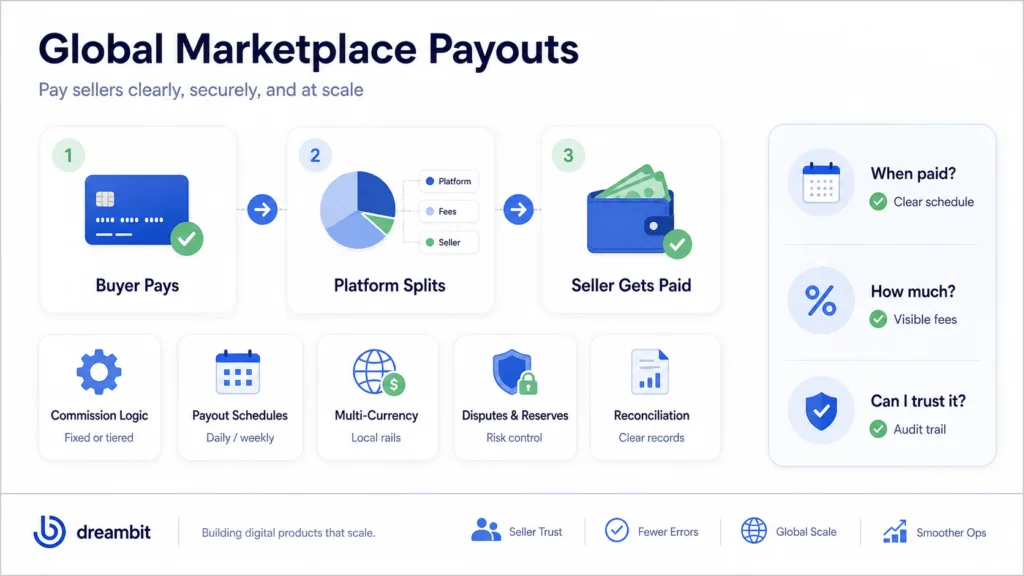
In reality, many founders think marketplace payments are simple: Buyer pays. The platform takes a commission. Seller receives the rest.
In reality, marketplace payouts are one of the most complex parts of the business.
Sellers care about three things:
- When will I get paid?
- How much will I receive after fees?
- Can I trust the platform to handle money correctly?
Consequently, if the answer is unclear, sellers will not prioritize your marketplace.
A scalable payout system should include:
Clear commission logic
The platform should support fixed commissions, category-based commissions, seller-tier commissions, subscription plans, promotional rates, and manual overrides. Sellers should see estimated net earnings before they accept or fulfill an order.
Configurable payout schedules
Some marketplaces pay instantly. Others pay after delivery confirmation, after a return window closes, weekly, monthly, or after a minimum balance threshold. The right model depends on your risk level, product category, refund policy, and seller relationship.
Reserve and dispute handling
If a category has high return rates or fraud risk, the platform may need to hold part of the seller’s balance temporarily. This should be transparent and rule-based, not random.
Multi-currency and local payment rails
If your marketplace expands globally, sellers may expect payouts in their local currency through local rails. Tipalti describes marketplace payout APIs as a way to automate payments to 100 or 10,000 suppliers, support multi-currency payments, handle local rails, improve compliance, and maintain audit trails.
Reconciliation and reporting
Finance teams need transaction IDs, payout statuses, fee breakdowns, refunds, tax data, and audit history. Without this, the marketplace will eventually drown in spreadsheets.
Successful multi-vendor marketplace development means building an operating system, not a feature list
A marketplace MVP should not include every possible feature. But it must include the right foundation.
Many weak marketplace products look good on day one and fail on day 180 because they were designed as a storefront, not an operating system. They have a homepage, product pages, and checkout, but no serious seller lifecycle, no ranking logic, no payout architecture, no admin intelligence, and no way to handle growth without manual chaos.
A strong marketplace is built around four connected layers.
Buyer Experience Layer
This includes search, filters, product pages, reviews, checkout, order tracking, support, returns, and notifications. Dreambit focuses on mobile and web solutions that engage, convert, and retain users, with services spanning mobile/web development, UX/UI, app quality audit, maintenance, and e-commerce development.
For marketplaces, buyer UX should reduce decision anxiety. Buyers need to quickly understand:
- Is this seller verified?
- Is this product available?
- When will it arrive?
- What happens if something goes wrong?
- Why is this result recommended?
- Are reviews trustworthy?
- Are there better alternatives?
The goal is not to show everything. The goal is to help buyers choose with confidence.
Seller Experience Layer
Seller UX determines supply growth.
A seller experience that works well includes onboarding, listing tools, inventory control, order management, and payout visibility. Without these, good vendors leave. Poor tools also attract only those willing to tolerate chaos, which damages platform quality over time.
Admin and Operations Layer
The admin panel is where marketplace quality is controlled.
Admins need dashboards for seller approvals, product moderation, disputes, refunds, payouts, suspicious activity, category health, search performance, inventory gaps, and support load. Without this, the team operates blindly.
Dreambit’s marketplace development scope includes analytics dashboards, and its e-commerce deliverables include admin panels for inventory and order management, analytics, conversion tracking, CRM/payment integrations, and scalable infrastructure.
Technical Infrastructure Layer
Specifically, this includes the backend, APIs, database architecture, payment integrations, cloud infrastructure, monitoring, analytics, mobile/web apps, and third-party services.
Dreambit’s cross-platform development approach is especially relevant here because marketplaces usually need to serve buyers and sellers across mobile and web platforms without unnecessarily multiplying development costs. Our team treats cross-platform development as a way to build products that work across devices, with benefits such as faster time-to-market, consistent user experience, easier maintenance, wider reach, scalability, and improved performance.
For marketplace founders, this matters because speed is strategic. The faster you test supply, demand, search, payouts, and retention loops, the faster you learn where your competitive advantage actually is.
How Dreambit can help build a marketplace that scales
Dreambit’s e-commerce development process covers discovery, architecture, design, development, QA/testing, launch, and support. For marketplace platforms and heavily customized solutions, Dreambit estimates a typical development timeline of 4–8 months, depending on integration scope.
This is the right mindset for marketplace development because the biggest risks are not always visible in the UI. They live in flows like:
- Seller onboarding
- Product data validation
- Search relevance
- Commission rules
- Payment splitting
- Refund handling
- Admin moderation
- Analytics
- Infrastructure scalability
- Post-launch performance monitoring
Dreambit also offers app quality audits and maintenance support, including performance monitoring, compatibility updates, health checks, UI/UX improvements, feature updates, and monthly reporting. For marketplaces, this matters because the product does not become “finished” at launch. It becomes more complex with every seller, category, country, and transaction type.
Conclusion: The marketplace that wins is the one users trust to choose for them
The future of multi-vendor marketplaces belongs to platforms that reduce uncertainty.
Buyers do not want endless options. They want the right option from a seller they can trust.
Sellers do not want another channel that creates operational work. They want a platform that helps them get discovered, sell faster, and get paid without confusion.
Marketplace owners do not want manual chaos hidden behind a beautiful interface. They need infrastructure that can scale supply, protect quality, automate payouts, and surface the data needed to make better decisions.
At Dreambit, we help you with multi-vendor marketplace development that people trust and return to.
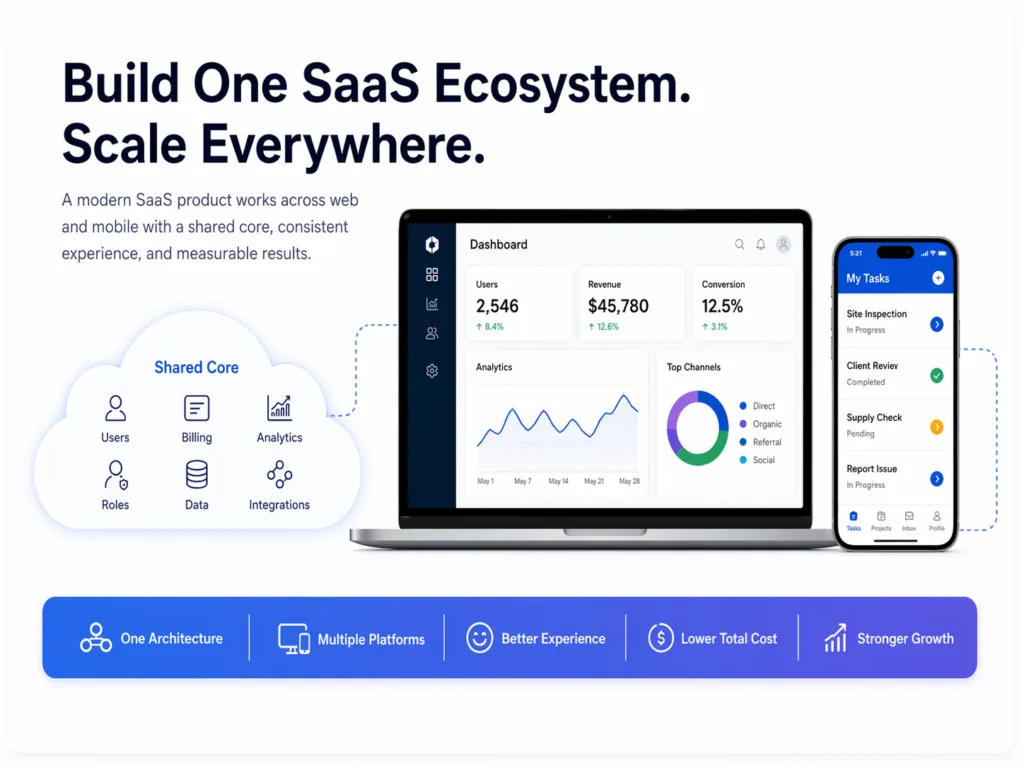
Modern SaaS web mobile development is not a website plus an app… It is about designing an ecosystem where every user, every device gets the right interface for the right moment.
That distinction matters more than many founders realize.
A sales manager may need a desktop dashboard to analyze pipeline performance. An admin may need a secure web portal to manage users, roles, billing, and permissions. A customer may only need a fast mobile web experience to complete one action without installing anything.
When all of these use cases are treated as “we need an app,” the product becomes expensive very quickly. Teams start building separate interfaces, duplicating logic, managing multiple backlogs, and paying for features before they know which platform users actually need.
At DreamBit, this is exactly the type of trap we help product teams avoid. Our work across web and mobile products shows a consistent pattern: successful SaaS products are not built around devices first. They are built around user behavior, business goals, and a technical foundation that can scale across platforms.
Why SaaS Product Development for Web and Mobile Requires Architecture First
One of the most common early-stage SaaS mistakes is asking, “Should we build web or mobile first?”
The better question is: “Where does the user experience the problem?”
For B2B SaaS products, the answer is often not one place. Work happens across environments: at a desk, in a meeting, in a warehouse, on the road, between calls, or during a customer interaction. That means the product architecture should support multiple surfaces, but not necessarily multiple independent products.
Take DreamBit’s CleanSmarts case. The product supports cleaning business operations with real-time communication between staff, managers, and customers. Cleaners use mobile features for task completion, time logging, supply updates, inspections, issue tracking, scheduling, and messaging, while managers easily monitor cleaning status across multiple locations.
That is a good example of context-driven SaaS design. The mobile app is not there because “mobile-first” sounds modern. It exists because cleaners are physically moving between locations, updating tasks, scanning barcodes or NFC sensors, sending photos, and responding to schedule changes.
Now compare that with a SaaS sales platform like SalesMate. It’s a product for tracking leads, managing deals, assigning tasks, accessing reports, and using AI-driven insights to support sales decisions. The product reached 10K MAU, with 33% D1 retention, 12% D30 retention, and 20% new users to paid users.
Again, the value is not “mobile app.” The value is workflow continuity: a sales professional can track deals, receive alerts, collaborate with the team, and make decisions based on real-time performance data.
That is the mindset SaaS teams need before writing a single line of code.
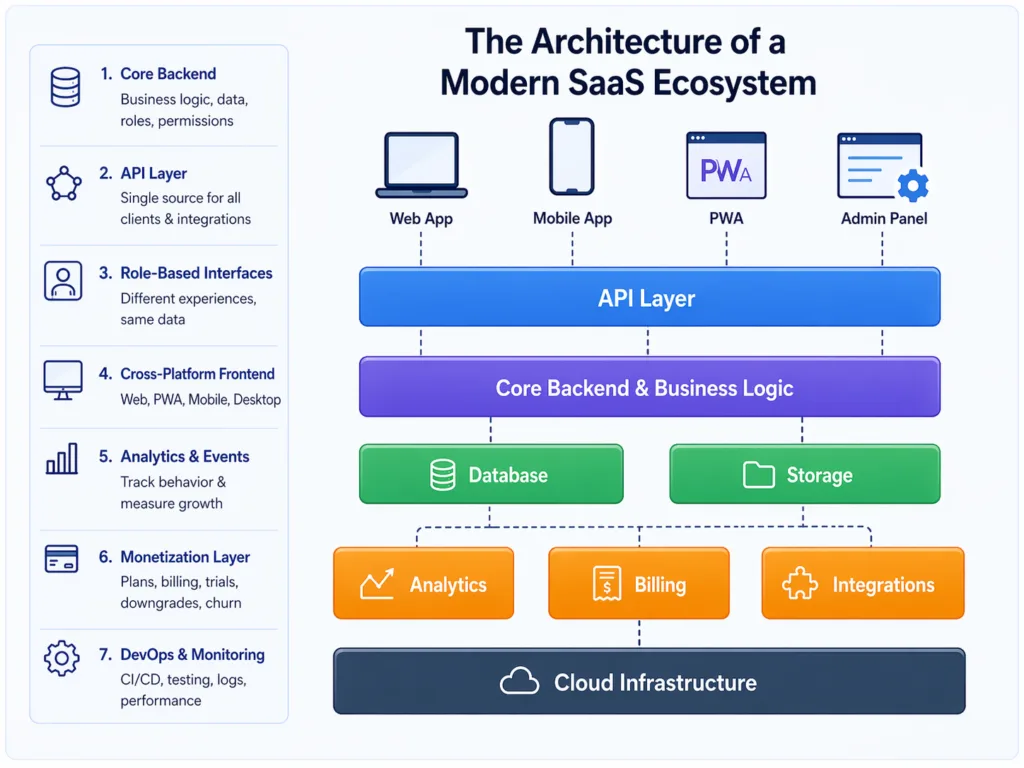
The architecture of a modern SaaS ecosystem
A modern SaaS product is not a website plus an app. It is a shared system with multiple access points.
At a high level, the architecture usually includes:
- Core backend and business logic
This is where accounts, workspaces, roles, permissions, workflows, billing rules, notifications, and integrations live. - API layer
Web, mobile, admin panels, third-party integrations, and internal tools should connect to the same core logic instead of rebuilding it separately. - Role-based interfaces
Admins, end users, managers, field workers, and customers often need different experiences, but they should still work from the same data model. - Cross-platform front end
This may include a responsive web app, PWA, Flutter-based mobile app, native modules, or a combination of these. - Analytics and event tracking
SaaS teams need to see onboarding completion, activation points, feature adoption, conversion, churn risk, and revenue impact. - Subscription and monetization layer
Plans, trials, upgrades, downgrades, billing events, cancellation flows, and win-back offers should be part of the architecture, not patched in later. - DevOps, QA, and monitoring
CI/CD, crash reporting, performance monitoring, testing, release management, and fast hotfix capability determine how safely the product can evolve.
DreamBit’s technology ecosystem fits this type of SaaS architecture well. We have a deep expertise in Flutter, OpenAI, Firebase, Node, Python, FireCMS, Typesense, Tinybird, Branch, Mixpanel, Amplitude, AppsFlyer, Bitrise, RevenueCat, AWS, Google Cloud, and MySQL.
That stack tells an important story: building SaaS is not only about UI. It is about search, analytics, attribution, subscriptions, cloud infrastructure, AI features, backend services, release pipelines, and data-driven decisions.
Why the “mobile-first” approach is often a $100k. This is the core problem in SaaS web mobile development for B2B teams.
“Mobile-first” became a default phrase in product development. For consumer products, it often makes sense. But for B2B SaaS, mobile-first can become an expensive trap when it is interpreted as “build a native mobile app before understanding the full workflow.”
The risk is simple: many B2B workflows are too complex to be solved only on a small screen.
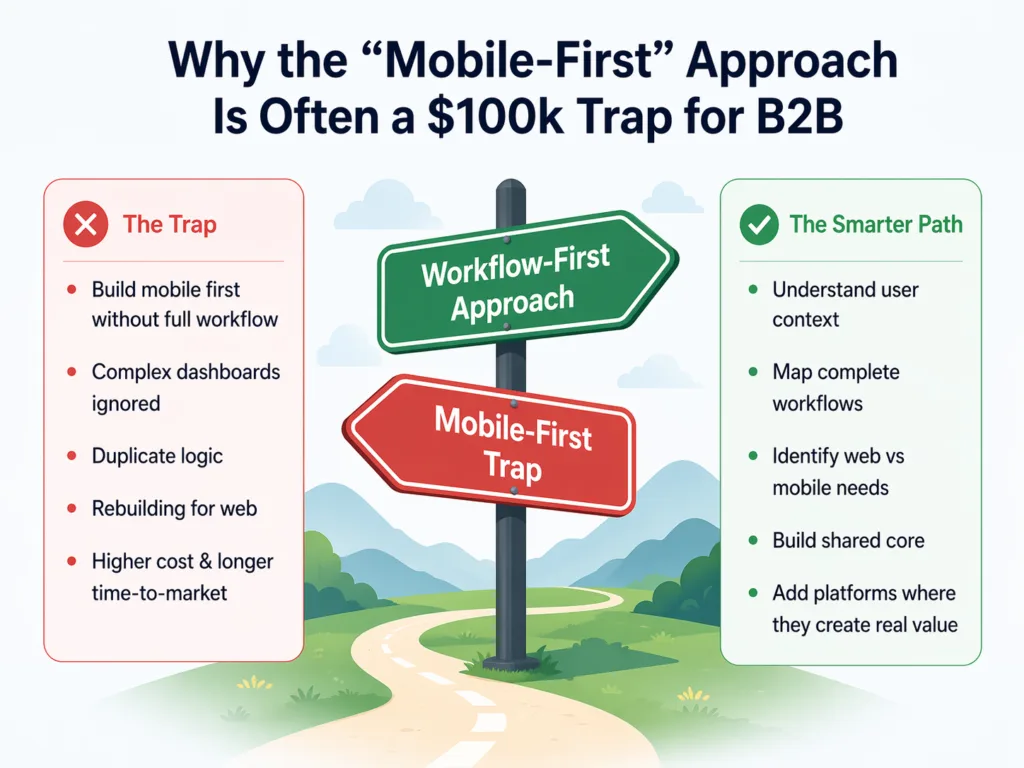
Dashboards, reporting, account configuration, role management, team collaboration, billing, permissions, bulk edits, and integrations often work better on desktop or web. If a team starts with mobile without mapping these workflows first, they may end up rebuilding the same logic later for web.
That is where the cost compounds.
You pay for mobile screens. Then you pay for the web dashboard. Next one you pay to sync both. Then you pay for QA across devices. Then you pay again when product logic changes and every platform needs updates.
DreamBit has already explored this cost problem in the context of Flutter and cross-platform development. In our recent article, we compare separate native iOS, native Android, and web development with a Flutter-centered multi-platform approach, estimating roughly 40% lower two-year TCO for the Flutter-centered model in the example scenario.
The lesson is not that every SaaS product must use Flutter. The lesson is that platform duplication is rarely neutral. It becomes a permanent cost structure.
For B2B SaaS, the smarter approach is usually as follows:
- Start with the core workflow.
- Identify which roles need desktop-level control.
- Identify which actions must happen on mobile.
- Build shared logic once.
- Add platform-specific experiences only where they create real value.
A mobile app can be essential. But it should be essential because of user context, not because “every SaaS needs an app.”
Bridging the gap. Flutter changes how teams approach SaaS web mobile development entirely.
Another common SaaS mistake is assuming that a responsive website is enough.
Responsiveness only means the layout adapts to screen size. It does not automatically solve performance, offline access, push notifications, app-like navigation, device integrations, or real-time interaction.
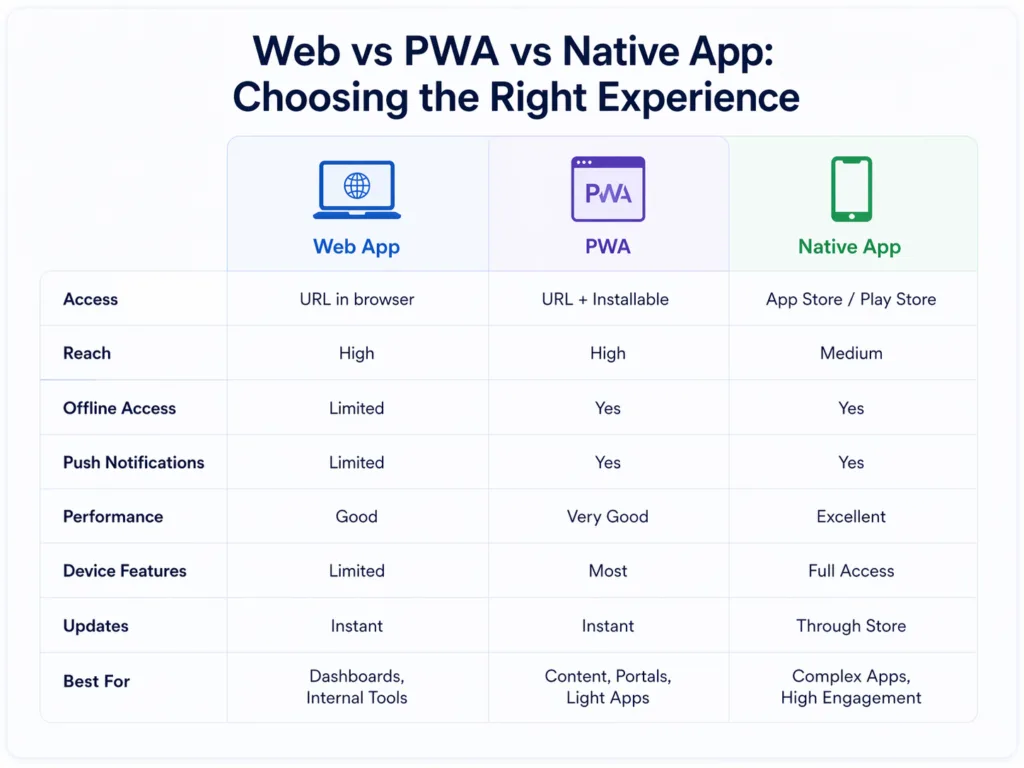
This is where modern cross-platform tools change the game.
Progressive Web Apps can provide app-like experiences using web technologies. MDN describes PWAs as apps built with web platform technologies that can provide a platform-specific app experience, run across devices from a single codebase, be installed, work offline, and integrate with the device and other apps.
Google’s web.dev also emphasizes that PWAs combine web reach with app-like capabilities, including installability, offline work, and access across devices without app store packaging or review delays.
Flutter offers a different but related advantage: it allows teams to build mobile, web, desktop, and embedded experiences from a single codebase, while still creating highly customized, adaptive interfaces. Flutter’s official site positions it as an open-source framework for building multi-platform applications from one codebase.
For SaaS teams, the opportunity is not just “save development time.” It is architecture flexibility.
You can build:
- a web dashboard for admins and managers;
- a mobile app for high-frequency field actions;
- a PWA for lightweight access and sharing;
- a shared design system for consistency;
- a shared backend for business logic;
- analytics across all user journeys.
That is how you bridge the gap between web accessibility and native-level experience.
The goal is not to force one platform to do everything. The goal is to make every platform part of one coherent product.
Subscription fatigue and the technical cost of churn management
SaaS is not finished when users sign up. In subscription products, the real challenge begins after activation.
Users are overwhelmed with subscriptions. They compare value constantly. They cancel quickly when they do not understand what they are paying for. That means churn management is no longer just a marketing problem. It is a technical product problem.
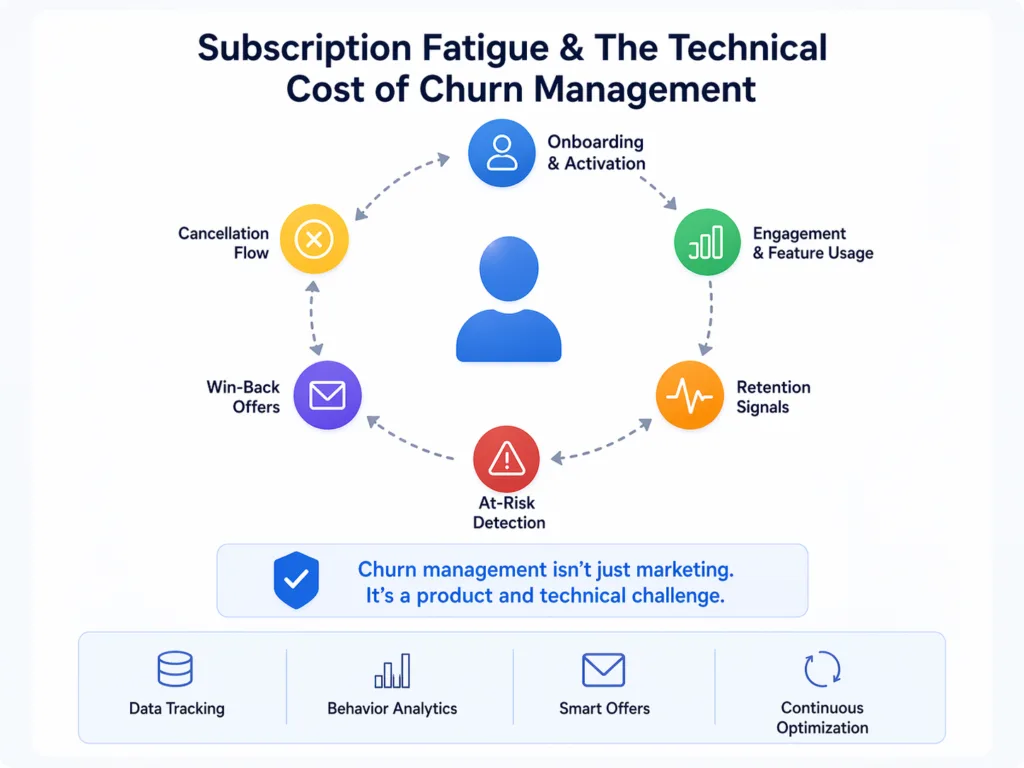
RevenueCat’s 2026 subscription apps report is based on data from over 115,000 apps and more than $16 billion in revenue. It describes a modern market with more competition, higher CACs, and higher churn pressure. The report also shows how difficult subscription retention can be. Yearly plans significantly outperform monthly and weekly plans, while weekly subscription retention remains especially low.
For SaaS teams, this means subscription architecture must support more than payments. It should support:
- free trials and plan limits;
- feature gating;
- upgrade prompts;
- usage-based segmentation;
- churn prediction signals;
- cancellation surveys;
- win-back offers;
- plan downgrade paths;
- lifecycle emails and push notifications;
- A/B testing for paywalls and onboarding;
- cohort-based revenue analysis.
A roadmap for building SaaS across web and mobile
All things considered, a practical SaaS roadmap should look like this:
Step 1: Map user roles and environments.
Separate desk-based workflows from mobile workflows. Identify which users need dashboards, which need fast actions, and which need occasional access.
Step 2: Define the shared product core.
Design the backend, data model, permissions, billing logic, and API layer before over-investing in platform-specific UI.
Step 3: Choose the right platform sequence.
For many B2B SaaS products, web dashboard first plus mobile companion later may be smarter. Field-service SaaS, mobile may need to come first. Customer-facing products, a PWA may reduce friction before a native app is justified.
Step 4: Build the MVP around measurable value.
Do not launch with “everything.” Launch with the smallest workflow that proves users can solve the problem and return.
Step 5: Instrument analytics from day one.
Track activation, retention, feature usage, conversion, churn signals, and revenue impact.
Step 6: Add subscription intelligence early.
Plan for trials, upgrades, downgrades, cancellation flows, win-back offers, and plan experiments before churn becomes a blind spot.
Step 7: Scale platforms only when behavior proves the need.
If users are already completing core actions on mobile web, maybe a native app can wait. If mobile users need offline access, push notifications, camera input, or field updates, then native or cross-platform mobile becomes a stronger investment.
Conclusion: build one SaaS ecosystem, not three disconnected products
At DreamBit, we specialize in SaaS web mobile development – from architecture to post-launch growth.
The biggest SaaS development pitfall is building without a clear product architecture. A modern SaaS product needs to work across web and mobile, but that does not mean every platform should be built separately or at the same time. The smartest teams start with user context, define a shared technical core, and choose platform experiences based on real behavior.
For B2B SaaS, this often means resisting the “mobile-first” trend and choosing a workflow-first approach instead. Sometimes the best first release is a web dashboard, sometimes it is a mobile app, otherwase it is a PWA. Sometimes it is a Flutter-based multi-platform product. The right answer depends on how users work, where revenue happens, and what the product needs to prove first.
At DreamBit, we help teams make those decisions before they become expensive. From architecture and UX to Flutter development, AI features, analytics, subscription flows, and post-launch growth, we build SaaS products that are designed to scale – not just launch.
Planning a SaaS product for web and mobile? Let’s define the right architecture before your budget gets trapped in the wrong platform.