
Insights9 minute read
How to Add AI to an Existing Mobile App (Without Rebuilding It)
AI integration in mobile apps without a rebuild: five integration patterns, cloud vs on-device vs hybrid, the backend architecture, real costs, privacy and how to measure whether the feature works.
 Eldar Miensutov
Dreambit

AI integration in mobile apps doesn’t require a rebuild. Most existing apps can add a useful AI feature, such as smarter search, recommendations, an in-app assistant, or document and photo understanding, by connecting the current app to an AI service through its backend. A single cloud-based feature typically takes a few weeks of engineering. Adding two to four features to a mid-sized app commonly lands at $50,000–$180,000. The decisions that matter are which feature to add first, where the model runs, and how you’ll know it’s working.
Dreambit has shipped 150+ products over 14 years (5M+ downloads, 4.9★ across 114 reviews), and we’ve added AI features to apps that were never designed for them, including an AI-powered mobile CRM described in our Salesmate case study. This guide covers the integration patterns that work, the architecture choices behind them, the running costs, and how to pick a first feature that earns its keep.
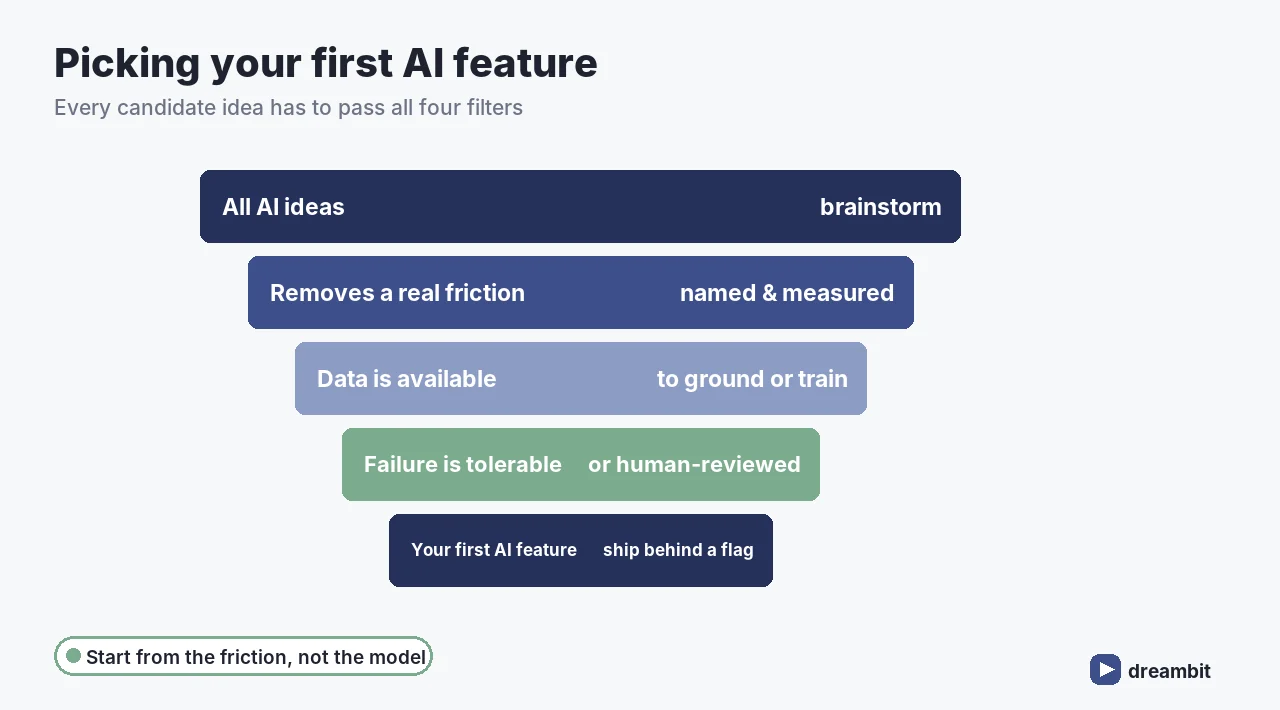
Start with the friction, not the model
The most common mistake is to start from “we should add AI” rather than “users struggle with X”. Good first AI features remove a specific, measurable friction:
- Users can’t find things, so search returns nothing useful.
- Users abandon a long form or a tedious data-entry step.
- Support answers the same questions every day.
- Users don’t discover the parts of the catalogue or content that would suit them.
- Staff spend hours reading documents, photos or messages to extract a few fields.
If you can’t name the friction and measure it today, an AI feature won’t fix it. You’ll just ship a demo.
Five patterns for AI integration in mobile apps
1. Smarter search
Semantic search understands what people mean, not just the words they type. “Something warm for a rainy hike” finds the right jacket even if no product description contains those words. It’s often the highest-return first feature, because search is already a core flow and its success is easy to measure.
2. Personalised recommendations
Products, content, workouts or next actions tailored to each user’s behaviour. Simple models trained on your own interaction data frequently beat large language models here, and cost a fraction to run.
3. An in-app assistant
A chat or voice assistant that answers questions from your help content, policies or the user’s own data. To be trustworthy it must be grounded in approved sources and cite them, which is retrieval-augmented generation, covered in AI chatbot development. If the assistant should take actions on the user’s behalf, that’s an agent, with a different risk profile; see AI agent development.
4. Document, photo and voice understanding
Scan a receipt and fill in the expense, photograph a meal and log it, dictate a note and get structured fields. These features remove data entry, which is often the main reason users churn.
5. Automation behind the scenes
Not every AI feature needs a visible interface. Classifying support tickets, flagging fraud, summarising activity for staff or drafting replies for review can improve the product without the user ever seeing an “AI” label.
Where should the model run: cloud, on-device or hybrid?
This is the architecture decision that shapes cost, privacy and speed:
- Cloud: the app calls your backend, which calls an AI provider. It’s fastest to build and gives access to the most capable models, but you pay per request and data leaves the device. For most first features, this is the right start.
- On-device: a smaller model runs on the phone. There’s no per-request cost, it works offline and data stays private, but it takes more engineering and the models are less capable. Apple and Google both now offer on-device model APIs, for example Apple’s Foundation Models framework.
- Hybrid: simple, frequent tasks such as classification and intent detection run on the device, and harder reasoning goes to the cloud. It’s the usual end state for high-volume apps.
Cloud AI is cheaper to build and on-device AI is cheaper to run. At around 100,000 monthly active users, cloud inference for a busy feature can reach roughly $5,000 a month, while moving it on-device costs nothing per request but $30,000–$80,000 of upfront engineering. Break-even typically arrives within six to fourteen months, which is why the sensible path is to launch in the cloud, measure real usage, and move only the high-volume simple tasks onto the device.
The architecture: never call AI providers straight from the app
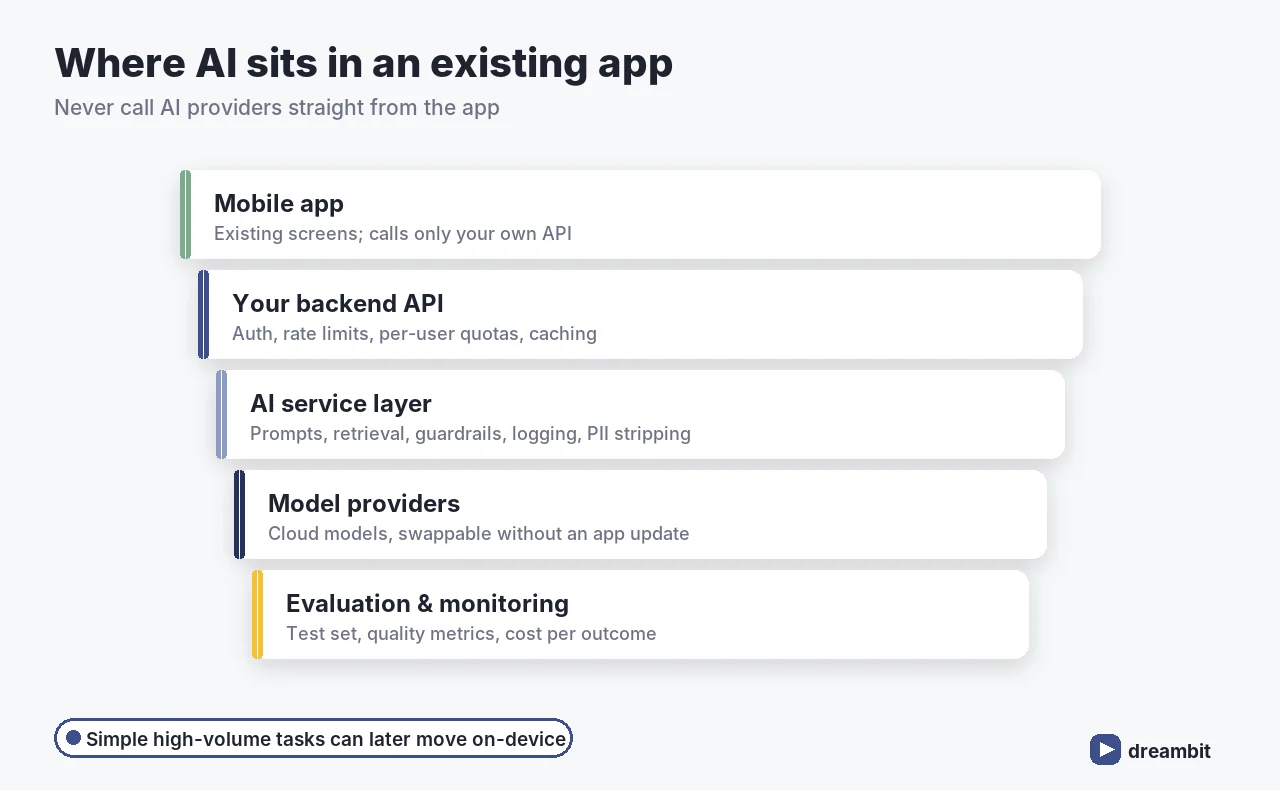
However the feature looks, keep the AI behind your own backend rather than calling a provider directly from the mobile app:
- Secrets stay safe. API keys shipped inside an app bundle are extracted quickly. It’s one of the most common findings in a mobile app audit.
- You can switch models without shipping an app update and waiting for store review.
- You control cost with rate limits, caching and per-user quotas.
- You control data by stripping personal information before anything leaves your systems.
- You can evaluate by logging inputs and outputs, so you can measure quality and debug failures.
In practice that means an AI service layer in your backend that owns prompts, retrieval, guardrails, logging and provider calls. The app just calls your API. If your current backend can’t support that cleanly, the AI feature can be the first module of a gradual modernization, as covered in legacy app modernization.
What adding AI to an app costs
- A single cloud AI feature in an app with a healthy backend: often a few weeks of engineering, from around $20,000.
- Two to four AI features in a mid-sized app: commonly $50,000–$180,000, including the AI service layer, evaluation and UI work.
- On-device or hybrid: add several weeks of engineering for model optimisation, packaging and device testing.
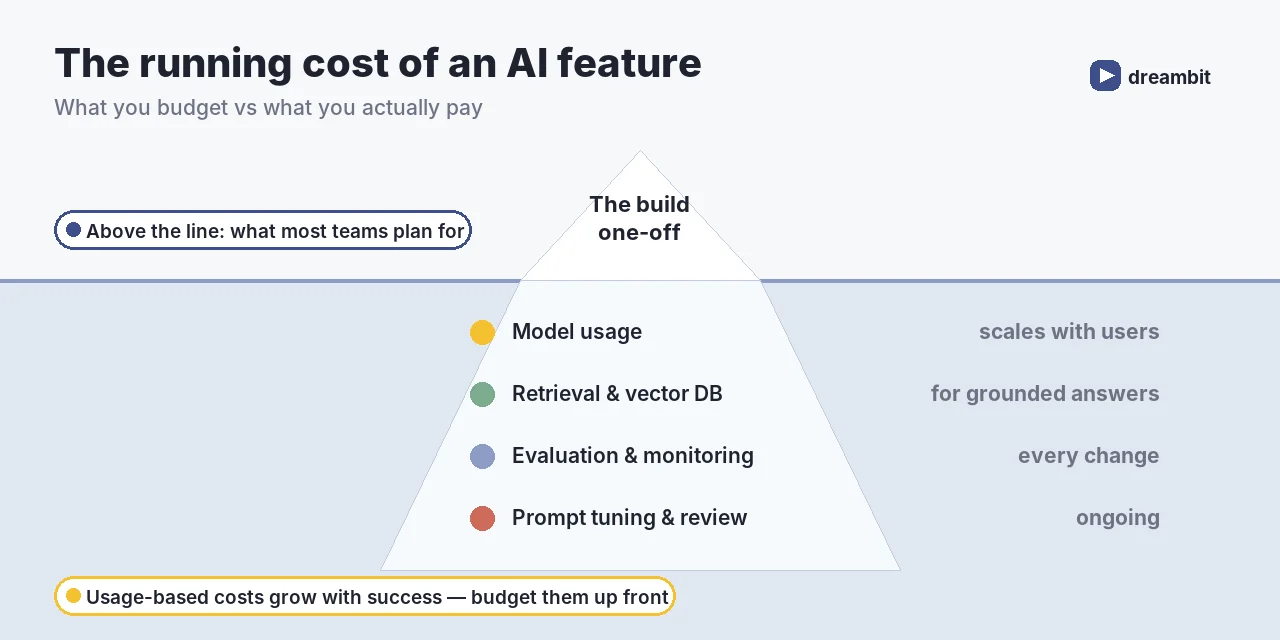
Then there’s the monthly bill, which is the part most budgets forget. It covers model usage that scales with active users, vector databases for retrieval, monitoring, evaluation runs, and the time to review outputs and tune prompts. Large on-device models also affect app size, so download them on demand rather than bundling them. For broader context on budgets, see mobile app development cost.
Privacy and trust
- Tell users when they’re interacting with AI and what data it uses.
- Minimise data: send only what the feature needs, and strip personal information where you can.
- Check provider terms on data retention and model training, and prefer providers that don’t train on your data.
- Keep humans in the loop for anything consequential, such as payments, health or account changes.
- Respect store policies: both Apple and Google review AI features, especially those generating content.
How to measure whether the AI feature works
Ship every AI feature with its success metric defined in advance, and an evaluation set of real examples with known-good outputs. Re-run the evaluation on every prompt, model or retrieval change. Typical metrics by pattern:
- Search: searches that end in a click or purchase, and searches that return nothing.
- Recommendations: click-through and conversion compared against a non-personalised control group.
- Assistant: questions resolved without escalation, answer accuracy against the evaluation set, and user ratings.
- Data extraction: field accuracy and how often users correct the result.
- All features: cost per successful outcome, latency and error rate.
We’ve written about testing AI features in Flutter apps in how AI features in Flutter apps are transforming user experience.
How we add AI to existing apps
- Friction audit: analytics, support tickets and user interviews, to find where AI would remove real effort.
- Pick one feature that has a measurable baseline and a tolerable failure mode.
- Build the evaluation set first: real examples with known-good results.
- Add the AI service layer to the backend: prompts, retrieval, guardrails, logging, provider abstraction.
- Ship behind a feature flag to a share of users, and compare against the control group.
- Tune, then scale: improve quality and cost, consider moving high-volume tasks on-device, then pick the next feature.
Our broader approach to building with AI is set out in how Dreambit builds with AI.
When not to add AI
Good AI integration in mobile apps sometimes means deciding not to integrate. Skip it, or postpone it, when a deterministic rule would do the job reliably; when you have no data to ground or train the feature on; when a wrong answer would be harmful and nobody can review the output; or when the core app has unresolved stability problems that an AI feature would only hide. Fixing a slow checkout or a confusing onboarding flow often moves the same metric further, for less money, than any model. Saying so early is part of the job, a point we make in our take on AI.
Common mistakes when adding AI to an app
- Starting with the model instead of the friction. Pick the problem first.
- Calling AI providers from the app. Exposed keys, no cost control, no evaluation.
- No evaluation set. Without one, you can’t tell whether a change helped.
- A generic chatbot on the home screen. Useful AI usually sits inside an existing flow.
- Ignoring the monthly bill. Usage-based costs grow with success.
- Going on-device too early. Prove the feature in the cloud, then optimise.
Key Takeaways
- AI integration in mobile apps rarely needs a rebuild. Most features connect through your backend.
- Start from a measurable friction such as search, data entry, support load or discovery, not from the model.
- The five common patterns are smarter search, recommendations, an assistant, document and photo understanding, and background automation.
- Launch in the cloud, measure usage, and move high-volume simple tasks on-device when the numbers justify it.
- Keep AI behind your own backend for security, cost control, model switching and evaluation.
- Two to four AI features in a mid-sized app commonly cost $50k–$180k, plus a monthly usage bill.
- Define the success metric and build an evaluation set before you ship.
Frequently Asked Questions
Can I add AI to my existing mobile app without rebuilding it?
Usually, yes. Most AI features connect through your backend: the app calls your own API, which calls an AI service layer that handles prompts, retrieval, guardrails and the model provider. The app’s existing screens stay as they are, with the new feature added inside an existing flow such as search, onboarding or support.
How much does it cost to add AI to a mobile app?
A single cloud-based AI feature in an app with a healthy backend often takes a few weeks of engineering, from around $20,000. Adding two to four AI features to a mid-sized app commonly costs $50,000–$180,000, including the AI service layer, evaluation and interface work. On top of that comes a monthly usage bill that grows with active users.
Should AI run on the device or in the cloud?
Start in the cloud: it’s faster to build and gives access to the most capable models. On-device AI has no per-request cost, works offline and keeps data private, but needs more engineering. At around 100,000 monthly active users, a busy cloud feature can cost about $5,000 a month, so high-volume simple tasks are often moved on-device later, in a hybrid setup.
What is the best first AI feature to add?
The one that removes a real, measurable friction in an existing flow. Smarter search, personalised recommendations, photo or document data extraction and support assistants are common first choices. Pick a feature where you have data to ground it, where an occasional wrong answer is tolerable or reviewed by a person, and where you can measure improvement against today’s baseline.
Is it safe to call an AI API directly from a mobile app?
No. API keys inside an app bundle can be extracted, and you lose control of cost, data and model choice. Route AI requests through your own backend, where you can apply authentication, rate limits and quotas, strip personal information, switch models without an app update, and log inputs and outputs for evaluation.
How do I know if an AI feature is working?
Define the success metric before launch and build an evaluation set of real examples with known-good outputs. Release the feature behind a flag to a share of users and compare against a control group, for example search-to-purchase rate, recommendation conversion, questions resolved without escalation, or extraction accuracy, alongside cost per successful outcome.
Written by
Eldar Miensutov
Eldar Miensutov is the Founder and CEO of Dreambit, a cross-platform web and mobile app development studio. With over a decade of experience in software engineering and digital product development, he has built a team of skilled engineers delivering tailored solutions for startups and established businesses worldwide. His technical expertise spans mobile app development with React Native and Flutter, full-stack web engineering, and modern cloud-based architectures. Eldar's approach combines rigorous engineering discipline with a deep focus on user experience, helping clients ship products that are both performant and intuitive. Before founding Dreambit, Eldar gained hands-on experience across diverse industries, developing a clear understanding of how technology drives real business outcomes. Today, he is personally involved in the technical direction of every Dreambit project, ensuring each product meets the studio's high standards for quality, reliability, and maintainability. Eldar works with clients across Europe, North America, and beyond.
Read next
All articles


Tell us about your product
A 30-minute call with a team that has done it. You leave with refactor, rebuild or leave alone, and why.