A mobile app audit is an independent review of an existing app across five areas: code and architecture, security, performance and stability, UX and accessibility, and release and operations health. It ends in a prioritised list of what to fix, what to leave alone, and whether the codebase is worth building on. A focused audit of a typical app takes 1–2 weeks. A full audit with deep security and code review takes 4–6 weeks. The output should be a decision, not a 90-page PDF nobody reads.
Dreambit has shipped 150+ products over 14 years (5M+ downloads, 4.9★ across 114 reviews), and a fair share of our work starts with an app someone else built: a vendor that disappeared, an in-house team that moved on, or a product that grew faster than its architecture. Here’s what we look at, what a useful audit report contains, and how to read the results.
What is a mobile app audit?
An audit answers one question with evidence: what state is this app really in, and what should we do about it? It is not a QA pass and it is not a penetration test, although it uses both. A QA pass checks whether features work. A pen test checks whether an attacker can get in. An audit asks whether the app is maintainable, secure, stable and fit for where the business wants to take it next.
The difference matters because the expensive problems in a mobile app are rarely visible bugs. They’re the structural ones: a codebase nobody can safely change, a backend that leaks data through an over-permissive API, dependencies three major versions behind, or a release process that lives in one departed developer’s head.
When to commission a mobile app audit
The best time is before a big decision, while you can still change it. Typical triggers:
- Changing vendors or bringing development in-house. Know what you’re inheriting before you sign for it.
- Before buying or investing in a product. Technical due diligence on the app itself, not just the pitch deck.
- Before scaling. Marketing spend amplifies whatever is broken, and a 10× traffic increase finds every weak point.
- After a run of bad releases. Crashes, rising one-star reviews, or every fix creating two new bugs.
- Before deciding to rewrite. Rebuilds are expensive and often unnecessary. An audit tells you which parts are actually rotten.
- Ahead of a compliance requirement. HIPAA, PCI DSS, GDPR or an enterprise customer’s security questionnaire.
What a mobile app audit covers
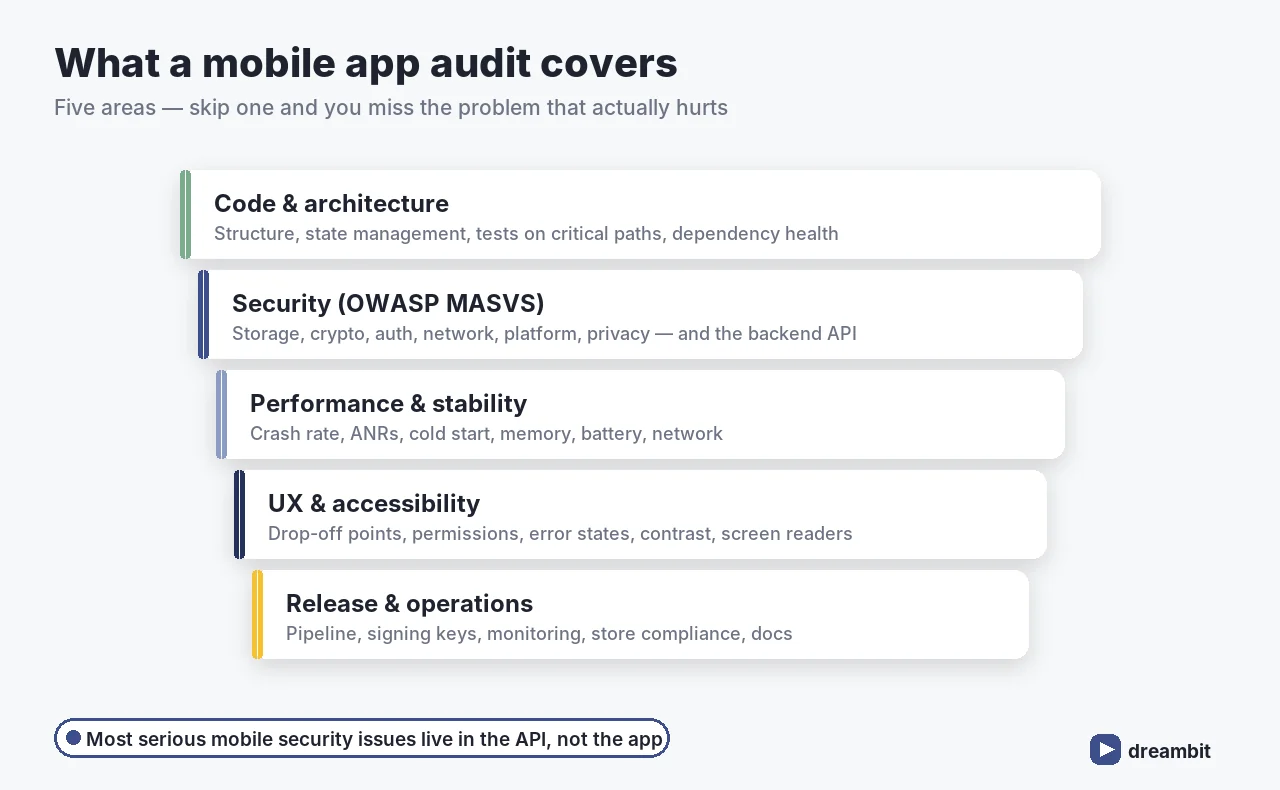
We split every audit into five areas. Skipping any one of them is how audits miss the thing that actually hurts.
1. Code and architecture
Is the code structured so it can change safely? We look at separation of concerns, state management, test coverage on critical paths, dependency health (outdated, abandoned or vulnerable packages), build configuration, and how much logic is duplicated between platforms. The practical question is how expensive the next feature will be. A clean layered architecture, like the approach we describe in clean architecture for scalable Flutter apps, makes that cost predictable. A tangle makes it a gamble.
2. Security
We assess against the OWASP Mobile Application Security Verification Standard (MASVS), the industry baseline for mobile security. Its control groups cover data storage, cryptography, authentication, network communication, platform interaction, code quality, resilience and privacy. In practice the most common findings are unglamorous: API keys and secrets hard-coded in the app bundle, tokens stored insecurely, missing certificate validation, and backend endpoints that trust the client far too much.
Most serious mobile security problems are not in the app at all. They’re in the API behind it. An endpoint that returns another user’s data when you change an ID in the request is invisible from the app’s screens and obvious to anyone with a proxy. That’s why a mobile app audit that only reviews the client code isn’t a security audit.
3. Performance and stability
Crash-free sessions, ANRs (app not responding), cold-start time, memory, battery and network usage. On Android, Google publishes the thresholds that hurt you in the Play Store directly.
Google Play treats an app as having bad behaviour when its user-perceived crash rate exceeds 1.09% or its user-perceived ANR rate exceeds 0.47% of daily active users, and it can reduce the app’s visibility in Play as a result. Stability isn’t just a quality metric. On Android it’s a distribution metric (Android vitals, Google Play Console).
We pull crash and vitals data from Firebase Crashlytics, Play Console and App Store Connect rather than relying on what we can reproduce on a desk. Freezes and jank usually trace back to a few specific causes; we walked through the most common ones in why Flutter apps freeze.
4. UX and accessibility
Where do users drop out? We review onboarding, core flows, permission prompts, error states and empty states against real analytics, and check accessibility basics: contrast, touch-target sizes, screen-reader labels and dynamic text. Small UX defects compound. Asking for every permission on first launch, for example, is a reliable way to lose users before they’ve seen any value, as we covered in app permission requests.
5. Release, store and operations health
Can you ship a fix today? We check the build and release pipeline, signing keys and who holds them, environment configuration, monitoring and alerting, store listing compliance, SDK target-version requirements, and documentation. The scariest audit finding is often “only one person knows how to release this app, and they’ve left.”
How the audit process works
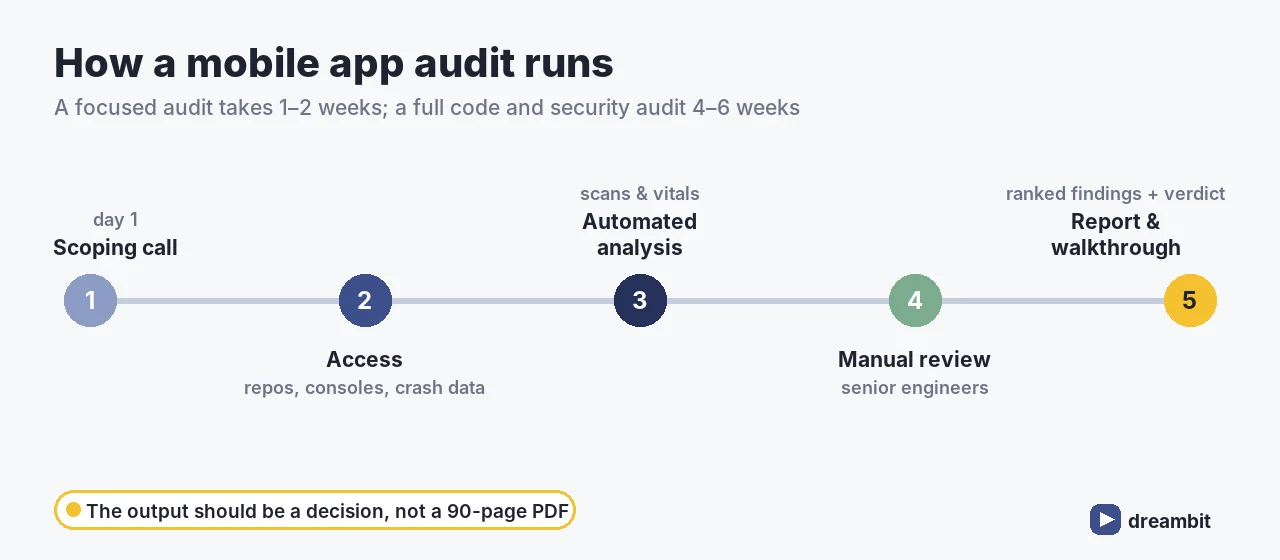
- Scoping call: goals, the decision the audit should inform, platforms, and any known pain.
- Access: source repositories, build pipeline, analytics and crash tools, store consoles, API documentation and a test environment.
- Automated analysis: dependency and vulnerability scans, static analysis, secret detection, crash and vitals data pull.
- Manual review: senior engineers read the code, test security controls, walk the user flows and review the backend contracts.
- Report and walkthrough: findings ranked by severity and effort, discussed live with your team, ending in a recommendation.
A focused audit of a typical app takes 1–2 weeks. A full audit with deep code and security review, or of a large multi-platform product, takes 4–6 weeks.
What a useful audit report contains
An audit report is only as good as the decisions it enables. Ours always include:
- An executive summary in plain language: overall health, the top risks, and the recommendation.
- Findings ranked by severity and effort, so you can see the cheap high-impact fixes first.
- Evidence for each finding: file, endpoint, screenshot or metric, so your team can verify it rather than take our word.
- A remediation plan with rough estimates for each fix.
- A verdict on the codebase: keep and improve, refactor in stages, or rebuild specific parts.
If a report gives you two hundred “medium” findings and no recommendation, it hasn’t finished the job.
Red flags that point to a rebuild
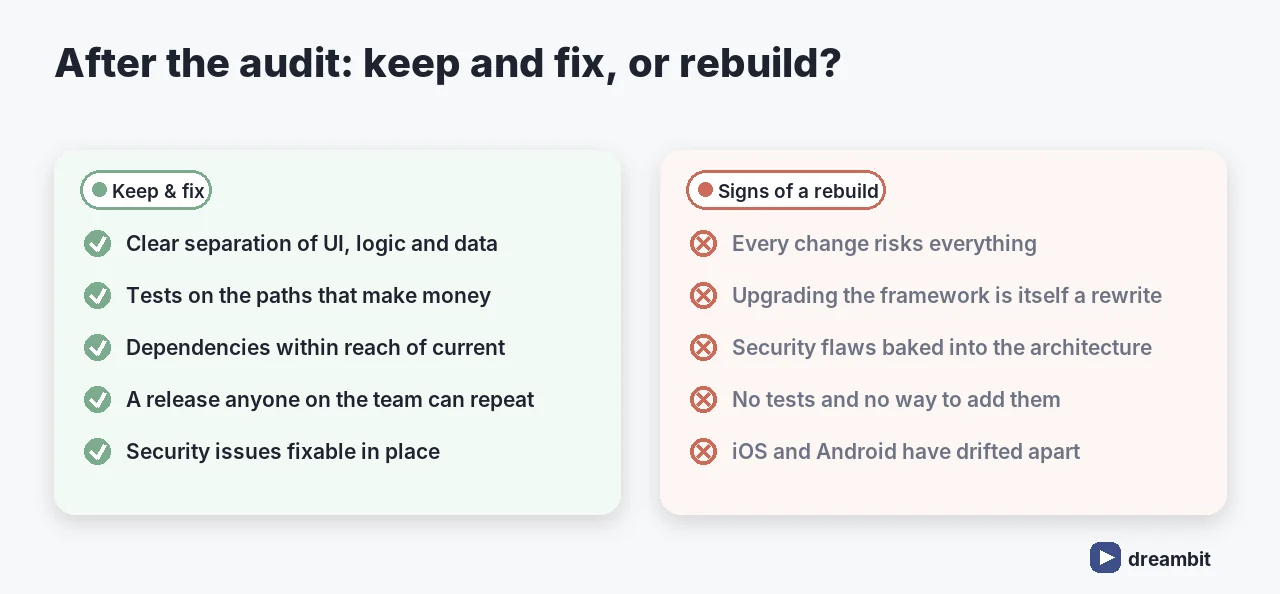
Most apps don’t need rewriting. An audit is how you find out whether yours is the exception. The signs that point towards rebuilding part or all of an app:
- No meaningful separation between UI, business logic and data, so every change risks everything.
- A framework or core dependencies so far out of date that upgrading is itself a rewrite.
- Security problems baked into the architecture rather than fixable in place.
- No automated tests on the paths that make money, and no way to add them without restructuring.
- Platform code diverged so far that iOS and Android are effectively two different products.
The opposite signs (clear structure, working tests, current dependencies, a release you can repeat) mean you should keep the app and fix what the audit found. That’s almost always cheaper.
How much does a mobile app audit cost?
Price follows scope: number of platforms, size of the codebase, backend complexity, user roles, compliance requirements, and whether a retest after fixes is included. Security penetration testing alone is commonly quoted at $7,000–$35,000 per platform. A broader audit that also covers architecture, performance, UX and release health is scoped after a call, because a 20-screen app and a multi-role platform with a large API are very different jobs.
Whatever it costs, compare it with what it informs. An audit is usually a small fraction of the cost of building a mobile app, and it routinely prevents a rewrite that wasn’t needed, or catches the security flaw before a customer does.
How we run audits at Dreambit
Our audits are done by the same senior engineers who build and maintain apps every day, not by a separate checklist team. That matters, because judging whether code is maintainable takes people who maintain code. We’ve taken over and stabilised apps built by other teams, and we’ve written up one of those journeys in our clean architecture case study. Our QA philosophy is in how we approach quality assurance, and the testing side in mobile app testing services.
We also don’t use an audit as a sales funnel for a rebuild. If the honest answer is “your app is in decent shape, fix these twelve things,” that’s the answer you get.
Common mistakes with app audits
- Auditing only the app, not the API. Most data exposure happens in the backend.
- Commissioning the audit after the decision. An audit after you’ve signed with a new vendor or started a rewrite is a post-mortem.
- Treating it as a one-off. Apps drift. A lighter yearly check catches dependency rot and new OS requirements early.
- Fixing in order of discovery. Fix in order of severity and effort, starting with the cheap critical ones.
- Not giving the auditor real access. Without source code, crash data and store consoles, you’re paying for guesses.
Once the urgent issues are fixed, keeping the app healthy is a maintenance job. See mobile app maintenance for what that involves.
Key Takeaways
- A mobile app audit reviews code and architecture, security, performance and stability, UX and accessibility, and release health.
- A focused audit takes 1–2 weeks. A full audit with deep code and security review takes 4–6 weeks.
- Security should be assessed against OWASP MASVS, and the backend API must be in scope.
- On Android, crash rates above 1.09% or ANR rates above 0.47% count as bad behaviour and can reduce Play Store visibility.
- A useful report ranks findings by severity and effort and ends in a clear recommendation.
- Commission an audit before a vendor change, an acquisition, a scale-up or a rewrite decision, not after.
- Most apps should be fixed, not rebuilt. The audit tells you which kind yours is.
Frequently Asked Questions
A mobile app audit is an independent review of an existing app across code and architecture, security, performance and stability, UX and accessibility, and release and operations health. It produces a prioritised list of findings with evidence, a remediation plan, and a clear recommendation on whether to keep and improve the codebase, refactor it in stages, or rebuild specific parts.
A focused audit of a typical app takes about 1–2 weeks. A full audit with deep code and security review, or an audit of a large multi-platform product with a complex API, usually takes 4–6 weeks. Duration depends on the size of the codebase, the number of platforms, backend complexity and how quickly the auditor gets access to source code, crash data and store consoles.
Cost follows scope: platforms, codebase size, backend complexity, user roles, compliance needs and whether a retest after fixes is included. Security penetration testing alone is commonly quoted at $7,000–$35,000 per platform. A broader audit covering architecture, performance, UX and release health is usually priced after a scoping call.
It should. A proper audit assesses the app against the OWASP Mobile Application Security Verification Standard (MASVS), covering data storage, cryptography, authentication, network communication, platform interaction, code quality, resilience and privacy. Crucially, it also reviews the backend API, because many serious mobile security problems, such as endpoints that return another user’s data, live on the server rather than in the app.
Commission an audit before a big decision rather than after it: before changing vendors or bringing development in-house, before buying or investing in a product, before a major scale-up or marketing push, after a run of bad releases, before deciding to rewrite, and ahead of a compliance requirement such as HIPAA, PCI DSS or GDPR. A lighter yearly check also catches dependency rot and new OS requirements early.
Yes, a good audit ends with a verdict on the codebase. Most apps should be kept and fixed. A rebuild is justified when there is no separation between UI, logic and data, when upgrading the framework is itself a rewrite, when security flaws are built into the architecture, when critical paths have no tests and no way to add them, or when iOS and Android have drifted into two different products.