
Flutter vs React Native is the wrong fight to pick first. In 2026 both frameworks ship fast, production-grade cross-platform apps from a single codebase, and both cut build cost 30–60% against separate native iOS and Android teams. The honest decision rule: choose React Native if your team already writes JavaScript, choose Flutter if your product is animation-heavy or needs pixel-identical UI everywhere — and if neither fits, build native and stop pretending otherwise.
Dreambit has shipped 150+ products over 14 years (5M+ downloads, 4.9★ across 114 reviews), including 60+ builds on Flutter and Firebase. We’ve also delivered React Native for teams whose web stack made it the obvious answer. Here’s the comparison as it actually plays out on a project, not as a benchmark chart.
The short answer to Flutter vs React Native
If you want the decision without the essay:
- Your team writes React/JavaScript today → React Native. The onboarding cost of Dart is real and you will pay it in weeks.
- Custom design system, heavy animation, brand-identical on both platforms → Flutter. It draws every pixel itself, so “identical” is the default rather than the goal.
- Standard business app — booking, catalogue, loyalty, internal tool → either. Pick by hiring, not by framework.
- Deep platform integration — Bluetooth mesh, background sensors, AR, heavy camera work → consider native, or budget for native modules in whichever you choose.
Everything below is the reasoning behind those four lines.
What each framework actually is in 2026
Before any Flutter vs React Native comparison means anything, it helps to know what each one actually does at runtime. The architectures have converged in outcome but not in method, and the difference still matters in edge cases:
- Flutter compiles Dart ahead of time to native ARM code and renders through its own engine (Impeller on Metal and Vulkan). There is no JavaScript bridge at runtime, and the framework draws its own widgets rather than mapping to platform controls.
- React Native runs JavaScript — precompiled to bytecode by Hermes — and drives real platform views. A button is a genuine UIButton or Android widget, which is why React Native apps inherit platform behaviour for free.
That single difference explains most of the trade-offs: Flutter gives you control over every pixel, React Native gives you the platform’s own behaviour. See the official Flutter architectural overview if you want the engineering detail.
Performance: the gap that mostly closed
The Flutter vs React Native performance argument is mostly settled. For a normal business app in 2026, users cannot tell which framework you used. Both hit 60fps on ordinary screens; both are fast enough for lists, forms, maps and checkout.
Architecture and state management affect app performance more than the choice between Flutter and React Native. In our experience the two real performance killers are an unbounded list rebuilding on every keystroke and a synchronous call on the UI thread — neither is a framework problem, and both survive a framework migration untouched.
Where a difference still shows: continuous custom animation, complex gesture-driven interfaces and heavy canvas work favour Flutter, because there’s no JavaScript layer between the gesture and the frame. Long-running background work and very large lists of platform-native components favour React Native’s use of real views. If your app is neither, this section should not decide anything — we’ve written more about keeping apps fast in mobile app testing and QA.
Cost: your framework is not the cost driver
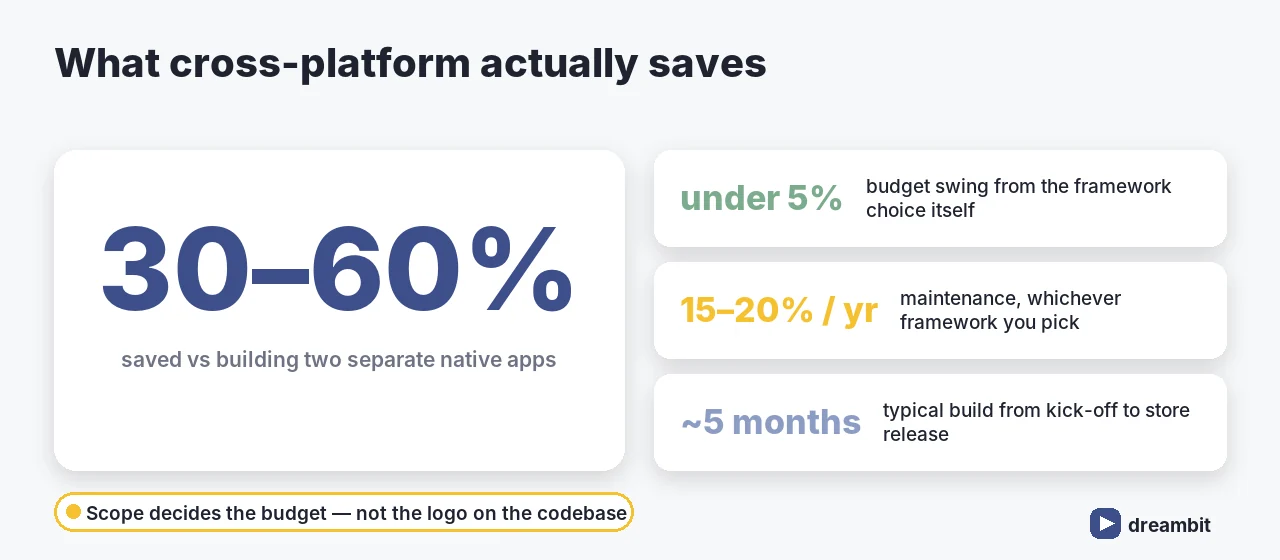
Both Flutter and React Native save roughly 30–60% against building and maintaining two separate native apps. What they don’t do is change the size of your product.
Cross-platform saves on implementation, not on scope. Design, backend, integrations, QA across real devices, app store work and post-launch maintenance are the same bill in both frameworks — which is why a Flutter vs React Native debate almost never moves the budget more than 5%, while cutting two features moves it 20%.
The realistic levers on cost are scope discipline and team rate, both covered in the cost of custom software development in 2026 and in our MVP scoping approach.
Talent and hiring: the factor that actually decides it
This is where the comparison stops being theoretical. In practice, Flutter vs React Native is a hiring decision wearing an engineering costume: Dart is a small language community, JavaScript is the default.
JavaScript is used by about 78% of working developers, while roughly 4.2% have written Dart (Stack Overflow Developer Survey, 2025). Flutter leads on framework adoption — 9.4% of all developers against 8.4% for React Native — but React Native carries close to 6× as many US job listings. Adoption and hireability point in opposite directions, which is why “who can maintain this in two years” beats any benchmark.
Practically: a React team ships a first release in React Native in a fraction of the time it would spend learning Dart. A team with no mobile or JS history can start either way, and then Flutter’s consistency is worth a lot. If you’re staffing rather than outsourcing, our guide to hiring mobile app developers covers what to screen for.
Developer experience and ecosystem
Both have hot reload, both have mature tooling, and both will occasionally make you swear:
- Flutter — one toolchain, one language, batteries included. Widgets are verbose but predictable. Upgrades are usually uneventful.
- React Native — a wider package ecosystem and everything npm offers, plus Expo, which removes most of the native build pain for standard apps. The cost is more moving parts and more dependency drift.
Dependency drift is the quieter long-term tax: a React Native project with 40 community packages will need more upkeep than a Flutter project with 15 first-party ones. Budget it either way — see mobile app maintenance.
UI and design fidelity
If your designer hands you a custom design system with bespoke motion, Flutter will reproduce it identically on both platforms because it renders everything itself. If you want an app that feels natively iOS on iOS and natively Android on Android — platform scroll physics, native text selection, system widgets — React Native gets there with less effort.
Neither is “better”. They’re answers to different briefs: brand consistency versus platform familiarity. Decide which one your users would notice.
Native modules, integrations and the escape hatch
Every serious cross-platform project eventually touches something the framework doesn’t cover — a payment SDK, a BLE peripheral, a background location service, a vendor’s proprietary library. Both frameworks let you drop to Swift/Kotlin and bridge it, and in both cases that work costs real money.
Two rules we apply at scoping: list every third-party SDK before choosing the framework and check which has a maintained plugin; and if more than a third of the app is native-bridged, revisit whether cross-platform is the right call at all. That check has saved clients more budget than any framework debate.
Maintenance and long-term risk
Both are backed by large companies and neither is going away, but the risk profiles differ. Flutter’s risk is platform-level: when Apple or Google change rendering or system behaviour, you wait for the engine to catch up. React Native’s risk is ecosystem-level: an unmaintained community package is your problem the day it breaks.
Either way, plan on 15–20% of build cost per year to keep a mobile app healthy — OS updates alone force work every autumn.
A realistic cross-platform build timeline
A typical cross-platform product runs roughly five months from kick-off to store release: 1–2 weeks of discovery and technical scoping, 2–3 weeks of design and design-system work, 8–12 weeks of build in sprints with integrations started early rather than last, 2–3 weeks of QA across real devices on both platforms, and 1–2 weeks for store review, staged rollout and launch monitoring.
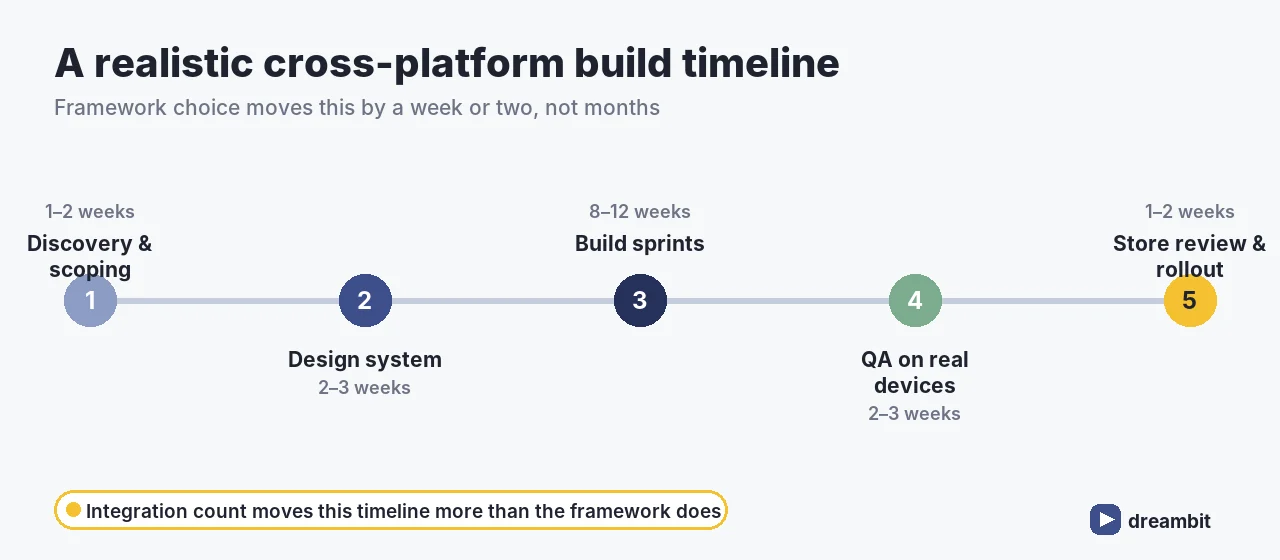
Framework choice moves this timeline by a week or two, not by months. What moves it is integration count and how firm the scope is — a single undecided payment provider costs more calendar time than the entire Flutter vs React Native evaluation. The one place the framework does show up is QA: Flutter’s self-rendered UI behaves identically across devices, while React Native inherits per-platform quirks you have to see on hardware.
How we decide on a real project
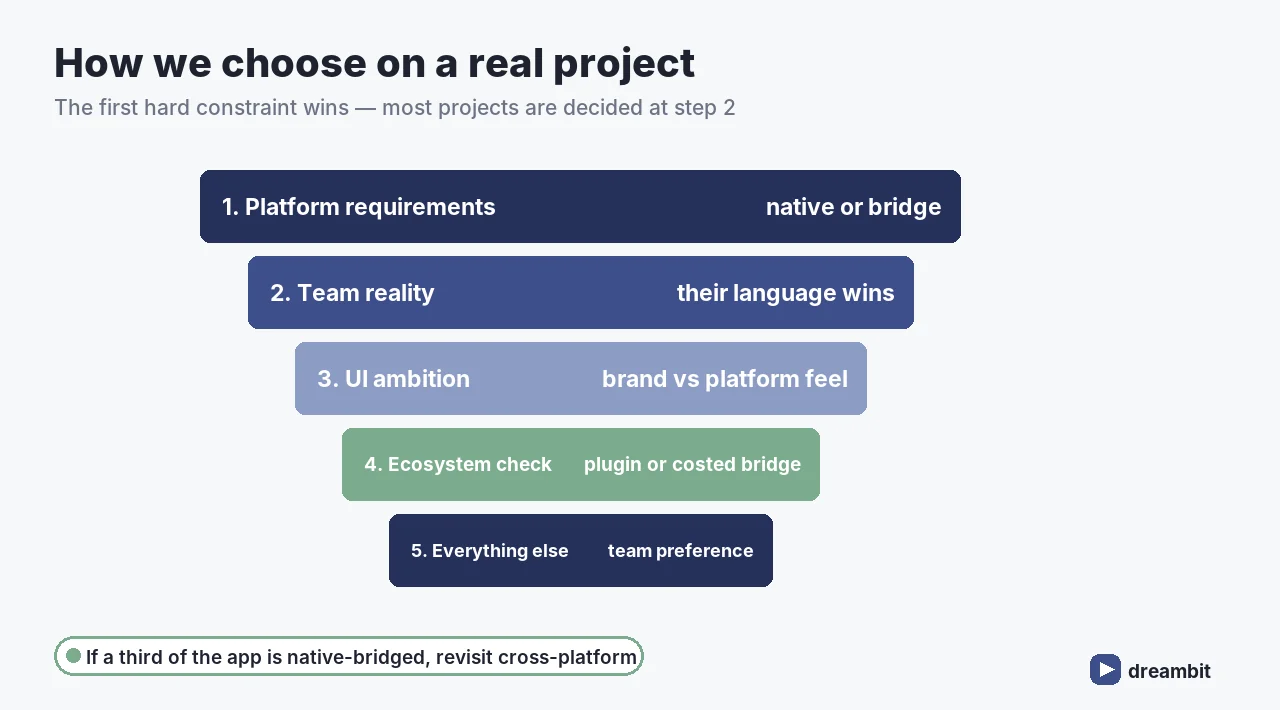
Our Flutter vs React Native selection sequence, in order — the first hard constraint wins:
- Platform requirements — does anything in the spec need deep native access or hardware work? If yes, native or heavy bridging.
- Team reality — who will maintain this in year two? Their language wins by default.
- UI ambition — custom motion and identical branding push to Flutter; platform-native feel pushes to React Native.
- Ecosystem check — every required SDK must have a maintained plugin, or a costed bridging plan.
- Everything else — at this point either works; pick the one your team will be happier in.
Most projects are decided at step 2. That’s not a cop-out — it’s the variable with the biggest effect on delivery speed and defect rate.
When neither is the right answer
Go native when the app is the platform integration: continuous background sensing, AR, high-end camera pipelines, audio processing, or anything where a 10% frame-time penalty is a product failure. Go native also when you only need one platform — a cross-platform framework you only ship to iOS is added complexity with no payoff. Saying this early is part of the job; we made the same argument about over-engineering in AI agent development.
What 60+ Flutter builds taught us
We don’t run a fresh Flutter vs React Native debate on every project. Our default for SaaS MVPs is Flutter with Firebase, and the reasons are unglamorous: one language across both apps, fewer dependencies to babysit, and a predictable upgrade path — detailed in lessons from 60+ Flutter/Firebase projects. But “default” is not “always”. We’ve built React Native for clients with in-house React teams, because handing over a codebase nobody on staff can read is a failure even if the app is perfect on launch day. Offline behaviour, not framework choice, is what users actually complain about — which is why we design for it from the start, as covered in why an app that works without Wi-Fi works for your clients.
Common mistakes in the Flutter vs React Native decision
- Choosing on benchmarks. Synthetic frame-rate tests don’t predict how your app feels with real data and a real network.
- Ignoring who maintains it. The best framework is the one your team can still ship in two years.
- Assuming cross-platform means half the QA. You still test on both platforms and on real devices.
- Discovering native dependencies late. Audit every SDK before you commit, not in sprint six.
- Rewriting a working app to switch frameworks. Migration costs more than the problem it usually solves.
- Treating the framework as the architecture. State management, data layer and error handling decide quality in both.
Key Takeaways
- Flutter vs React Native rarely changes your budget by more than 5% — scope does.
- Both cut cost 30–60% versus separate native iOS and Android builds.
- Performance is a tie for standard business apps; Flutter leads on custom animation, React Native on platform-native feel.
- Hiring is the deciding factor: JavaScript is known by ~78% of developers, Dart by ~4.2%.
- Flutter renders its own pixels (brand consistency); React Native drives real platform views (platform familiarity).
- Audit every third-party SDK before choosing — native bridging is the hidden cost in both.
- Budget 15–20% of build cost per year for maintenance regardless of framework.
- If the app is mostly deep platform integration, or ships to one platform only, build native.
Frequently Asked Questions
Neither is better in general. For a standard business app the performance difference is not something users notice, so the decision comes down to your team and your UI ambition: React Native if your developers already write JavaScript, Flutter if you need pixel-identical branding across both platforms or heavy custom animation. The framework that your team can still maintain in two years is the right one.
Both cut build cost roughly 30–60% against developing and maintaining separate native iOS and Android apps, and the difference between them is usually under 5% of the budget. Cost is driven by scope, integration count and team rate, not by the framework — cutting two features moves the number far more than switching frameworks does.
Flutter compiles Dart ahead of time to native code and renders through its own engine, so it has an edge on continuous custom animation and gesture-heavy interfaces. React Native runs JavaScript precompiled by Hermes and drives real platform views, which suits platform-native feel and large lists of native components. For lists, forms, maps and checkout, both hold 60fps and architecture matters more than either engine.
React Native, by a wide margin in the job market: JavaScript is used by about 78% of working developers versus roughly 4.2% for Dart, and React Native carries close to 6× as many US job listings. Flutter still leads on overall framework adoption (9.4% of developers against 8.4%), so adoption and hireability point in different directions — check which is true in your hiring market.
Go native when the app is mostly platform integration — continuous background sensing, AR, high-end camera pipelines, audio processing — or when a small frame-time penalty would be a product failure. Also go native if you only ship to one platform, since a cross-platform framework then adds complexity with no payoff. A useful rule: if more than a third of the app needs native bridging, reconsider cross-platform entirely.
A typical cross-platform product takes about five months end to end: 1–2 weeks discovery and scoping, 2–3 weeks design, 8–12 weeks of build sprints, 2–3 weeks of QA on real devices across both platforms, and 1–2 weeks for store review and staged rollout. Framework choice shifts that by a week or two; the number of third-party integrations shifts it by months.