Mobile app maintenance is the ongoing work that keeps a live app secure, compatible, and worth using after launch — OS updates, bug fixes, dependency and security patches, hosting, and steady improvement. Budget roughly 15–20% of your original build cost per year: about $3,000–$10,000 for a small app, $10,000–$50,000 for a mid-size one, and $100,000+ for enterprise. Skipping it isn’t saving money; it’s deferring a bigger bill.
Dreambit has shipped and supported 150+ products over 14 years (5M+ downloads, 4.9★ across 114 reviews), and Priority Maintenance Support is one of our core services. Here’s what maintenance actually includes, what it costs, what happens when you neglect it, and how to choose the right support model.
What is mobile app maintenance?
Maintenance is not “fixing bugs when users complain.” It’s four distinct kinds of work:
- Corrective — fixing defects and crashes as they surface.
- Adaptive — keeping up with new iOS/Android versions, devices, and third-party API changes.
- Preventive — dependency and security patches, refactoring, monitoring before things break.
- Perfective — improving UX and performance, and adding what users actually ask for.
We covered the post-launch reality in what you should know about maintenance and updates after release.
How much does mobile app maintenance cost in 2026?
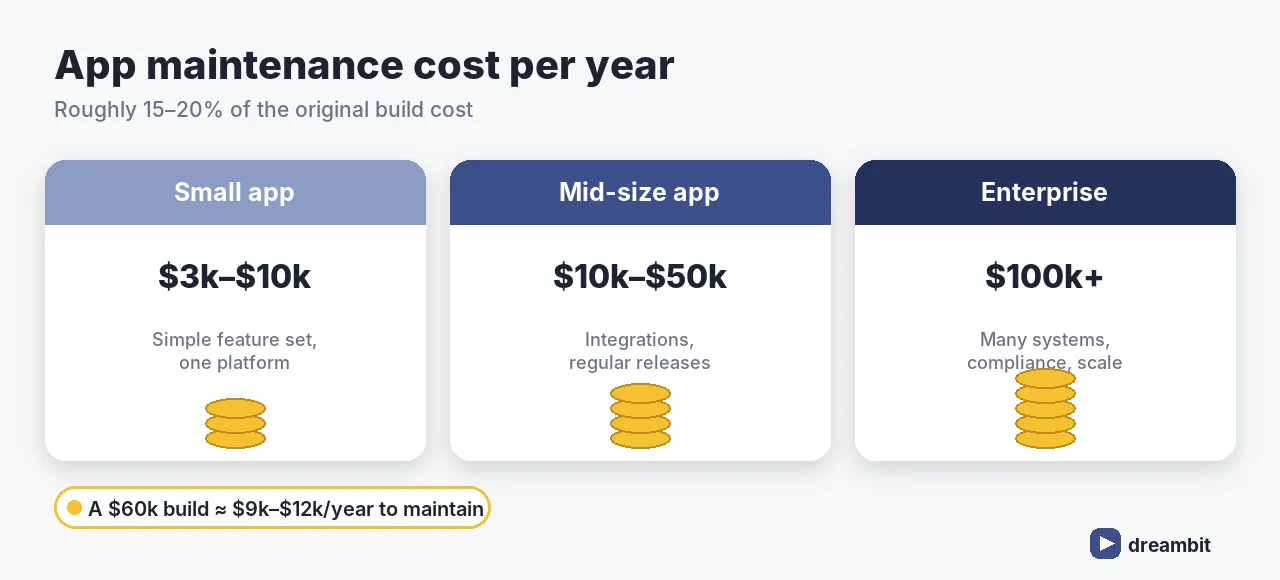
The reliable rule of thumb is 15–20% of the original development cost, per year. In absolute terms:
Small apps typically cost $3,000–$10,000 a year to maintain, mid-size apps $10,000–$50,000, and complex or enterprise apps $100,000+ — roughly 15–20% of the original build cost annually. An app that cost $60,000 to build should carry a $9,000–$12,000 yearly maintenance budget (industry benchmarks, 2026).
The main drivers are hosting and cloud infrastructure, bug fixing, OS/device compatibility, third-party integrations, UI/UX improvements, and compliance (GDPR, HIPAA, PCI DSS). Plan it alongside the cost of custom software development — not as an afterthought.
What happens if you skip maintenance
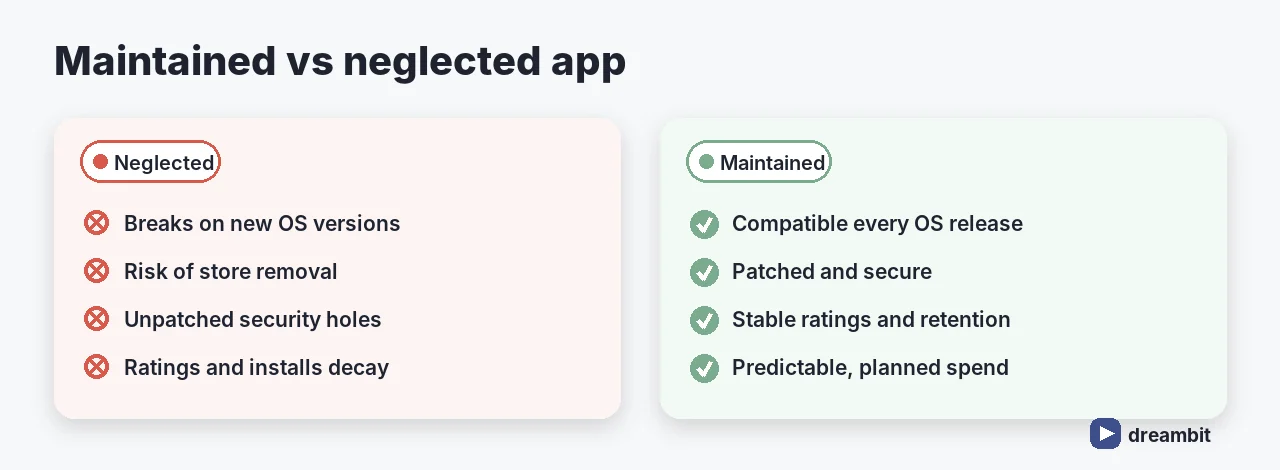
Neglect is quiet at first, then expensive:
- The app breaks on new OS versions — Apple and Google ship yearly; unmaintained apps eventually stop working.
- Store removal risk — both stores enforce minimum API/SDK levels and can delist stale apps.
- Security exposure — unpatched dependencies are the easiest way in.
- Rating decay — crashes and slowness show up in reviews fast, and installs follow.
- Compounding tech debt — a year of deferred updates turns a patch into a rewrite.
Both platforms publish their requirements — see Google Play’s target API level requirements.
Support models: which one fits you
- Ad-hoc / time & materials — pay per fix. Cheapest until something urgent breaks.
- Monthly retainer — a set block of hours, predictable budget, priority queue.
- Full managed support (SLA) — monitoring, guaranteed response times, proactive updates.
The right choice depends on how much revenue depends on the app being up. If downtime costs you customers, buy the SLA.
What a good maintenance plan includes
- Monitoring & crash reporting — you learn about problems before users tell you.
- Regular OS and dependency updates — scheduled, not reactive.
- Security patching — with a defined response window.
- Performance checks — startup time, memory, battery.
- Regression testing on each release — see our mobile app testing and quality audit guide.
- A roadmap for improvements — maintenance should also move the product forward.
Common maintenance mistakes to avoid
- No maintenance budget at all. The most common and most costly planning error.
- Reacting instead of scheduling. Planned updates are far cheaper than emergency ones.
- Ignoring analytics and crash data. The fix list is already there — read it.
- Letting dependencies rot. Small, frequent upgrades beat one giant migration.
- Treating maintenance as pure cost. Done well, it protects revenue and retention.
Key Takeaways
- Budget 15–20% of your build cost per year for mobile app maintenance.
- Typical ranges: $3,000–$10,000 small, $10,000–$50,000 mid-size, $100,000+ enterprise.
- Maintenance is four jobs: corrective, adaptive, preventive, and perfective.
- Skipping it risks OS breakage, store removal, security holes, and rating decay.
- Pick a support model based on how much revenue depends on uptime.
Frequently Asked Questions
If you would rather not run this in-house, our priority maintenance and support covers monitoring, SLA response times and the update cadence described above.
Budget roughly 15–20% of the original build cost annually. In practice that’s about $3,000–$10,000 a year for a small app, $10,000–$50,000 for a mid-size app, and $100,000+ for complex or enterprise apps. An app that cost $60,000 to build needs roughly $9,000–$12,000 a year.
Four kinds of work: corrective (fixing bugs and crashes), adaptive (new iOS/Android versions, devices, third-party API changes), preventive (dependency and security patches, monitoring, refactoring), and perfective (UX and performance improvements). A good plan also includes crash reporting and regression testing on every release.
It breaks on new OS releases, risks removal from the stores for failing minimum API requirements, accumulates unpatched security vulnerabilities, and loses ratings and installs as crashes pile up. Deferred updates also compound into technical debt, turning a routine patch into an expensive rewrite.
Plan a regular cadence rather than reacting to breakages: security and dependency patches promptly, compatibility updates around each major iOS/Android release (yearly), and smaller improvement releases every few weeks or months depending on your roadmap. Scheduled updates are far cheaper than emergency ones.
It depends on how much revenue depends on uptime. Ad-hoc time-and-materials is cheapest until something urgent breaks. A monthly retainer gives predictable budget and a priority queue. Full managed support with an SLA adds monitoring and guaranteed response times — worth it when downtime costs you customers.