
Insights9 minute read
How Long Does It Take to Build an App? Realistic Timelines by Phase
How long it takes to build an app in 2026: timelines by phase and app type, App Store and Google Play review, what slows projects down, what speeds them up, and a realistic 4-month MVP plan.
 Vladyslav Bilomeria
Dreambit
How long does it take to build an app? A focused MVP typically takes 2–4 months from kick-off to the app stores, a medium-complexity app with accounts, payments and integrations 4–6 months, and a complex or regulated platform 6–12 months or more. Those numbers include discovery, design, QA and store review, not just coding. In our experience, what stretches a timeline is rarely the code. It’s decisions that wait, integrations that start late, and scope that keeps growing.
Dreambit has shipped 150+ products over 14 years (5M+ downloads, 4.9★ across 114 reviews), from MVPs that went live in weeks to multi-year platforms. This guide breaks the timeline down phase by phase, shows what’s typical for each type of app, and covers the factors that speed a project up or slow it down. It’s the companion to our mobile app development cost guide, because time and money move together.
App development timeline by phase
Every app goes through the same phases. What changes is how long each one takes:
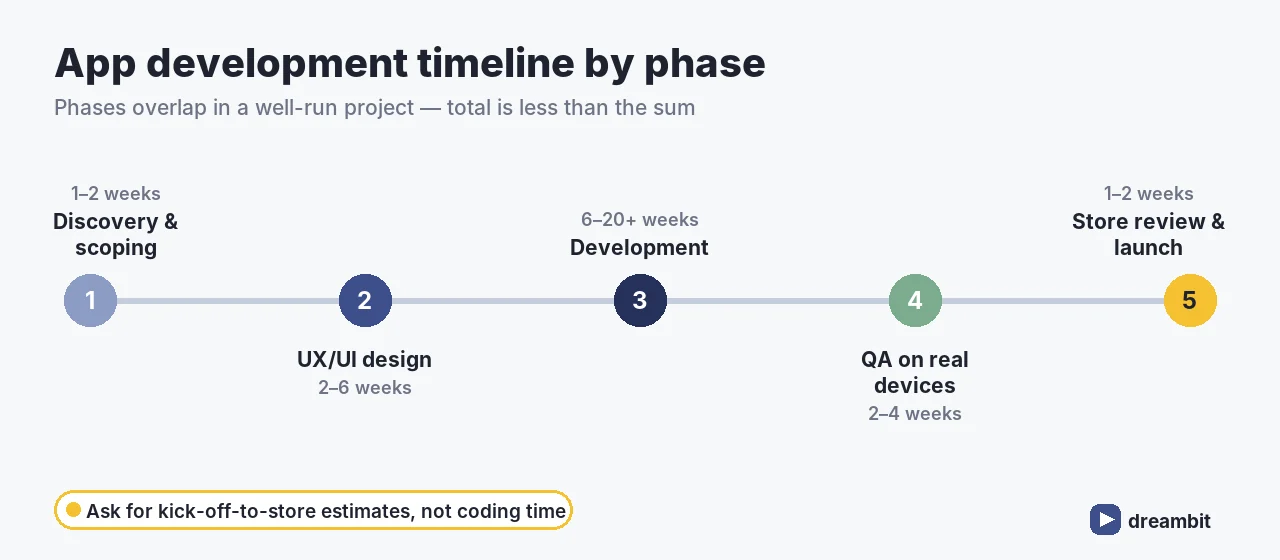
- Discovery and scoping: 1–2 weeks. Goals, users, core flows, integrations, platforms and the MVP cut, written down and agreed. We describe what happens here in what we do in the first two weeks of a project.
- UX/UI design: 2–6 weeks. User flows, wireframes, then visual design and a clickable prototype. It overlaps with development once the first screens are approved.
- Development: 6–20+ weeks. The app, the backend, the admin panel and integrations, built in one- or two-week sprints with working software demoed at the end of each.
- QA and testing: 2–4 weeks of dedicated effort, plus continuous testing during development. Real devices, both platforms, edge cases. See mobile app testing services.
- Store submission and launch: 1–2 weeks. Store listings, review, staged rollout and launch monitoring.
The phases overlap in practice. Design for later screens continues while the first ones are being built, and testing runs throughout. That’s why a well-run project is shorter than the sum of its phases.
How long does it take to build an app of each type?
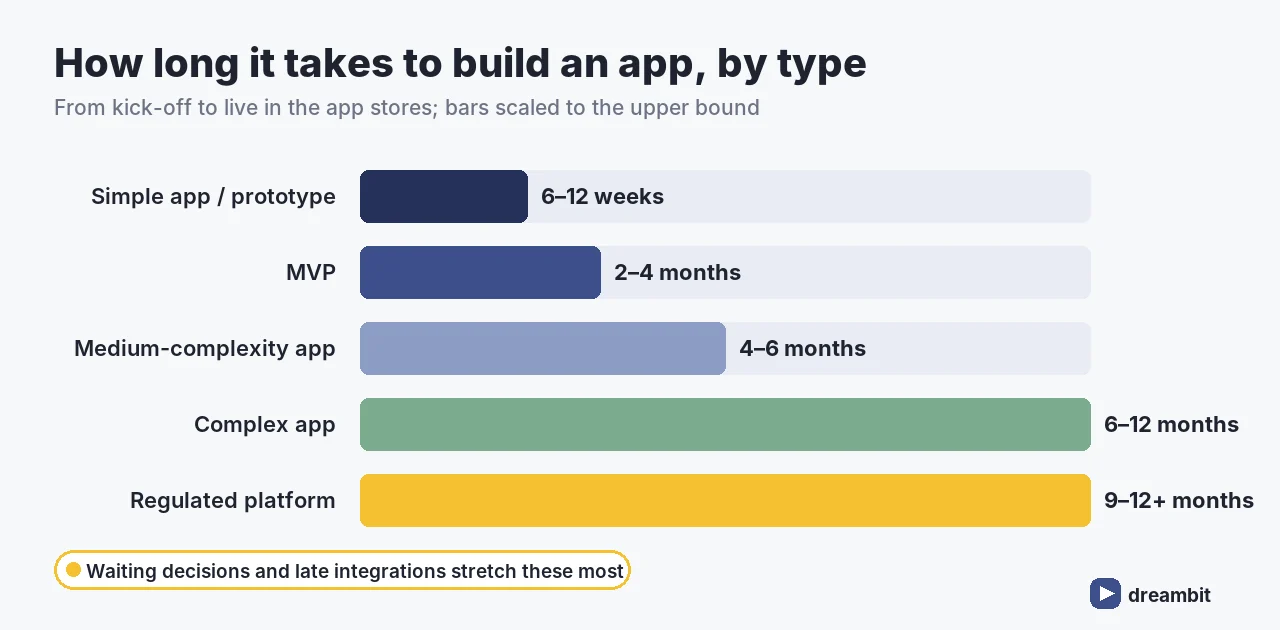
- Simple app or prototype: 6–12 weeks. A few core screens, little or no backend, one main flow.
- MVP: 2–4 months. One core workflow done properly, with accounts, a backend, basic admin and analytics. It’s the right first release for most new products; see MVP development.
- Medium-complexity app: 4–6 months. Several user roles, payments or subscriptions, third-party integrations, push notifications, an admin panel.
- Complex app: 6–12 months. Real-time features, many integrations, marketplace logic, or heavy offline sync.
- Regulated platform: 9–12+ months. Healthcare, fintech or insurance, where compliance, audit trails and security testing are on the critical path. Our telemedicine app development guide shows what that adds.
Discovery, design, QA and store review each add real weeks to an app timeline, which is why a “two-month app” quoted as pure coding time routinely becomes a five-month project. When comparing estimates, ask whether the number runs from kick-off to live in the store, or only covers development.
Web apps vs mobile apps: does the timeline differ?
For the same scope, a web app usually reaches users a little sooner than a mobile app, mainly because there’s no store review and every user gets every update immediately. The build itself takes about as long, because design, backend and integrations are the same work either way. Building both a web app and native iOS and Android apps for the same product roughly multiplies the front-end effort, which is why many products launch on one surface first and add the others once the core is proven. A cross-platform codebase narrows the gap between iOS and Android to almost nothing. For the web side of the picture, see web app development cost.
App store review: plan for it
Review is short but not zero, and it’s the one phase you don’t control:
- Apple App Store: Apple says that on average 50% of submissions are reviewed within 24 hours and over 90% within 48 hours (Apple App Review). New apps and apps in sensitive categories often take longer, and a rejection restarts the clock.
- Google Play: reviews usually take a day to a few days. New personal developer accounts must run a closed test with testers for 14 days before they can publish to production, so open an organisation account or plan the test early.
Budget one to two weeks for submission and launch, submit a release candidate before the launch date you’ve announced, and never schedule marketing around a review you haven’t passed yet.
What slows down the time it takes to build an app
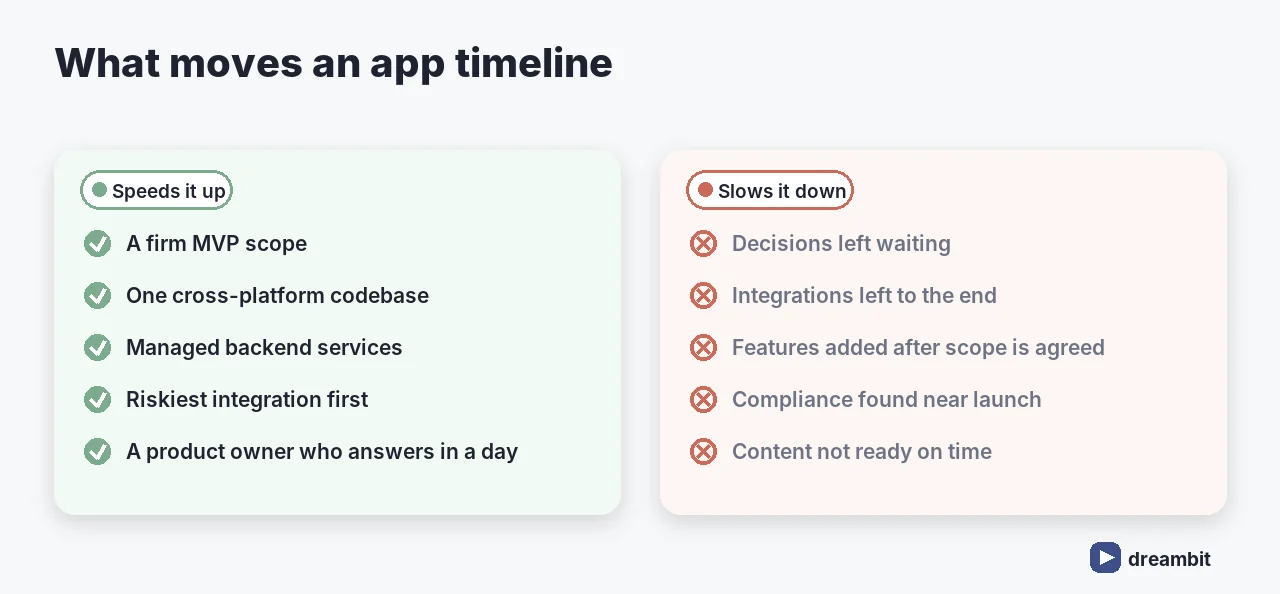
- Decisions that wait. An undecided payment provider, an unapproved design or a stakeholder who first sees the product in month four can cost more calendar time than any technical problem.
- Late integrations. Third-party APIs, legacy systems and vendor sandboxes always take longer than expected. Leaving them to the end makes them the critical path.
- Scope creep. Every “small” addition reshuffles the sprint plan. Most delays come from features added after the scope was agreed.
- Compliance discovered late. Privacy, accessibility or industry regulation found near launch means rework.
- Content not ready. Copy, product data, images and legal text that the business owes the project.
- Team changes. Swapping people mid-project costs weeks of lost context.
What speeds it up, without cutting quality
- A firm MVP scope. The fastest way to launch sooner is to launch with less. Cut features, not quality.
- Cross-platform development. One Flutter or React Native codebase for iOS and Android avoids building and testing everything twice. We compared the options in Flutter vs React Native.
- Managed backend services for authentication, storage, push notifications and analytics, rather than building them from scratch. Our approach is described in lessons from 60+ Flutter/Firebase projects.
- Integrations first. Prove the riskiest connection in the first sprints, not the last.
- A product owner with authority who can answer questions within a day.
- Weekly demos. Problems found in week three are cheap. The same problems found in month four are not.
Can AI make app development faster?
Yes, within limits. AI-assisted coding speeds up boilerplate, tests, documentation and refactoring, and we use it every day under a spec-first, review-everything discipline described in how Dreambit builds with AI. It doesn’t speed up the parts that dominate most timelines: deciding what to build, waiting for third parties, testing on real devices and passing store review. Treat any estimate that halves the timeline “because of AI” with caution. The coding gets faster. The rest of the project doesn’t.
A realistic example: a 4-month MVP
An illustrative timeline for a cross-platform booking MVP with customer accounts, card payments, push reminders and a simple staff admin:
- Weeks 1–2: discovery, scope map, MVP cut, integration choices confirmed.
- Weeks 2–5: UX flows, then visual design for the core screens. Development starts in week 4 on the approved screens.
- Weeks 4–13: development sprints, with the payment integration in the first sprint and weekly demos.
- Weeks 12–15: focused QA on real devices, bug fixing, performance.
- Weeks 15–16: store submission, review, staged rollout and launch monitoring.
Every week a decision waits on the client side moves the launch by about a week. That’s why the single best timeline lever is a responsive product owner.
How to get a timeline estimate you can trust
When you ask how long it takes to build an app, the honest first answer from any good team is “it depends on scope, so let’s define it”. A reliable estimate has four things behind it: a written scope map of roles, flows and integrations; a low and high range per module rather than one number; the assumptions spelled out, such as who provides content, which payment provider and how fast decisions come back; and an explicit statement of what’s in and out of the first release. An estimate without those is a guess with a date on it. We give a firm timeline for a well-defined first phase and range estimates for what follows, because nobody can honestly promise a date for features that haven’t been designed.
After launch: the first 90 days
Launch day isn’t the end of the timeline. Plan for a stabilisation period of two to four weeks, when real users on real devices surface the bugs no test plan caught, followed by the first improvement cycle driven by analytics and feedback. Keep the core team in place through this window, because the people who built the app fix it fastest. After that, the app moves into a steady rhythm of releases and maintenance, covered in mobile app maintenance.
Common timeline mistakes
- Quoting coding time as delivery time. Always ask for kick-off-to-store estimates.
- Fixing the launch date before the scope. Decide what’s in the MVP, then commit to a date.
- Integrating last. The riskiest work should go first.
- No buffer for store review. Rejections happen. Leave room for them.
- Adding team members to catch up. New people slow a late project down before they speed it up.
Key Takeaways
- How long it takes to build an app: MVP 2–4 months, medium-complexity 4–6 months, complex 6–12 months, regulated platforms 9–12+ months.
- Phases: discovery 1–2 weeks, design 2–6, development 6–20+, QA 2–4, launch 1–2. Well-run projects overlap them.
- Apple reviews about 50% of submissions within 24 hours and over 90% within 48. New Google Play personal accounts need a 14-day closed test.
- Delays come mostly from waiting decisions, late integrations and scope creep, not from code.
- Speed up with a firm MVP scope, cross-platform development, managed backend services and integrations first.
- AI speeds up coding, not decisions, third parties, device testing or store review.
Frequently Asked Questions
How long does it take to build an app?
From kick-off to live in the app stores, a simple app or prototype typically takes 6–12 weeks, an MVP 2–4 months, a medium-complexity app 4–6 months, a complex app 6–12 months, and a regulated platform in healthcare or fintech 9–12 months or more. These figures include discovery, design, QA and store review, not just coding.
How long does each phase of app development take?
Discovery and scoping usually takes 1–2 weeks, UX/UI design 2–6 weeks, development 6–20 or more weeks, focused QA 2–4 weeks, and store submission and launch 1–2 weeks. In a well-run project these phases overlap, so the total is shorter than their sum.
How long does App Store review take?
Apple states that on average 50% of submissions are reviewed within 24 hours and over 90% within 48 hours, although new apps and sensitive categories can take longer and a rejection restarts the clock. Google Play reviews usually take a day to a few days, and new personal developer accounts must complete a 14-day closed test before publishing to production.
What makes app development take longer than planned?
Most delays come from decisions that wait, third-party integrations left until the end, features added after the scope was agreed, compliance requirements discovered near launch, content that isn’t ready, and team changes mid-project. Pure coding problems are a smaller cause than most people expect.
How can I build my app faster?
Agree a firm MVP scope and cut features rather than quality, build one cross-platform codebase for iOS and Android, use managed backend services for authentication, storage and notifications, tackle the riskiest integration first, and have a product owner who can answer questions within a day. Weekly demos catch problems while they are still cheap.
Does AI make app development faster?
AI-assisted coding speeds up boilerplate, tests, documentation and refactoring. It does not shorten the parts that dominate most timelines: deciding what to build, waiting on third parties, testing on real devices and passing store review. Treat estimates that halve a timeline because of AI with caution.
Written by
Vladyslav Bilomeria
Vladyslav Bilomeria is a Senior Software Engineer at Dreambit specialising in cross-platform mobile development. He builds performant, maintainable apps for iOS and Android using Flutter and a range of modern technologies, with a focus on clean architecture and smooth user experience. Vladyslav has contributed to projects across healthcare, e-commerce, and productivity, bringing technical precision and attention to detail to every release. With over 6 years of experience, his broad engineering expertise makes him a go-to engineer for complex UI challenges and native integrations.


Tell us about your product
A 30-minute call with a team that has done it. You leave with refactor, rebuild or leave alone, and why.