Web app development cost in 2026 runs from $18,000–$60,000 for an MVP, through $70,000–$180,000 for a mid-complexity commercial product, to $180,000–$500,000+ for an enterprise-grade, compliance-heavy platform. What moves you between those bands is not the framework or the country your team sits in. It’s the number of user roles, the integrations, compliance scope and whether AI is in the product. Then add 15–20% of the build cost every year to keep it running.
Dreambit has shipped 150+ products over 14 years (5M+ downloads, 4.9★ across 114 reviews), from lean SaaS MVPs to multi-role platforms with payments, integrations and AI features. This guide breaks the number down the way we scope it on real projects: by what you’re building, what drives the price, and the costs that turn up after launch.
What counts as a web app (and why it matters for the price)
A website shows information. A web app lets people do something: log in, manage data, pay, collaborate, get results. That line is where cost jumps, because a web app has state, users, permissions and a backend that has to stay correct under load.
Most projects fall into one of four shapes:
- Internal tool or dashboard: one organisation, a few roles, lots of data, few design surprises.
- SaaS product: multi-tenant, sign-up and billing, onboarding, admin panel, analytics.
- Marketplace or platform: two or more sides (buyers and sellers, clients and providers), payouts, trust and moderation.
- Progressive web app (PWA): a web app that installs, works offline and sends push notifications, often in place of a native mobile app.
How much does web app development cost in 2026?
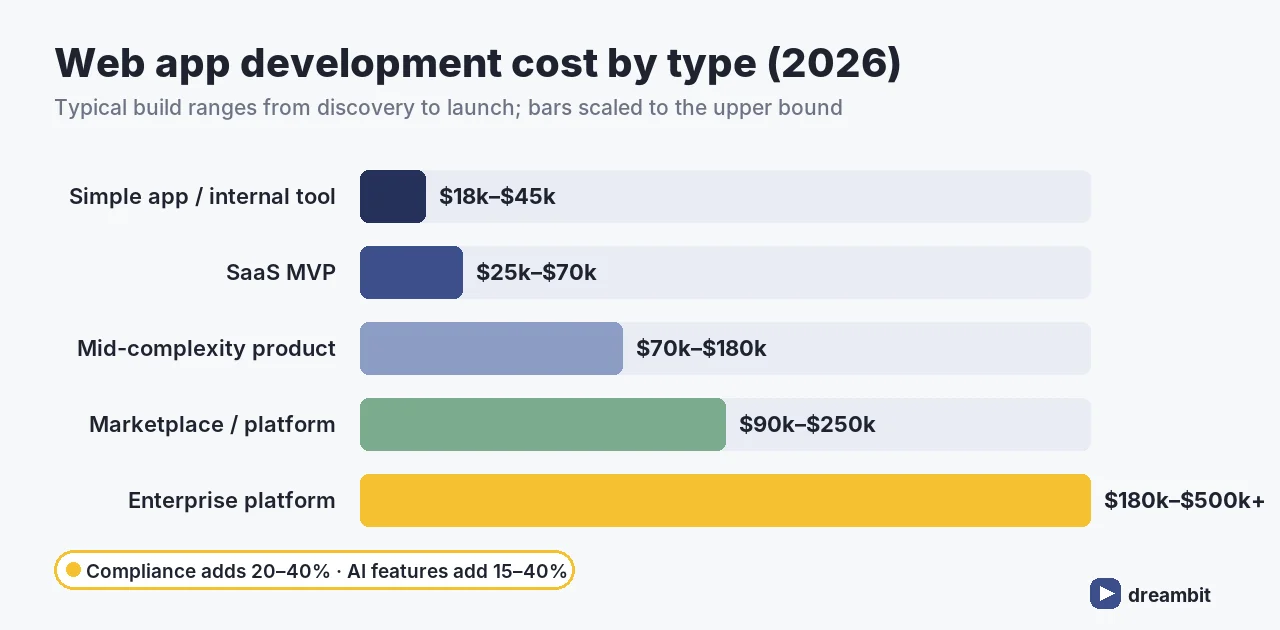
Realistic ranges for a competent team, from discovery to launch:
- Simple web app or internal tool: $18,000–$45,000. One or two roles, standard auth, CRUD screens, a few reports.
- SaaS MVP: $25,000–$70,000, typically 3–4 months. Sign-up, billing, core workflow, admin.
- Mid-complexity commercial product: $70,000–$180,000 over 5–8 months. Multi-role access, several integrations, custom reporting.
- Marketplace or multi-sided platform: $90,000–$250,000. Two sets of user flows, payments and payouts, dispute handling.
- Enterprise, compliance-heavy platform: $180,000–$500,000+. SSO, audit trails, SOC 2 / HIPAA / GDPR scope, high availability.
Two line items blow up web app budgets more than any other: compliance (SOC 2, HIPAA, GDPR) typically adds 20–40% to a build, and AI features such as chat, recommendations or automation add 15–40%. Both are routinely missing from early estimates, which is why the quote you get after discovery is often higher than the number in your head (industry benchmarks, 2026).
For the broader picture across all kinds of custom work, see the cost of custom software development in 2026.
What drives web app development cost
If you want to predict where your project lands, count these, in roughly this order of impact:
- User roles. Every role (customer, admin, manager, partner) is its own set of screens, permissions and tests. Going from two roles to five roughly doubles the surface area.
- Integrations. Payments, CRM, ERP, email, analytics, identity providers. Each one is design, build, error handling and a vendor that changes its API on you.
- Compliance scope. Audit logs, data residency, encryption at rest, access reviews. It’s work you can’t skip and can’t demo.
- AI features. Retrieval, evaluation, guardrails and running costs, covered in AI chatbot development and AI agent development.
- Design ambition. A clean component library is cheap. A bespoke design system with custom motion is not.
- Real-time and offline. Live collaboration, presence, sync and conflict resolution are a category of engineering, not a feature.
Framework choice is conspicuously absent from that list. React, Vue, Angular or Next.js will not move the budget more than a few percent. Scope will.
Where the money goes: cost by phase
A typical split on a mid-complexity build:
- Discovery and technical scoping: 5–10%. The cheapest place to cut scope and the most expensive place to skip.
- UX/UI design: 10–15%.
- Frontend and backend engineering: 50–60%.
- QA and testing: 10–15%, more if you support many browsers and devices.
- DevOps, deployment and launch: 5–10%.
If a quote has almost nothing in discovery and QA, it hasn’t removed that work. It’s moved it into your first three months after launch.
The costs after launch
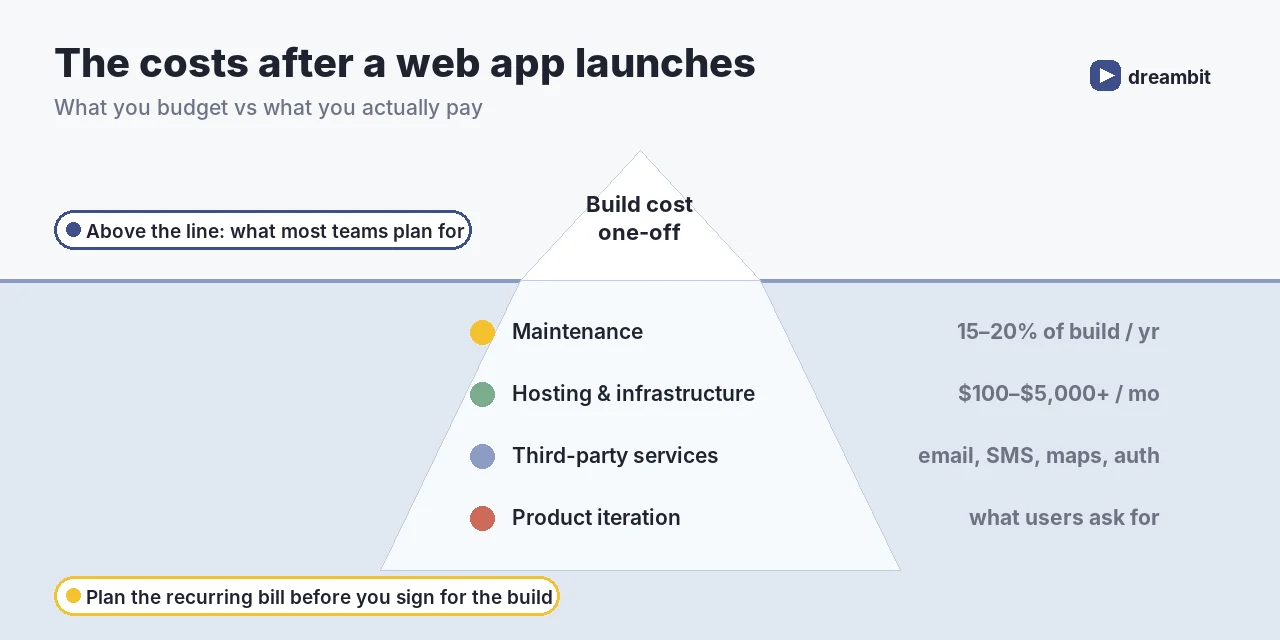
A web app is never finished. The recurring bill has four parts:
- Maintenance: 15–20% of build cost per year for security patches, dependency upgrades, browser changes and bug fixes.
- Hosting and infrastructure: $5–$50 a month for a simple PWA, and $100–$5,000+ a month for a real product with databases, background jobs, CDN and backups, scaling with traffic and data.
- Third-party services: email, SMS, maps, search, monitoring, auth. Each is small, and together they add up.
- Product iteration: the features your first users ask for. This is the part that actually grows the business.
We cover the maintenance side in detail in app maintenance. The same logic applies to web.
Web app, PWA or native mobile app?
This is the decision that moves budgets the most, and the one founders most often make by default.
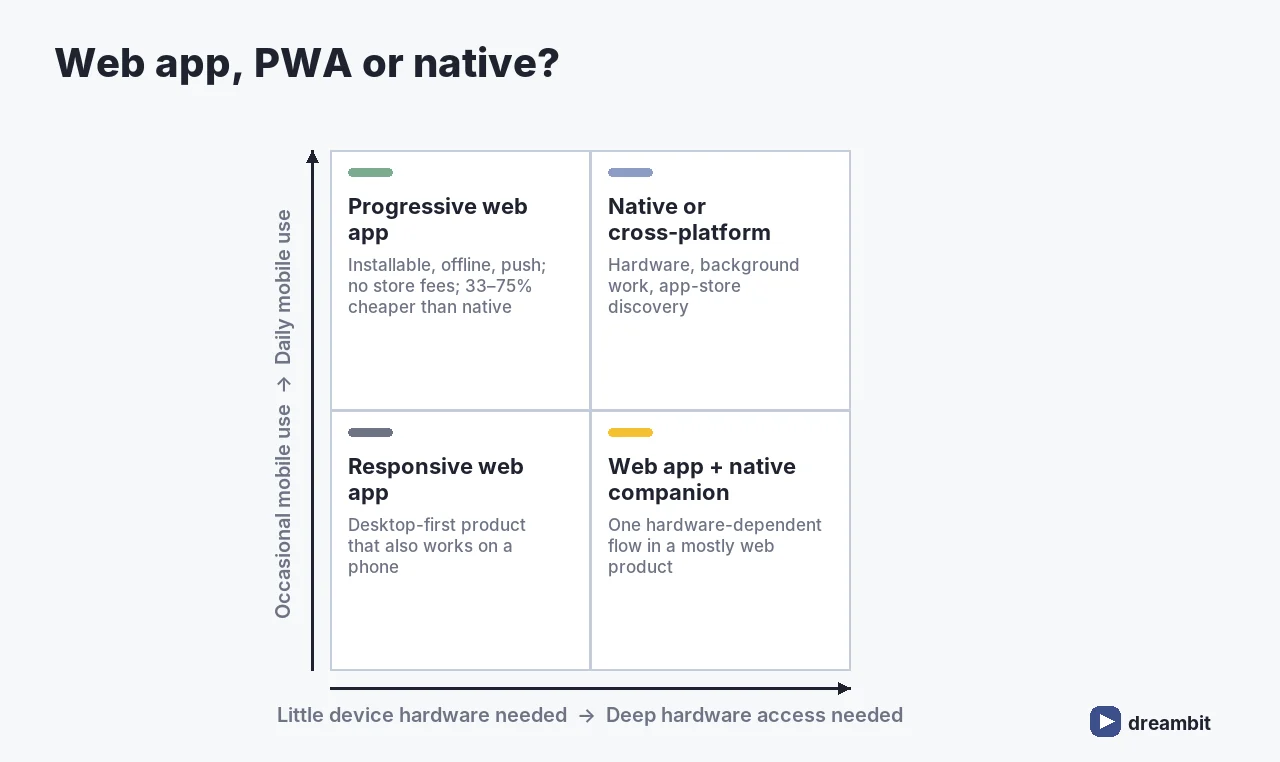
A progressive web app typically costs 33–75% less than a native app once you count development plus three years of maintenance. A dual-platform native build commonly runs $150,000–$400,000 against $40,000–$120,000 for a comparable PWA, which also pays no app-store commission and ships updates instantly (industry benchmarks, 2026).
A PWA isn’t always the answer. Native still wins for deep hardware access, heavy background work, and products where app-store presence drives discovery. If you need both web and mobile, a shared cross-platform codebase is usually the middle path. We compared the two leading options in Flutter vs React Native. Google’s progressive web app guidance is the best reference for what the web platform can do today, including offline support, which we argue for in why an app that works without Wi-Fi works for your clients.
How to reduce web app development cost without cutting quality
- Start with one role and one workflow. Ship the core loop, then widen. That’s the whole point of an MVP.
- Buy the commodity parts. Auth, billing, email and search are solved problems. Build what makes you different.
- Use a component library. Save custom design for the screens that sell the product.
- Integrate early. The integration you leave for last is the one that breaks the timeline.
- Decide compliance scope in discovery. Retrofitting audit trails and data residency costs far more than designing them in.
- Keep the team stable. Churn on a project costs more than any hourly-rate difference. See outsourcing vs product development for how engagement models affect this.
How long it takes
Time and cost move together, because most of a web app budget is engineering time. As a planning guide: a simple internal tool takes 6–10 weeks, a SaaS MVP 3–4 months, a mid-complexity product 5–8 months, and an enterprise platform 9–12 months or more before the first production release. The first release is never the last one, though. Plan the roadmap in phases so each one ships something people can use.
The thing that stretches timelines most is decisions, not code: an undecided payment provider, a compliance question nobody owns, or a stakeholder who first sees the product in month four. Weekly demos of working software are the cheapest insurance against all three.
Questions to ask before you accept a quote
Two quotes for “the same” web app can differ 3× and both be honest, because they’re pricing different assumptions. Ask every vendor:
- What exactly is in scope? Ask for roles, workflows and integrations in writing, not a page count.
- How much of the budget is discovery and QA? If it’s close to zero, that work will come back as change requests.
- Who owns the code, the cloud accounts and the credentials? It should be you, from day one.
- What happens after launch? Get warranty period, support terms and the maintenance rate up front.
- Which parts are fixed and which are estimates? A good partner can tell you where the uncertainty is and why.
- Who is actually on the team? Senior people in the pitch and juniors on the project is the oldest trick in the industry. If you’re comparing engagement models, our guide to hiring developers covers what to screen for.
How we estimate a web app at Dreambit
We don’t give a fixed price from a one-paragraph brief, because any number we gave would be a guess. Instead:
- Discovery call: goals, users, constraints, existing systems.
- Scope map: roles, core workflows, integrations and compliance, written down and agreed.
- Range estimate: a low/high band per module, with the assumptions behind each.
- MVP cut: what ships first, what waits, and what it saves.
- Fixed scope for phase one: a firm number for the part we can fully define.
That last step matters most. You get certainty on the first release, and every later phase is priced once real users have shown you what’s worth building.
Common mistakes when budgeting a web app
- Budgeting the build only. Maintenance, hosting and services are 15–20%+ per year, every year.
- Counting screens instead of roles. Roles and permissions drive complexity far more than page count.
- Treating compliance as a later problem. It’s 20–40% of the build when designed in, and more when bolted on.
- Adding AI “because everyone is”. It adds 15–40% plus a monthly bill. Add it where it earns its keep.
- Choosing native by default. If a PWA covers the use case, you’re paying 33–75% more for an app-store icon.
- Picking the lowest quote. A low number with thin discovery and QA usually comes back later as change requests.
Key Takeaways
- Web app development cost in 2026: MVP $18k–$60k, mid-complexity $70k–$180k, enterprise $180k–$500k+.
- A SaaS MVP is typically $25k–$70k over 3–4 months.
- Roles, integrations, compliance and AI drive cost. Framework choice barely does.
- Compliance adds 20–40% and AI features add 15–40%, and both are often missing from early estimates.
- Budget 15–20% of build cost per year for maintenance, plus $100–$5,000+ a month in infrastructure for a real product.
- A PWA can cost 33–75% less than native over three years when it fits the use case.
- Get a firm price for a well-defined phase one, not a guess for the whole roadmap.
Frequently Asked Questions
Most web apps cost $18,000–$60,000 for an MVP, $70,000–$180,000 for a mid-complexity commercial product, and $180,000–$500,000 or more for an enterprise-grade, compliance-heavy platform. A SaaS MVP typically lands at $25,000–$70,000 over 3–4 months. The number of user roles, integrations, compliance scope and AI features decide where in those ranges you land.
Plan on 15–20% of the original build cost every year for maintenance: security patches, dependency and framework upgrades, browser changes and bug fixes. On top of that, hosting and infrastructure run from $5–$50 a month for a simple PWA to $100–$5,000+ a month for a real product with databases, background jobs, CDN and backups, plus third-party services such as email, SMS and monitoring.
A simple internal tool takes around 6–10 weeks, a SaaS MVP 3–4 months, a mid-complexity product 5–8 months, and an enterprise platform 9–12 months or more before the first production release. Unmade decisions stretch timelines more than code does, such as an undecided payment provider or an unowned compliance question.
Usually, yes. A progressive web app typically costs 33–75% less than a native app once you include development and three years of maintenance. A dual-platform native build commonly runs $150,000–$400,000 against $40,000–$120,000 for a comparable PWA, which also avoids app-store commission. Native still wins when you need deep hardware access, heavy background processing or app-store discovery.
User roles and integrations are the biggest everyday drivers, because each role and each connected system multiplies screens, permissions, error handling and testing. Compliance such as SOC 2, HIPAA or GDPR typically adds 20–40% to a build, and AI features add 15–40%. The choice of frontend framework rarely moves the budget by more than a few percent.
Start with one role and one core workflow, then widen. Buy commodity parts like authentication, billing, email and search instead of building them, use a component library for most screens, integrate third-party systems early, decide compliance scope during discovery rather than retrofitting it, and keep the team stable. Then get a firm price for a well-defined first phase rather than a guess for the whole roadmap.