Vladyslav Bilomeria
When a new mobile app project lands on your desk, one of the first decisions you’ll face is whether to build it in Flutter or FlutterFlow. On the surface, the names suggest they’re basically the same thing — but they’re not, and picking the wrong one can quietly derail a project. Flutter is Google’s open-source UI framework written in Dart; FlutterFlow is a visual, no-code/low-code builder that sits on top of Flutter and lets you drag and drop your way to an app. That distinction matters a lot once you get past the initial prototype. Both tools have real merit — the question is which one is right for what you’re actually trying to build. This post breaks down the differences honestly, without pulling punches in either direction.
What Is the Real Difference Between Flutter and FlutterFlow?
Flutter is a code framework; FlutterFlow is a visual layer built on top of it. With Flutter, you write Dart code directly — you control every pixel, every state transition, every dependency. FlutterFlow takes the opposite approach: it generates Flutter code from a visual editor, meaning you don’t write most of the code yourself. The output is technically still a Flutter app, but the path to get there is fundamentally different.
That difference has downstream consequences for nearly everything: how you handle complex business logic, how you integrate third-party services, how you debug issues, and how the project scales over time. FlutterFlow produces working Flutter code, but it’s generated code — optimized for speed of creation, not for long-term readability or maintainability. If you ever need to take that exported code and maintain it without FlutterFlow, you’re dealing with someone else’s architectural decisions baked into every file.
Flutter, on the other hand, gives you complete architectural freedom. You choose your state management approach, your folder structure, your testing strategy. That freedom comes with a cost — you need developers who know Dart and understand Flutter’s widget system — but it means the app you ship is exactly the app you designed, not what a template allowed.
Who Should Use FlutterFlow?
FlutterFlow is genuinely the right tool for early-stage validation, MVPs, and simple apps that don’t need to scale far beyond their initial scope.
If you’re a founder who needs to test a concept with real users before committing to a full engineering investment, FlutterFlow can get you to a working app in days rather than weeks. Its drag-and-drop interface lowers the barrier for non-developers, and its built-in Firebase integration means you can stand up a backend alongside your UI without writing a single line of backend code. For simple workflows — a booking form, a content feed, a basic CRUD app — FlutterFlow handles these well.
Fact: No-code and low-code platforms can reduce development time by 60–80% compared to traditional methods, and by 2025, 70% of new enterprise applications were expected to be built using low-code or no-code tools — up from less than 25% in 2020. (Index.dev)
The speed advantage is real and not trivial. For an early-stage startup burning through runway, shipping an MVP in two weeks instead of two months can be the difference between a funding round and a shutdown. FlutterFlow earns that use case genuinely.
Where it starts to break down is the moment your requirements get non-standard. Custom animations, complex state management across nested screens, OAuth 2.0 flows with enterprise APIs, HIPAA compliance, Bluetooth integrations, background tasks — these are all categories where FlutterFlow either requires significant workarounds or simply can’t deliver what you need. And the deeper you get into workarounds, the more the speed advantage erodes.
When Does Flutter Make More Sense?
Flutter makes more sense when the app has complexity, performance requirements, or a lifespan that extends beyond a quick prototype.
The scale of Flutter’s adoption tells part of the story: over 500,000 Flutter apps have been published on the Google Play Store, and more than 31,000 companies globally use Flutter as their primary mobile development tool. Apps like Google Ads, BMW’s myBMW, eBay Motors, and Nubank are built in Flutter — not because those teams couldn’t find a faster alternative, but because the framework’s performance and flexibility matched what those products required.
Flutter is the better choice when you’re dealing with:
- Complex UI/UX — custom animations, non-standard interactions, or a design system that doesn’t map cleanly to pre-built components
- Advanced integrations — enterprise APIs, proprietary SDKs, hardware interfaces (Bluetooth, camera, NFC), or authentication flows beyond username/password
- Team scale — larger teams need clean, readable, version-controllable code; generated code from FlutterFlow can create painful merge conflicts and review cycles
- Long-term maintenance — code you’ll still be modifying in two years should be code your team can reason about, not generated output from a visual tool
- Regulated industries — healthcare, fintech, and other regulated sectors often have compliance requirements (HIPAA, PCI-DSS) that FlutterFlow’s platform constraints can’t meet
The trade-off is upfront investment. Flutter development takes longer at the start, and requires skilled Dart developers. But it’s engineering debt that pays off — instead of accruing debt from generated code that you’ll eventually have to rewrite anyway.
How Do They Compare on Performance and Scalability?
Flutter outperforms FlutterFlow on both dimensions once apps grow beyond simple use cases.
Flutter’s performance advantage comes from direct control: you can profile and optimize every render cycle, eliminate unnecessary rebuilds, choose precisely the right state management approach for your use case, and ensure your dependency tree stays clean. Apps like Google Ads reportedly recorded a 33% increase in customer satisfaction after migrating to Flutter, and the Hamilton musical app cut development time by 70% while shipping a polished, high-performance product.
FlutterFlow introduces abstraction layers that can create performance overhead. The visual editor generates code that prioritizes coverage and compatibility over efficiency — for a small app, this is invisible. For an app with dozens of screens, complex data flows, or real-time updates, the overhead compounds. Debugging is also harder: when something breaks, you’re debugging generated code rather than code you wrote, which adds a layer of indirection that slows down diagnosis.
Scalability has a team dimension too. FlutterFlow’s version control story is weak for collaborative work — generated code is verbose and not structured for human reviewers, which makes pull requests difficult and code reviews nearly meaningless. As team size grows, this friction becomes a real bottleneck.
Which One Should You Choose for Your Project?
Choose FlutterFlow if you’re validating an idea quickly and keeping scope small. Choose Flutter if you’re building something you plan to ship, maintain, and grow.
The clearest signal is this: if you’re asking whether you might need to “graduate” from FlutterFlow to Flutter later, that’s your answer. Every project that starts in FlutterFlow and eventually needs Flutter’s full capabilities faces a migration — and those migrations are rarely clean. Leenspace’s technical analysis notes that while FlutterFlow does allow code export, maintaining that exported code independently is genuinely challenging because the generated code doesn’t follow the architectural patterns a hand-written Flutter project would.
If your project is a proof of concept, a demo for investors, or an internal tool with limited scope — FlutterFlow is a legitimate choice and you should use it without guilt. If it’s a consumer app you expect to reach real users, a B2B product with enterprise clients, or anything touching regulated data — start in Flutter, even if it takes longer.
At Dreambit, we build in Flutter for exactly this reason. The projects we take on tend to have requirements that would hit FlutterFlow’s ceiling quickly — custom integrations, performance-sensitive UIs, complex auth flows. Starting in Flutter means we’re not designing around a tool’s constraints, we’re designing around the product’s actual requirements.
Key Takeaways
- Flutter is a code framework; FlutterFlow is a visual builder on top of Flutter. They share a foundation but represent very different development approaches.
- FlutterFlow is genuinely fast for early-stage work — it can cut MVP development time by 60–80% and is legitimate for validating ideas before committing to full engineering.
- FlutterFlow has hard ceilings. Complex animations, advanced API integrations, HIPAA compliance, and enterprise-scale state management are areas where the platform breaks down.
- Flutter has 500,000+ apps on Google Play and 31,000+ companies using it — including Google, BMW, Nubank, and eBay Motors — because it handles production-grade requirements that no-code tools can’t.
- Performance and debuggability favor Flutter at scale; generated code adds abstraction layers that make optimization and bug diagnosis harder as apps grow.
- Migrating from FlutterFlow to Flutter later is painful. Exported FlutterFlow code is not clean, maintainable Flutter code — if you know you’ll need Flutter eventually, start there.
- The right choice depends on scope and lifespan. Small, short-lived, low-complexity apps: FlutterFlow. Anything you’re building to last: Flutter.
Hi there 😉
In regard to team performance, there’s more exciting news that we would like to share. As you are all aware, there is a Flutter Club initiative within the company. Our devs conduct such sorts of technology discussions and trend updates as well as exchanging memes.
We imagine it’s a primary rule to look at amusing images on Slack two times every week. 🙂
And now, it is time to open the Pandora’s Box: our QA team has decided to initiate its club! 🎉
And if you ask us why is community interactions so important in IT?
That is quite simple
– help us look for ideas and bring them to life
– definitely, minimize any operation problems
– help keep us abreast of the current trends.
– and surely make sure that your goals are met satisfactorily
The most important policy in our company is to encourage every new idea, so good luck with all the activities of the QA Club!
Oh, and while we are on the subject of interesting topics. Do you have any initiatives or traditions in your company? 💙
Top 5 Tips from Dreambit.io
Creating a user-friendly mobile app is key to attracting and retaining users. At Dreambit.io, we know how to achieve this. Here are our top 5 tips:
1️⃣ Intuitive Interface Design Your app should be easy to use from the first launch. Use clear icons, logical navigation, and a minimalist design. Test your app with real users to ensure all features are understandable.
2️⃣ Speed and Performance No one likes to wait. Optimize your app to launch quickly and run smoothly without delays. Use caching, minimize server requests, and optimize images and videos.
3️⃣ Personalization Apps that can adapt to individual user needs always have an edge. Use data to provide personalized content, recommendations, and settings. This will help make the app more useful and engaging.
4️⃣ Security and Privacy Users need to trust your app. Ensure a high level of data security and privacy. Use encryption, regularly update the app to fix vulnerabilities, and provide a transparent privacy policy.
5️⃣ User Support Quick and effective user support can significantly enhance the user experience. Provide FAQs, support chats, or a feedback system. Respond to user feedback and promptly fix issues.
Follow these tips from Dreambit.io, and your mobile app will become user-friendly, reliable, and popular among users.
Today, we at Dreambit.io want to talk about one of the most powerful tools for mobile app analytics – Firebase. Firebase Analytics helps developers gain deep insights into user behavior, allowing for improvements in app functionality and usability.
Key Features:
🚀 Automatic Data Collection: Automatically gathers essential user data.
🚀 Custom Events: Set up specific user action tracking.
🚀 Audience Analysis: Segment users for precise marketing.
🚀 Service Integration: Easily connects with other Firebase products and third-party services like BigQuery.
Advantages:
🖌️ Real-Time Data: Quick response to changes.
🖌️ Free: Basic capabilities are free.
🖌️ Intuitive Interface: User-friendly and easy to navigate.
Statistics on Firebase Analytics Usage:
☑️ 70% Conversion Growth: According to Google, companies using Firebase Analytics typically see up to a 70% increase in conversions.
☑️ 2.5 Billion Active Devices: Firebase Analytics is actively used on over 2.5 billion devices worldwide.
☑️ 90% of Top Apps: Over 90% of top apps on the Google Play Store use Firebase for analytics and other functions.
We actively use Firebase Analytics in our projects and are ready to help you integrate it into your app to elevate your analytics to the next level.
Intro
This architecture has a layered structure and allows for clear separation of logic from the UI. It is based on the principles of SOLID and KISS, making it easy to use and maintain. It uses core packages such as linter, code formatting & automatization, network, BLoC, localization, dependency injection and Either. The structure of the architecture is represented with the diagram below.
The architecture described below is highly scalable and allows us to quickly implement new features.
Layers
Application separated into 4 layers.
Presentation
Layer “Presentation” interacts with layer “Business Logic” by triggering events and responding to state changes.
Business Logic
The “Business Logic” layer interacts with the “Domain” layer using methods to receive/send data.
Domain
The “Domain” layer interacts with the “Data” layer using methods that depend on the specific data source (for example, for API using requests/responses). Handling of all errors related to getting/parsing data is performed in this layer.
Data
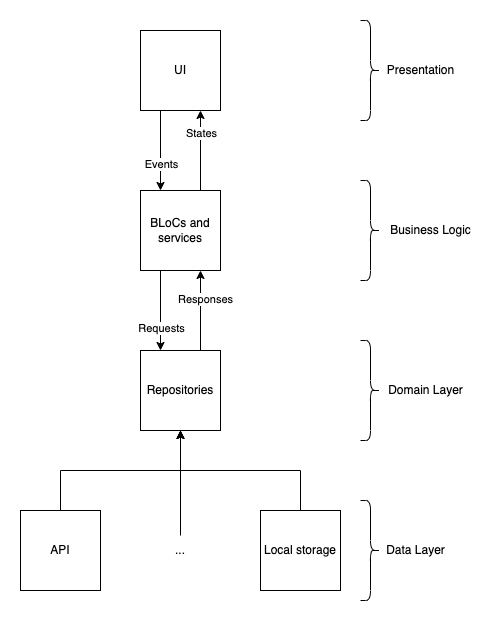
The main advantages of this architecture are
- clear separation of logic from the UI;
- catching and logging all possible errors;
- displaying localized and understandable error messages to users;
- dependency injection;
- lightweight blocs;
- easy implementation of different themes;
- ease of support and expansion;
- strict adherence to the principles of SOLID and KISS;
- simplicity.
Core Packages
- Linter – flutter_lints;
- Code formatting & automatization – Lefthook;
- Network – dio;
- BLoC – flutter_bloc;
- Localization – easy_localization;
- Dependency injection – get_it;
- Either – dartz, fpdart.