Vladyslav Bilomeria
E-learning app development is the process of designing, building, and maintaining mobile or web applications for online education — from course marketplaces and corporate training to language tutoring and microlearning. The thing that decides success isn’t the feature list; it’s engagement: an e-learning app only works if learners come back and finish what they start. A focused, engaging MVP usually takes 4–6 months to build and 3–5 core features to get right.
E-learning is one of Dreambit’s core industries, and across 14 years we’ve shipped 150+ products with 5M+ downloads. Below is the practical playbook we use with founders and training teams — what it costs, the features that actually drive completion, where AI helps, how to monetize, and the mistakes that quietly kill retention.
What is e-learning app development?
E-learning app development covers any software built to teach, train, or certify. In practice it splits into a few product types, each with its own engagement and content model:
- Course marketplaces — many instructors, many courses (Udemy-style).
- LMS & corporate training — structured learning, progress tracking, compliance.
- Microlearning apps — short, daily, habit-forming lessons (Duolingo-style).
- Language & tutoring — live or AI-driven practice and feedback.
- Kids & K-12 education — gamified, safe, parent-aware.
- Skill & certification platforms — assessments, credentials, outcomes.
The type you choose shapes your content pipeline, your monetization, and which features matter most.
How much does e-learning app development cost in 2026?
A realistic range for a custom e-learning app in 2026 is $30,000–$200,000+, depending on scope, content features, and platforms. A focused single-platform MVP lands at the lower end; a multi-platform product with live classes, gamification, and AI personalization sits higher.
An engaging e-learning MVP with courses, video lessons, quizzes, and progress tracking typically costs $30,000–$60,000 and reaches the app stores in 4–6 months — adding live classes or AI personalization pushes a build into the $60,000–$150,000 range (Dreambit project benchmarks, 2026).
The main cost drivers are video infrastructure, gamification depth, live/real-time features, AI personalization, and the number of platforms. For a fuller breakdown, see our guide to the cost of custom software development in 2026.
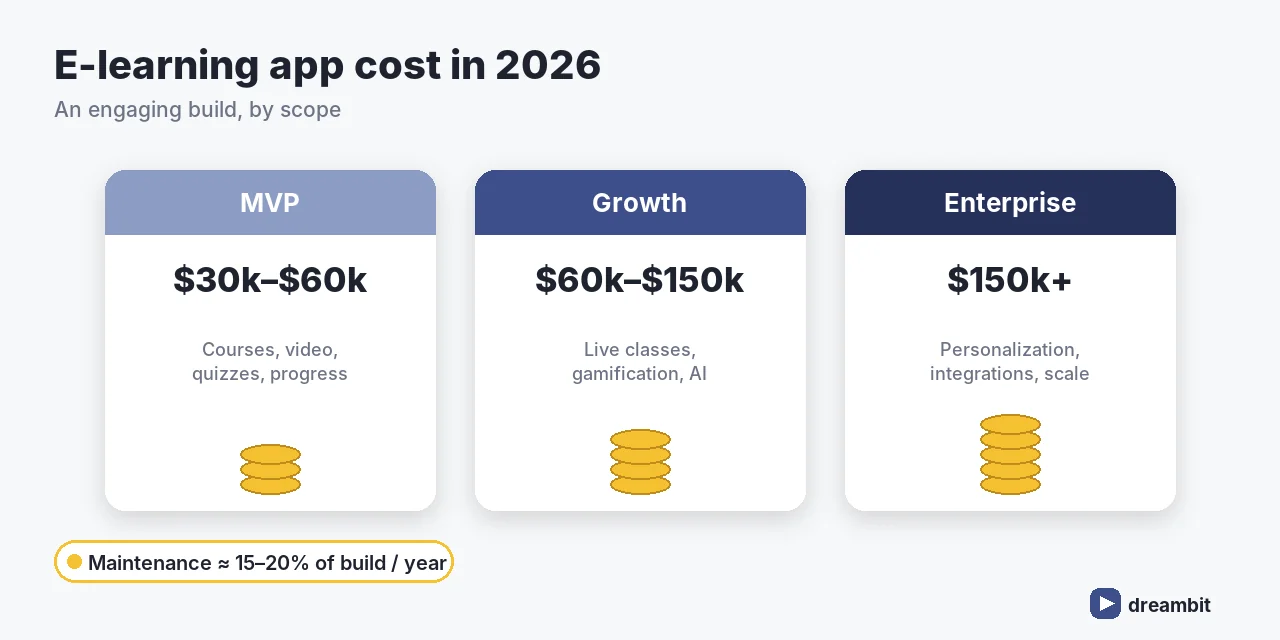
Must-have features for an e-learning app
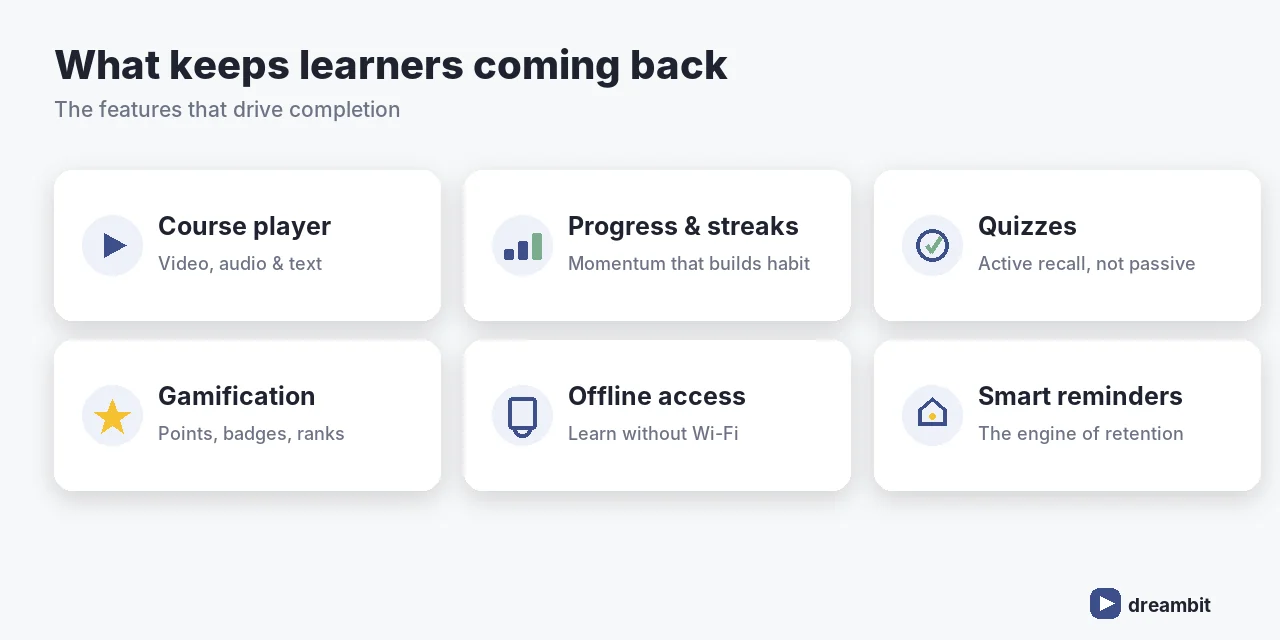
Engagement is the whole game. A credible e-learning app ships with a core built to keep learners coming back:
- Clean course player — video, audio, and text lessons that just work, online and off
- Progress tracking — visible streaks, completion, and next-step nudges
- Quizzes & assessments — active recall, not passive watching
- Gamification — points, badges, leaderboards, streaks that drive habit
- Offline access — learning continues without Wi-Fi
- Notifications & reminders — the quiet engine of daily retention
Retention is where most learning apps fail. We wrote about predicting and preventing drop-off in how we predict user churn and bring users back.
AI in e-learning apps
AI is now a baseline expectation, not a novelty. The highest-value uses we see:
- Personalized learning paths — content adapts to each learner’s pace and gaps
- AI tutoring & feedback — instant, patient help on demand
- Content generation — quizzes, summaries, and flashcards from existing material
- Smart recommendations — the next lesson a learner is most likely to finish
How to monetize an e-learning app
The model shapes the product, so decide it early:
- Subscription — predictable revenue; best for ongoing learning
- Freemium — free core, paid advanced content or features
- Course sales — one-off purchases or bundles
- B2B licensing — sell to companies for employee training (often the highest margin)
The right tech stack for an e-learning app
After 60+ MVPs, our default is a cross-platform front end with a scalable, media-ready back end:
- Frontend: Flutter or React Native — one codebase, 30–40% lower build cost. See why we use Flutter and Firebase for MVPs.
- Backend: Node.js or Python (Django) for content APIs and analytics.
- Media: a video CDN/streaming service for smooth playback at scale.
- Cloud: AWS or Firebase, with analytics wired in from day one.
Our e-learning app development process
- Discovery (1–2 weeks) — audience, content model, success metrics.
- UX/UI design (2–4 weeks) — engagement-first flows and prototypes.
- Development (8–16 weeks) — iterative sprints, analytics instrumented.
- QA & launch — tested across devices, then to the stores.
- Iterate on data — improve the flows that drive completion.
Not sure an app is the right move yet? Start with our checklist on whether your business needs a mobile app.
Common e-learning app development mistakes to avoid
- Building a content dump. More courses don’t help if no one finishes one.
- Ignoring retention from day one. Streaks, reminders, and nudges aren’t “later” features.
- Over-investing in live before validating recorded. Live classes are expensive; prove demand first.
- Skipping offline. Learners use commutes and gaps — meet them there.
- No analytics. If you can’t see where learners drop, you can’t fix it.
Key Takeaways
- Custom e-learning app development in 2026 typically costs $30,000–$200,000+; an engaging MVP is $30,000–$60,000.
- Engagement > features — progress, gamification, reminders, and offline drive completion.
- AI personalization and tutoring are now baseline expectations.
- Pick a monetization model early; B2B licensing is often the highest margin.
- Instrument analytics from day one and iterate on completion, not downloads.
Frequently Asked Questions
Custom e-learning app development typically costs $30,000–$200,000+ in 2026. An engaging MVP with courses, video, quizzes and progress tracking is usually $30,000–$60,000; adding live classes, gamification, or AI personalization pushes it to $60,000–$150,000. Maintenance runs about 15–20% of the build per year.
A focused, engaging e-learning MVP usually takes 4–6 months from discovery to app-store launch. Live classes, deep gamification, or AI personalization add time. The fastest path is to ship a strong recorded-course experience first, then expand based on real completion data.
Engagement features, not sheer content volume: a clean course player with offline access, visible progress and streaks, quizzes for active recall, gamification, and smart reminders. These drive course completion — the metric that actually matters — far more than the number of courses available.
Retention is designed in from day one: streaks and progress create momentum, reminders bring learners back, gamification rewards consistency, and AI personalization keeps content at the right level. We also instrument analytics to see exactly where learners drop and fix those flows.
Common models are subscriptions (predictable revenue for ongoing learning), freemium (free core, paid advanced content), one-off course sales, and B2B licensing to companies for employee training — often the highest-margin route. Pick the model early, because it shapes the product.
AI is everywhere right now, wrapped in equal parts hype and fear. We’ve skipped both. At Dreambit, AI isn’t a trend we’re chasing or a threat we’re bracing against — it’s a tool we’ve learned to use well, with intention. This is where we stand on responsible AI software development.
AI is a tool, not a shortcut
We don’t use AI to do less thinking. We use it to spend our thinking where it matters.
The boring parts of building software — digging through unfamiliar code, writing the first draft, chasing down a bug, reading documentation — AI handles faster than we ever could alone. That frees our people to focus on the things AI can’t do: judgment, architecture, the hard product decisions, knowing what should be built in the first place.
A tool doesn’t replace the craftsman. It makes a good one faster. That’s exactly how we treat it.

Quality is non-negotiable
Speed means nothing if it costs quality. So we built our process to make sure it never does.
We work spec-first: before anything gets written, we define what “correct” means. Everything is covered by tests that check real behavior, not vanity metrics. AI-generated work passes through the same review — and the same scrutiny — as anything a human writes. Nothing skips the line.
AI is fast, and fast can be dangerous: it produces work that looks right with total confidence. That’s precisely why we never let it run unchecked. A specification on the way in, tests and review on the way out. Confidence is earned, not assumed.
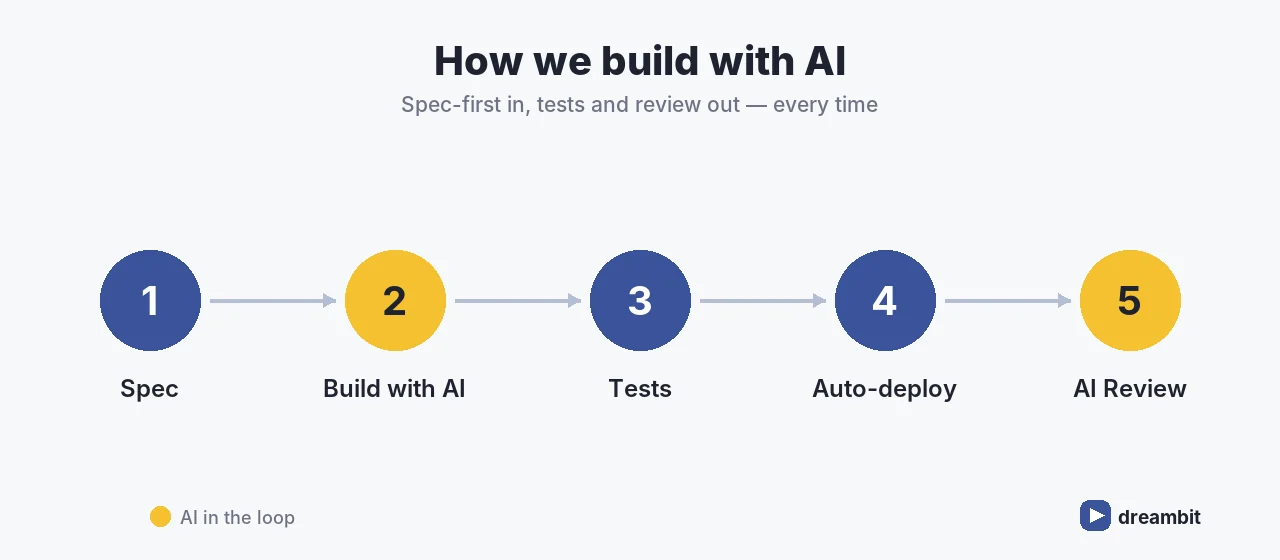
Everyone, not a chosen few
In a lot of companies, “using AI” means one enthusiast in the corner while everyone else watches. Not here.
AI is part of how every engineer, designer, and manager at Dreambit works — every day. We don’t hand off “the AI tasks” to a special team. We’ve made fluency a shared standard, with real onboarding, documented practices, and a team that helps each other level up. The result is consistent, not dependent on who happened to learn the tricks.
We respect the limits
Knowing what a tool can’t do is as important as knowing what it can.
We’ve spent real time learning where AI breaks — where it hallucinates, where it falls apart at scale, where bigger isn’t better. We don’t pretend those limits don’t exist. We design around them. That hard-won understanding is the difference between a flashy demo and software that actually holds up in production.
Honest about what AI is — and isn’t
We won’t tell a client AI is magic, and we won’t pretend it’s useless. Both are lies.
We’ll tell you where it genuinely creates value, and where it would just burn budget. We think being straight about that is the whole point. The companies that win with AI aren’t the loudest — they’re the ones who actually understand it.
Why responsible AI software development is the right way to build
Because we think responsible AI software development is simply the right way to build now.
AI done carelessly produces fragile, insecure, throwaway work — and gives the whole field a bad name. AI done with discipline lets a strong team move faster than ever without giving anything up. We’ve chosen the second path, and we’ve put in the work to walk it properly.
That’s our take. Not hype, not fear — just craft, brought up to speed.
Frequently Asked Questions
We treat AI as a tool, not a shortcut. It handles the repetitive work — exploring unfamiliar code, first drafts, debugging, documentation — while our engineers keep judgment, architecture, and product decisions. Every AI-assisted change is spec-first on the way in, and fully tested and human-reviewed on the way out.
Yes, when it earns it. AI is fast and can look right with total confidence, so we never let it run unchecked. AI-generated work passes the same code review, tests, and scrutiny as anything a human writes. A specification goes in; tests and review come out. Confidence is earned, not assumed.
Not the way we work. Speed means nothing if it costs quality, so our process is built so it never does: spec-first definitions of correct, tests that check real behaviour, and review on every change. Responsible AI software development makes a strong team faster without giving anything up.
No. AI accelerates a good developer; it does not replace one. It cannot do judgment, architecture, the hard product decisions, or know what should be built in the first place. A tool makes a good craftsman faster, and that is exactly how we treat AI-assisted development.
In the repetitive, time-consuming parts: digging through unfamiliar code, writing first drafts, chasing bugs, and reading documentation. Automating those frees our people for the work AI cannot do well. We also respect AI limits, where it hallucinates or fails at scale, and design around them.
Why Does SaaS Product Development for Web and Mobile Require Architecture First?
The answer is simple: the decisions you make before writing a single line of code determine whether you’re building one product or three. Successful SaaS products are not built around devices first. They are built around user behavior, business goals, and a technical foundation that can scale across platforms without duplicating every layer of complexity.
Most budget overruns in SaaS development don’t come from a single bad decision. They come from a structural mismatch between how the product was initially framed and how users actually interact with it. A team that starts with “we need a web app and a mobile app” often ends up maintaining two separate codebases, two separate release cycles, and two separate roadmaps — none of which share logic cleanly.
Modern SaaS isn’t a website plus an app. It’s an ecosystem where users get the right interface for the right moment, all connected to the same backend, the same data model, and the same business logic.
Fact: The global SaaS market reached an estimated $390.5 billion in 2025 and is projected to exceed $465 billion by 2026 (Statista; Precedence Research). Despite this growth, most SaaS MVPs cost between $15,000 and $50,000 to build — and the architectural decisions made before writing a single line of code are the single largest driver of whether that budget holds or spirals. (Source: SaaS Development Cost in 2026, Nuclieos)
What Does the Architecture of a Modern SaaS Ecosystem Actually Look Like?
A modern SaaS product built for both web and mobile isn’t two products that share a logo — it’s one layered system that expresses itself differently depending on context. The architecture that makes this possible typically has seven components:
- Core backend and business logic — The authoritative layer. All rules, calculations, and state live here. No client owns logic that belongs to the server.
- API layer — A single integration point for every interface. Web, mobile, and third-party integrations all talk to the same API surface. Consistency here prevents the drift that leads to duplicate endpoints.
- Role-based interfaces — Different users need different views of the same data. A dashboard for an admin isn’t the same as a dashboard for an end user. Interface design follows roles, not platforms.
- Cross-platform front end — Flutter, React Native, or a Progressive Web App strategy depending on product requirements. The decision here has direct cost implications (more on that below).
- Analytics and event tracking — Built in from day one, not bolted on later. You can’t optimize what you haven’t measured. Behavioral events should flow from every client into a unified pipeline.
- Subscription monetization layer — Payments, feature gating, plan management, and lifecycle events. This is its own engineering discipline, not an afterthought.
- DevOps and monitoring — Deployment pipelines, uptime checks, error tracking. The infrastructure decisions made here determine how expensive it is to ship updates across platforms.
When these layers are designed to be shared, adding a new platform surface — say, a tablet UI or a native desktop app — becomes an additive cost, not a rearchitecting effort.
Why Is the “Mobile-First” Approach Often a $100,000 Mistake?
Because most B2B SaaS workflows don’t start on mobile — they live on desktop. Defaulting to mobile-first without analyzing where your users actually spend their productive time can mean spending $40,000–$80,000 building a native mobile app that your core users open twice a week.
Platform duplication is rarely neutral. It becomes a permanent cost structure. You’re not just paying for the initial build — you’re committing to two separate release cycles, two sets of platform-specific bugs, two review queues (App Store and Play Store), and two roadmaps that drift further apart with every feature you ship.
The question to ask before writing any front-end code: where does the value-creating action actually happen? If you’re building a project management tool, the heavy work — creating tasks, reviewing timelines, setting permissions — almost certainly happens at a desk. The mobile app is a companion, not the primary interface. Design it accordingly, and you’ll save a significant portion of your initial budget.
The opposite is also true. If you’re building a field service app, a delivery tracking tool, or anything tied to location and physical context, mobile isn’t just a nice-to-have — it’s the product. The architecture should reflect that from the start.
How Does Flutter Change the Way Teams Approach SaaS Web and Mobile Development?
Flutter fundamentally changes the cost math of building for multiple platforms. Instead of maintaining separate codebases for iOS, Android, and web, a Flutter project compiles to all three from a single source. In practice, this translates to 45–55% cost savings compared to building separate native applications. (Source: Native vs Flutter in 2026, GuruSoftwares)
That’s not just a development speed advantage — it’s a structural budget advantage that compounds over time. A team of three Flutter engineers can do what would previously require five or six engineers across separate iOS, Android, and web stacks. Ongoing maintenance costs drop proportionally: real-world maintenance budgets for Flutter projects run at roughly 10–20% of the original build cost annually, versus significantly higher for teams maintaining parallel native codebases.
Flutter isn’t the right choice for every SaaS product. Products with heavy platform-native requirements — deep OS integrations, ARKit features, complex background processing — may still need native development for specific surfaces. But for the majority of SaaS products focused on data display, forms, dashboards, and workflows, Flutter’s 95% parity with native performance is more than sufficient.
Progressive Web Apps (PWAs) are a complementary strategy worth understanding. A well-built PWA can cover a large portion of mobile use cases without requiring App Store distribution at all — which removes both the 15–30% platform fee and the review cycle friction. MDN’s PWA documentation covers the technical groundwork. For SaaS products where the mobile use case is primarily content consumption or lightweight task completion, a PWA can be the right first step before committing to a full native or Flutter implementation.
What Does Subscription Fatigue Mean for Your Technical Architecture?
Subscription fatigue is real, and it has direct technical implications. When users can cancel in one tap, the architecture that manages their subscription lifecycle needs to be as sophisticated as the product itself.
This means more than just integrating Stripe. A subscription layer built for retention includes:
- Feature gating by plan — Tied to the backend, not the UI. A user who downgrades shouldn’t be able to access premium features because a front-end condition wasn’t updated.
- Churn prediction signals — Login frequency, feature engagement depth, and support ticket volume are all signals. Capturing them requires instrumented analytics from day one.
- Win-back and pause mechanics — An annual subscriber who tries to cancel is a different conversation than a monthly subscriber on day 15. The system should handle these differently.
- Lifecycle automation — Trial expiration, payment failure, plan upgrade prompts, and re-engagement emails should all be driven by system events, not manual intervention.
RevenueCat’s 2026 State of Subscription Apps report — based on data from over 115,000 apps representing more than $16 billion in revenue — found that the top 25% of apps grew 80% year-over-year while the bottom 25% shrank by 33%. The gap between those two groups is almost entirely explained by how well their subscription mechanics and retention loops were designed. (Source: RevenueCat State of Subscription Apps 2026)
Subscription fatigue isn’t a marketing problem — it’s an architectural one. Building the retention layer after users start cancelling costs significantly more than building it in from the start. The technical cost of churn management isn’t optional. It’s the difference between a SaaS product and a SaaS business.
What’s a Realistic Roadmap for Building SaaS Across Web and Mobile?
There’s a sequence that works, and it’s not the sequence most teams follow. Most teams start with UI mockups and a platform decision. The sequence that avoids expensive pivots looks like this:
Step 1: Map your user roles. Who uses this product, in what context, and what does success look like for each role? A product with five user types that aren’t mapped upfront will generate five times the feature requests and scope creep.
Step 2: Define the core product action. What is the one thing a user does in your product that creates value? Everything else supports or enables that action. This defines your MVP scope.
Step 3: Sequence your platforms. Based on where value-creating actions happen, decide which platform you’re building first and what the rollout sequence looks like. Web MVP, then Flutter mobile — or PWA first, then native later — are both valid sequences. Neither is “web and mobile simultaneously.”
Step 4: Build the MVP around measurable value. Ship the smallest version of the product that lets a real user complete the core action and pay for it. Everything else is roadmap.
Step 5: Instrument before you iterate. Add analytics before you add features. The next set of features should be driven by what users are actually doing, not what you think they’re doing.
Step 6: Add subscription intelligence. Once you have paying users, the subscription layer gets serious. Trial flows, plan logic, retention mechanics — this is where you invest after proving the core product works.
Step 7: Scale only when behavior justifies it. Adding a new platform, a new region, or a new feature tier should be a business decision backed by data, not a reaction to competitive pressure or founder enthusiasm.
Conclusion: Should You Build One SaaS Ecosystem or Three Disconnected Products?
One ecosystem, always. The goal of every architectural decision in SaaS development is to reduce the cost of the next decision — and the one after that. Three disconnected products (a web app, an iOS app, and an Android app) might appear to be three times the capability. In practice, they’re three times the maintenance burden, three times the release risk, and three times the cost of every feature you ship from that point forward.
The founders who build SaaS products that last are the ones who treat architecture as a budget decision from day one. A shared backend, a unified API, and a thoughtful choice of front-end technology aren’t technical luxuries. They’re the mechanism by which you keep your burn rate manageable and your roadmap executable.
Build the ecosystem. Let the platforms be expressions of it.
Key Takeaways
- Architecture before platforms. Decide how your backend, API, and data model work before you pick a front-end technology. Platform decisions made before architecture decisions are the primary cause of expensive rewrites.
- “Mobile-first” is a workflow question, not a default. Map where your users actually perform value-creating actions. For most B2B SaaS products, that’s a desktop. Build the mobile layer to support workflows, not to lead them.
- Flutter cuts the cost of multi-platform development by 45–55%. A single Flutter codebase serving iOS, Android, and web is not a compromise — it’s a structural budget advantage that compounds over the lifetime of the product.
- Subscription mechanics are technical infrastructure. Churn prevention, feature gating, trial flows, and lifecycle automation need to be engineered from the start. Bolting them on later costs significantly more and works worse.
- Sequence your platforms deliberately. Web MVP first, then Flutter mobile is a common and proven sequence. Building all platforms simultaneously is usually a way to build none of them well.
- PWAs are an underused option. For SaaS products where mobile use is primarily content consumption or lightweight tasks, a Progressive Web App removes App Store friction and distribution fees while covering the majority of mobile use cases.
- Measure before you iterate. Analytics instrumentation should come before the next feature, not after. The most expensive features are the ones built in response to assumptions rather than evidence.
Almost every business leader knows the frustration: your app launches successfully, users start pouring in, but then performance issues come crashing in. Features take longer to implement. Bug fixes break other parts of the app. Your development costs grow while velocity drops. The problem isn’t your team — it’s your foundation.
At DreamBit, we’ve seen this pattern countless times. Companies approach us after their initial app becomes too expensive to maintain or too slow to scale. The difference between apps that grow smoothly and those that collapse under their own weight? Clean architecture from day one.
This clean architecture case study shows why scalable structure matters from day one.
The Cost of Poor Architecture
When most businesses think about app development, they focus on features, design, and launch dates. But here’s what the numbers tell us: poorly architected apps cost 3-5 times more to maintain and scale than those built with proper structure from the start.
| Consider this scenario: Your startup launches an MVP that gains traction faster than expected. Suddenly, you need to add new features, integrate third-party services, and support thousands of concurrent users. If your app was built without a scalable architecture, you’re ending up with:30-40% longer development cycles for each new feature.60-70% more engineering resources spent on maintenance.Delayed market opportunities while competitors move faster. |
The business impact is clear: architecture directly affects your bottom line, time-to-market, and ability to compete.
This clean architecture case study highlights how layer separation prevents technical debt.
What Makes Architecture “Clean”?
Clean architecture isn’t about perfection — it’s about separation, scalability, and simplicity. At DreamBit, we structure every Flutter application around four distinct layers that work together:
| Presentation layer | Handles everything users see and interact with. Changes to UI won’t break the business logic. |
| Business logic layer | Vontains the rules and processes that make your app work. This stays consistent whether you’re on iOS, Android, or the web. |
| Domain layer | manages how data flows through an application. It catches and handles errors before they reach users. |
| Data layer | Connects to APIs, databases, and external services. It enables swapping providers or adding new integrations without rewriting the app. |
This separation means our team can work faster, your app can grow without breaking, and the codebase remains maintainable as complexity increases. It’s the architectural pattern behind apps serving 50+ million users without performance degradation.
As we show in this clean architecture case study, scalability depends on predictable app structure.

Measurable Business Outcomes
When we rebuild applications using clean architecture principles, our clients experience transformative results:
- Launch MVPs 2-3 months faster than traditional approaches, getting crucial market feedback while competitors are still in development.
- Reduce development costs by 30-40% through code reusability and streamlined maintenance.
- Scale to handle 10x user growth without performance issues or complete rewrites.
- Deploy new features 35% faster because changes don’t require hassle with tangled dependencies.
- Cut bug rates dramatically through proper error handling and isolated components.
The Flutter Advantage for Business
Why do we build on Flutter? Because it amplifies the benefits of clean architecture in ways that directly impact your business metrics.
One codebase and multiple platforms mean your iOS and Android apps stay perfectly synchronized. No more feature parity issues or doubled development timelines. Companies using Flutter report 30-40% faster time-to-market.
Near-native performance ensures your users experience smooth, responsive interfaces that build trust and drive retention. Flutter apps render at 60-120 frames per second, matching native app performance without the complexity.
Moreover, hot reload allows developers to see changes instantly, enabling them to experiment with UI improvements and business logic in real-time. This translates to faster feedback cycles with stakeholders and 25% faster product iteration.
Last but not least, it’s scalability. Every founder or executive hopes their app will go from 100 users to 100,000 and beyond. But success can become a nightmare if your app isn’t built to handle growth. A clean Flutter architecture provides future-proofing for scalability – both in terms of engineering and user load. On the engineering side, the modular design and abstraction of layers mean that adding a new feature or integrating with a new third-party service is straightforward and quick.
On the user side, scalability also means the app can handle increasing load or complexity without degrading performance.
How DreamBit Delivers with Clean Architecture
One great example of the clean architecture in action is our project WhatsitAI, an AI-powered app for identifying and valuing collectibles. From day one, we architected this app with a modular, layered structure to ensure ease of maintenance and future scalability.
Simply put, this meant each feature (camera scanning, image recognition, market pricing) was built as a distinct module, coordinated through a clean interface. This paid off quickly: when the client wanted to introduce a new multi-tier subscription model, we were able to integrate it without refactoring the core app logic.
The clean architecture also allowed seamless integration of cloud services for heavy AI processing, which kept the app’s front-end snappy while complex computations ran on the server.
The results speak to the business impact. Time to market was just 2 months for the MVP, meaning the client started seeing user feedback really quickly.
The app was simultaneously launched on Google Play and Apple App Store with high performance on both platforms. Thanks to the robust architecture, operational stability has been outstanding as well – the app maintained a minimal crash rate even as user numbers grew and new features were added.
In fact, WhatsitAI quickly gained high ratings and an active user base, validating the client’s investment with real revenue from subscriptions and in-app purchases.
All of these outcomes (fast launch, easy feature expansion, stable growth) trace back to decisions made at the architecture stage. It illustrates why we insist on doing it “right” upfront. For our clients, the clean architecture means faster growth, lower risk, and technology that enables their vision rather than limiting it.
Let’s Build Smarter
Clean architecture isn’t a luxury reserved for tech giants with unlimited budgets. It’s a strategic imperative for businesses that want to scale efficiently. The upfront investment in proper structure quickly pays for itself.
| The architecture you choose today determines your capabilities tomorrow. |
At DreamBit, we’ve made clean architecture a cornerstone of our development process. We combine this architecture with our deep Flutter expertise to build apps that are not only high-quality but also cost-efficient over the long run. For CEOs, the takeaway is clear. When you partner with a team like DreamBit, you’re not just hiring coders to crank out features. You’re gaining a technical foundation for your business that can adapt, endure, and support your ambitious goals.
Your Flutter app freezes when too much happens on the main thread – but it doesn’t have to. You open a fitness app. The dashboard loads instantly: live stats, charts, motivation. Everything just works – no frozen screen, no lag.
But here’s what most users don’t see: behind that smooth experience is a technical challenge that makes or breaks your app’s success.
When your app freezes for even one second, users leave. Performance isn’t just a technical metric – it’s the difference between 5-star reviews and instant uninstalls.
Learn more about Flutter performance tuning in our Flutter Optimization Guide
The Real Cost of a Frozen Screen
Picture this: a user taps “Apply Filter” on their product photo. The screen freezes. Three seconds pass. The animation stutters. The app feels broken.
This isn’t just annoying – it’s expensive:
- 18% of users abandon apps that feel sluggish
- Poor performance drops ratings by 0.5-1 stars on average
- Every frozen moment chips away at user trust
The problem? Most apps try to do everything at once on a single thread – like having one person manage a restaurant’s kitchen, serving, and cashier duties simultaneously.
How Flutter Solves the “Frozen Screen” Problem
Flutter takes a different approach. Instead of making your app do everything at once, it intelligently manages tasks in the background while keeping your interface responsive.
Think of it like a well-run kitchen:
- The chef (UI) focuses on presentation and plating
- The prep cook (background tasks) handles chopping and prep work
- Rush orders (urgent updates) get priority treatment
- Everything flows smoothly without chaos
The Three Problems We See Most Often
Problem №1: Apps That Lock Up During Data Loading
You’ve seen this: tap a button, the entire app freezes while waiting for data from the server.
Flutter’s solution: Using async/await patterns, the app continues responding to user taps and animations while quietly fetching data in the background. When data arrives, the screen updates smoothly – no interruption.
dart

// Instead of blocking the entire app:
Future loadUserData() async {
  var data = await fetchFromAPI();  // App stays responsive
  updateUI(data);  // UI updates when ready
}
The result: Your app feels instant, even on slow connections.
Business impact: Faster perceived load times mean higher conversion rates – users complete actions instead of abandoning them.
Problem №2: Heavy Tasks That Kill Performance
Processing photos, parsing large files, running calculations – these tasks can make your app stutter and lag.
Flutter’s solution: Heavy work gets moved to separate Isolates – independent workers that run in parallel. Your main app stays buttery smooth while the work happens on a different processor core.
dart

// Image processing without freezing the UI:
final result = await compute(processImage, photo);
// UI remains at 60fps while image processes
Real example: One retail client came to us with an app that froze when applying AI filters to product photos. After moving image processing to isolates:
- Processing time: 3.2 seconds → 0.4 seconds
- UI freezing: eliminated completely
- User engagement: +18% in two weeks
- App store rating: 3.8 → 4.6 stars
Problem №3: Real-Time Updates That Overwhelm the App
Live chats, stock tickers, IoT dashboards – when data flows constantly, apps can buckle under the pressure.
Flutter’s solution: Streams handle real-time data as a continuous flow – like a live broadcast that your app tunes into without missing a beat.
dart
// Handle live updates efficiently:
Stream
await for (var price in priceStream) {
updateChart(price); // Smooth updates, no overwhelming
}
The result: Smooth, responsive interfaces even with hundreds of updates per second.
Business impact: Users trust your platform with time-sensitive decisions – trading, monitoring, real-time collaboration – because it never lags.
The Technical Edge That Matters
Here’s what separates Flutter apps built by experienced teams from the rest:
Smart Task Prioritization (Event Loop)
Flutter’s event loop acts like an air traffic controller – ensuring critical UI updates always happen first, while background tasks wait their turn. This architecture means:
- Animations never drop frames during data loading
- User taps feel instant, even during heavy operations
- Battery life improves by 15-20% vs. poorly optimized apps
The Right Tool for Each Job
| Scenario | Flutter Approach | Business Benefit |
|---|---|---|
| API calls | Future + async/await | Users never see loading spinners freeze |
| Live updates | Streams | Real-time features that scale to millions |
| Heavy processing | Isolates (parallel execution) | Premium UX even with complex features |
What This Means for Your Business
When your app handles these challenges well, the benefits compound:
- Fewer crashes = better app store ratings
- Faster load times = higher conversion rates
- Smoother animations = premium brand perception
- Better battery life = longer user sessions
- Scalable performance = ready for growth without rebuilding
The Architecture That Scales
The real magic isn’t in fixing performance problems after they happen – it’s in building apps that never have them in the first place.
At DreamBit, we’ve seen the pattern: startups that invest in proper performance architecture from day one avoid costly rewrites later. Apps that feel fast on day 1 still feel fast at 100,000 users.
In one project, adopting clean async patterns cut our code review time by 30% – meaning faster feature delivery and lower development costs. For businesses, this isn’t just cleaner code – it’s faster time-to-market and lower maintenance costs.
Poor performance isn’t just a technical debt – it’s a business risk that grows with every new user.
Common Pitfalls (And How We Avoid Them)
Even experienced teams make costly mistakes:
❌ Heavy operations on the UI thread
→ Result: Janky scrolling, dropped frames, 1-star reviews
✓ Our approach: Use compute() and isolates for intensive work
❌ Waiting for tasks unnecessarily
→ Result: 2-3x slower load times than needed
✓ Our approach: Run parallel operations with Future.wait()
❌ Memory leaks from unclosed streams
→ Result: App crashes after 10-15 minutes of use
✓ Our approach: Proper stream subscription management and disposal
These aren’t just technical details – each one directly impacts your crash rate, user retention, and app store ranking.
Speed as a Competitive Advantage
In today’s market, users expect apps to feel native, instant, and effortless. When your app delivers on that expectation, you’re not just meeting a standard – you’re standing out from competitors who settle for “good enough.”
Your app’s performance sends a message about your brand. A smooth, responsive experience says: We care about details. We respect your time. We’re the premium choice.
A frozen screen says the opposite.
Built for Performance, Designed for Growth
At DreamBit, we don’t just build Flutter apps – we engineer experiences that feel instant and natural from the first tap.
Whether you’re launching an MVP or scaling an enterprise platform, we integrate performance best practices from day one:
- Async architecture designed for your specific use case
- Parallel processing for compute-intensive features
- Real-time capabilities that scale from 100 to 100,000 users
- Performance monitoring built into development workflow
Because the fastest way to lose users is to make them wait.
Ready to build an app that never freezes? Let’s talk about making your vision feel effortless.