Month: August 2026
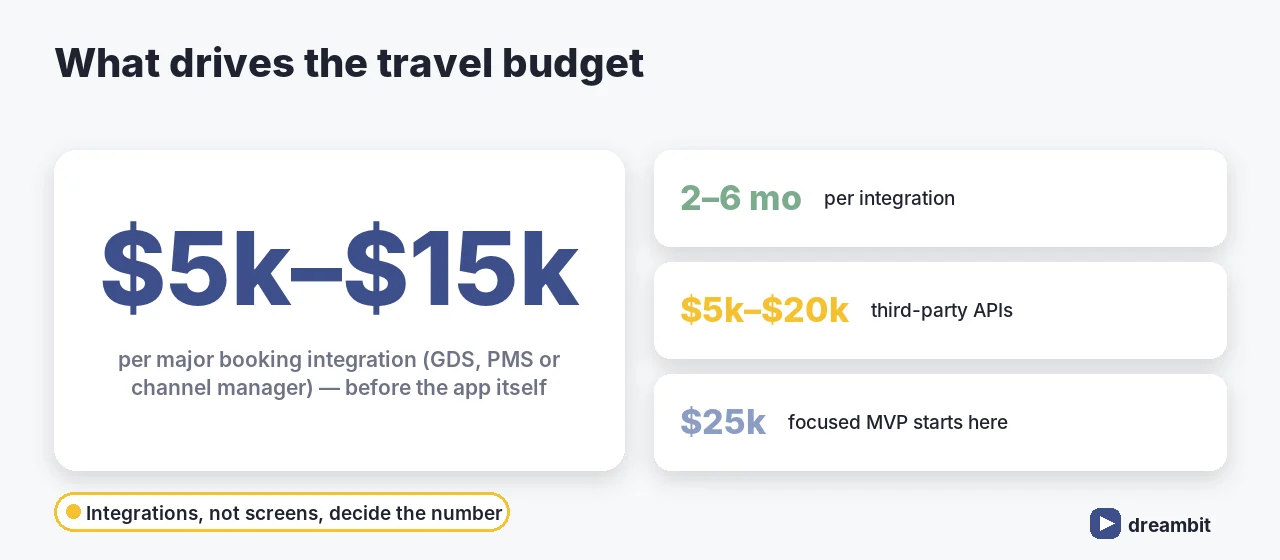
Travel app development is the process of building booking and trip-management software — flight and hotel search, itineraries, activities, and the GDS and supplier APIs that supply real inventory and prices. A focused MVP starts around $25,000, a solid mid-level platform runs $45,000–$70,000, and a full OTA reaches $100,000–$200,000+. The part teams underestimate isn’t the app — it’s that every major booking integration costs $5,000–$15,000 and takes 2–6 months on its own.
Dreambit has shipped 150+ products across 14 years (5M+ downloads, 4.9★ from 114 client reviews), including booking-driven products where availability accuracy and checkout trust decide revenue. Travel is a brutal category: you compete with Booking.com and Expedia on search, your prices come from suppliers you don’t control, and your users are often abroad on bad connections. This guide covers what to build, what it costs, which integrations matter, and where travel apps lose bookings.
What kind of travel app are you building?
“Travel app” covers several products with very different economics:
- OTA / booking marketplace — flights, hotels, cars; revenue from commission or markup.
- Hotel or chain app — direct booking, loyalty, digital key, in-stay services.
- Trip planner / itinerary — organise bookings, maps and documents in one place.
- Tours & activities — experiences marketplace with local supply.
- Corporate travel — policy compliance, approvals, expense integration.
- Travel-adjacent utilities — currency, transfers, e-SIM, guides.
Marketplaces are the hardest: two-sided supply plus live inventory. If that’s your model, read our multi-vendor marketplace guide alongside this one.
When a custom travel app is worth building
Competing head-on with the global OTAs on generic search is a losing bet — their inventory, brand spend and SEO footprint are unmatchable. In our experience a custom travel app earns its budget in four situations: you own direct supply (a hotel group, tour operator, transfer fleet) and want to cut commission; you serve a defined niche the majors handle badly (diving trips, accessible travel, pilgrimage, corporate policy travel); you need operational tooling your staff currently run on spreadsheets and email; or you have an existing audience and the app is a retention and loyalty play rather than an acquisition one.
If you’re not sure the app is the right vehicle yet, start with our checklist on whether your business needs a mobile app.
How much does travel app development cost in 2026?
Realistic ranges: a single-vertical MVP (say hotels only, one supplier) starts near $25,000. Add profiles, filters, payments and a decent booking flow and you’re at $45,000–$70,000. A multi-vertical platform with GDS connectivity, real-time pricing and multi-supplier inventory lands at $100,000–$200,000+.
Integrations, not screens, drive the travel budget. A single major integration — GDS, property management system, or channel manager — costs $5,000–$15,000+ to build and takes 2–6 months by itself. Third-party APIs such as Amadeus, Skyscanner or Google Maps typically add another $5,000–$20,000 to the total (industry benchmarks, 2026).
That’s why we scope travel builds around one vertical and one supplier first. The MVP discipline matters more here than in almost any other category, and the wider drivers are covered in the cost of custom software development in 2026.
Booking integrations: GDS, aggregators and direct suppliers
Your inventory comes from somewhere, and that choice shapes the whole product:
- GDS (Amadeus, Sabre, Travelport) — deep flight and hotel content, contracts and certification required, longest integration.
- Aggregator APIs — faster to launch, less margin control, rate limits to design around.
- Direct supplier / channel manager — best margins for hotels and operators, one integration per partner.
- Payments — multi-currency, 3-D Secure, and refund flows that match supplier rules.
Two hard truths: caching is mandatory (live search against a GDS on every keystroke is neither fast nor affordable), and price/availability drift is normal — your UX must handle “that fare just changed” gracefully instead of erroring out. Amadeus publishes its self-service travel APIs if you want to see the shape of the data before committing.
How long does it take?
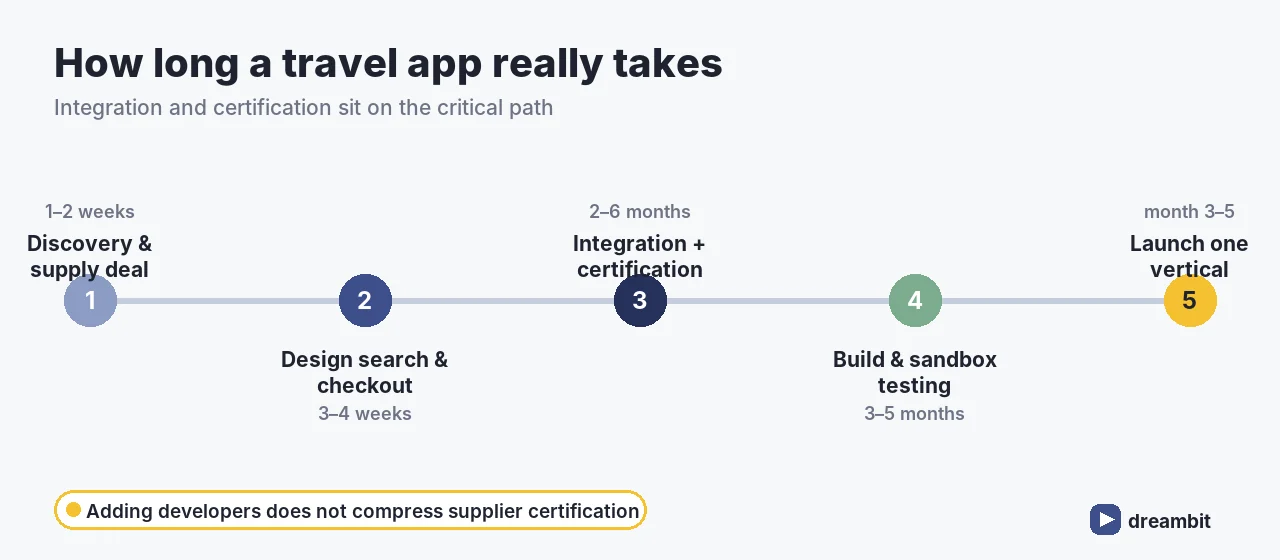
For a single-vertical MVP with one supplier, plan 3–5 months to launch. A mid-level multi-supplier platform runs 6–9 months, and a full multi-vertical OTA with GDS connectivity is realistically 9–14 months — because integration and certification work sits on the critical path and often can’t be compressed by adding developers. Start the commercial and technical paperwork with your supply partners in week one; design and build can proceed in parallel while approvals move.
Must-have features for a travel app
- Fast, forgiving search — flexible dates, nearby airports, filters that match how people actually plan
- Transparent pricing — taxes and fees visible early; surprises at checkout kill conversion
- Frictionless booking & payment — guest checkout, saved travellers, multi-currency
- Confirmations & itineraries — everything in one place, e-tickets and vouchers included
- Offline access — boarding passes and itineraries must open with no signal, abroad
- Notifications — gate changes, check-in reminders, delay alerts
- Support & cancellation flows — the difference between a refund and a chargeback
Offline is not optional in travel — roaming is expensive and airport Wi-Fi is unreliable. We made the general case in when your app works without Wi-Fi, it works for your clients.
The traveller journey — and where bookings leak
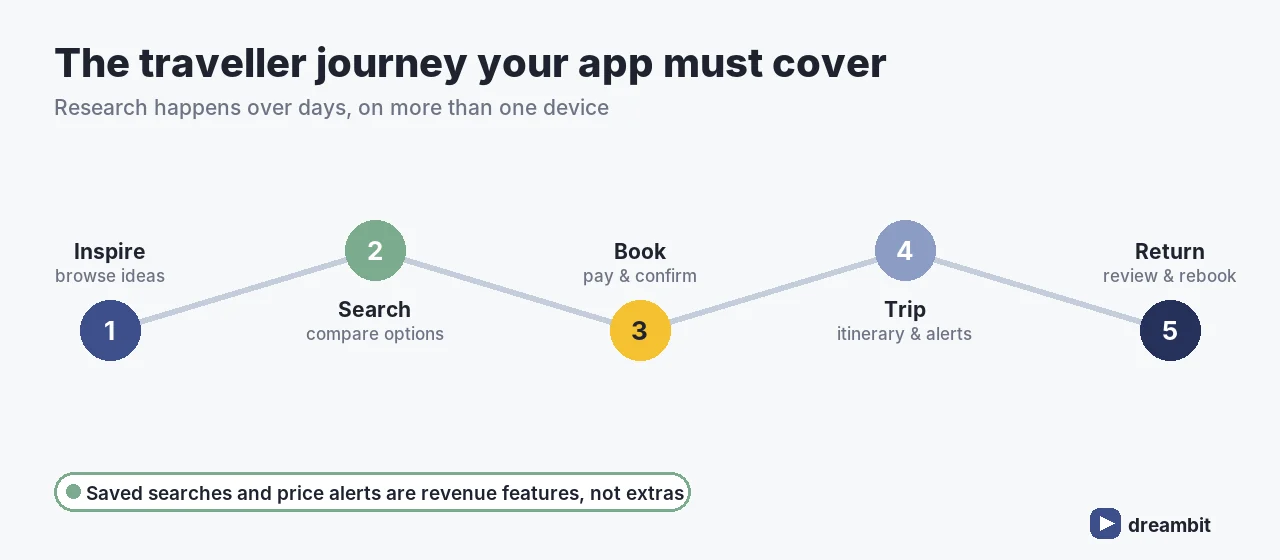
Travel has an unusually long, multi-session funnel: people research on a phone at night, compare for days, then book on another device. Two consequences: your saved searches, price alerts and cross-device continuity are revenue features, not extras; and abandoned-cart recovery works better here than in most categories.
The most common leak is checkout. Every additional field, forced account creation, or late-appearing fee costs bookings — the same pattern we documented in how to reduce cart abandonment by removing checkout steps.
How travel apps make money
- Commission — a cut of each booking; the standard OTA model, and the reason look-to-book rate is the metric that matters.
- Markup — you buy net rates and set your own price; better margin, more pricing responsibility.
- Direct booking savings — for hotels and operators the “revenue” is the commission you no longer pay a third party.
- Subscription / SaaS — for corporate travel and operator tooling.
- Ancillaries — insurance, transfers, seat selection, activities; often the healthiest margin in the basket.
Decide this before design, because it changes the product: a commission model optimises the funnel to booking, while a loyalty-driven direct app optimises for repeat visits and account value.
Retention: the part most travel apps skip
Travel purchases are infrequent, so an app that only handles booking gets deleted between trips. The apps that survive on the home screen do something useful during the trip — itinerary, documents, check-in reminders, digital key, on-trip support — and something valuable between trips, usually loyalty status or price alerts on saved searches.
The strongest retention lever in travel isn’t a discount, it’s usefulness in the airport: itineraries and boarding passes that open instantly with no signal, plus proactive delay and gate notifications. An app that solves a stressful moment gets reopened on the next trip (Dreambit delivery experience, 2026).
Predicting and preventing drop-off is its own discipline — see how we predict user churn and bring users back.
Dynamic pricing and AI in travel apps
AI in travel is most useful where it reduces decision fatigue:
- Personalised ranking — order results by what this traveller actually books, not just price.
- Price prediction and alerts — “wait or book now” guidance, with honest confidence.
- Natural-language trip search — “warm, direct flights, under $600 in October”.
- Itinerary generation — draft day plans a human can edit.
- Support automation — grounded in your real fare and cancellation rules, never invented.
The risk is specific: a confidently wrong answer about a refund policy becomes a support and legal problem. That’s why we build these features spec-first with verification — see how Dreambit builds with AI.
The right tech stack for travel
- Apps: Flutter or React Native for iOS and Android from one codebase — see lessons from 60+ builds.
- Search: a dedicated search layer plus aggressive caching of supplier responses.
- Backend: Node.js or Python (Django) with queues for booking and ticketing jobs.
- Payments: a gateway with multi-currency, 3-D Secure and partial refunds.
- Offline: local storage for itineraries, passes and documents.
Our travel app development process
- Discovery (1–2 weeks) — vertical, supply source, margin model, success metric.
- Start integration paperwork immediately — GDS certification runs in parallel with design.
- Design search and checkout first — they are the product.
- Build with a sandbox supplier — real API shapes from week one.
- Launch one vertical, one market — prove look-to-book before expanding.
- Instrument and iterate — search speed, look-to-book, checkout completion.
What the first sprint looks like is described in what we do in the first two weeks.
Common travel app development mistakes
- Underestimating integrations. Each major one is a months-long project, not a sprint task.
- No caching strategy. Live supplier calls on every search are slow and expensive.
- Hiding fees until checkout. The single biggest conversion killer in travel.
- Assuming connectivity. Your users are abroad, roaming off, in an airport basement.
- Ignoring cancellation and refund UX. It drives reviews, support cost and repeat business.
- Launching four verticals at once. Flights, hotels, cars and activities are four products.
Key Takeaways
- Travel app development costs ~$25,000 for a focused MVP, $45,000–$70,000 mid-level, $100,000–$200,000+ for a full OTA.
- Each major booking integration adds $5,000–$15,000 and 2–6 months; third-party APIs add $5,000–$20,000.
- Caching and graceful price-drift handling are architectural requirements, not polish.
- Offline itineraries and transparent pricing are the features that protect bookings.
- Launch one vertical in one market, prove look-to-book, then expand supply.
- Timelines: 3–5 months single-vertical MVP, 6–9 months mid-level, 9–14 months full OTA.
- Decide the money model — commission, markup, direct savings, subscription, ancillaries — before design.
- Build in-trip usefulness (itineraries, alerts, offline documents) or the app gets deleted between trips.
Frequently Asked Questions
A focused single-vertical MVP starts around $25,000, a mid-level platform with profiles, filters and payments runs $45,000–$70,000, and a full multi-vertical OTA with GDS connectivity reaches $100,000–$200,000+. Each major booking integration adds $5,000–$15,000, and third-party APIs another $5,000–$20,000.
Plan 3–5 months for a single-vertical MVP with one supplier, 6–9 months for a mid-level multi-supplier platform, and 9–14 months for a full OTA. Supplier integration and certification sit on the critical path and can’t be compressed by adding developers, so start that paperwork in week one.
A GDS such as Amadeus, Sabre or Travelport provides deep flight and hotel inventory, but requires contracts and certification and takes the longest to integrate. Aggregator APIs launch faster with less margin control, while direct supplier or channel-manager integrations give the best margins for hotels and tour operators.
Fast forgiving search with flexible dates, transparent pricing with fees shown early, frictionless payment, confirmations and itineraries in one place, offline access to boarding passes and documents, proactive notifications, and clear cancellation and support flows. Offline access is essential — users are abroad on poor connections.
Mostly at checkout: extra form fields, forced account creation and fees that appear late. Travel also has a long multi-session funnel, so missing saved searches, price alerts and cross-device continuity loses users who research for days before booking. Instrument look-to-book and checkout completion before adding features.
Real estate app development is the process of building property search and management software — listing marketplaces, agent tools, rental platforms, and the MLS/IDX integrations that feed them real data. Budget $35,000–$300,000+ depending on scope, and expect 4–9 months. The part that surprises most teams isn’t the app: it’s that MLS integration alone runs $20,000–$40,000, plus $10,000–$20,000 for every additional board you need.
Dreambit has shipped 150+ products over 14 years (5M+ downloads, 4.9★ across 114 reviews), including marketplaces where search quality and data freshness decide whether users convert. Property search is unusual as a product problem: the buying cycle runs for months, users compare you directly against national portals with enormous budgets, and your inventory data comes from third parties you don’t control. Winning means being faster and more relevant in a narrow niche — not out-spending Zillow.
Here’s what real estate app development involves, what it costs, how MLS data actually works, where property apps lose their leads, and how to sequence a build so the budget survives contact with reality.
What is a real estate app?
PropTech products fall into a few distinct types, each with its own data and monetization model:
- Listing marketplace — buyers search, agents list; revenue from featured listings or leads.
- Agent / brokerage tools — CRM, listing management, client pipelines.
- Rental platform — applications, screening, payments, leases.
- Property management — tenants, maintenance requests, accounting.
- Investment / analytics — valuations, yield modelling, portfolio views.
Marketplaces are the hardest of these to get right — two-sided supply and demand plus data operations. Our multi-vendor marketplace guide covers that dynamic in depth.
When building your own property app makes sense
Not every brokerage needs an app. In our experience it pays off in three situations: you serve a specific niche the portals handle badly (new builds, student lets, commercial, a single metro), you have proprietary inventory or off-market stock, or you need internal tooling your agents currently do in spreadsheets. If your plan is a general-purpose portal competing head-on nationally, the honest advice is usually don’t — differentiation has to come before development.
If you’re unsure the app is the right vehicle at all, start with our checklist on whether your business needs a mobile app.
How much does real estate app development cost in 2026?
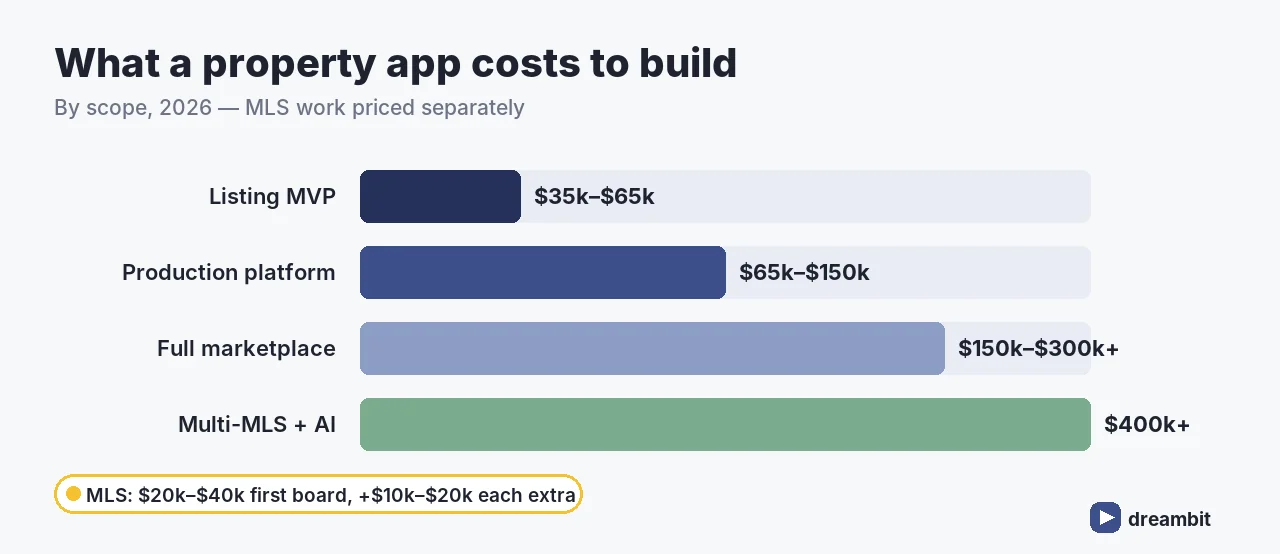
A basic listing MVP runs $35,000–$65,000. A production platform with map search, saved searches, lead routing and admin tooling sits at $65,000–$150,000. A full marketplace with MLS/IDX integration and AI recommendations reaches $150,000–$300,000+, and multi-MLS aggregation platforms can exceed $400,000.
MLS integration is the line item that breaks budgets: a single-board API integration starts around $20,000–$40,000, and each additional MLS board adds roughly $10,000–$20,000 — because every board has its own rules, approval process and data quirks. Maintenance then runs 15–20% of build cost per year (industry benchmarks, 2026).
Scope this like any first build — one market, one core flow. Our MVP development guide is the discipline that keeps a PropTech budget honest.
MLS and IDX integration: what to know before you commit
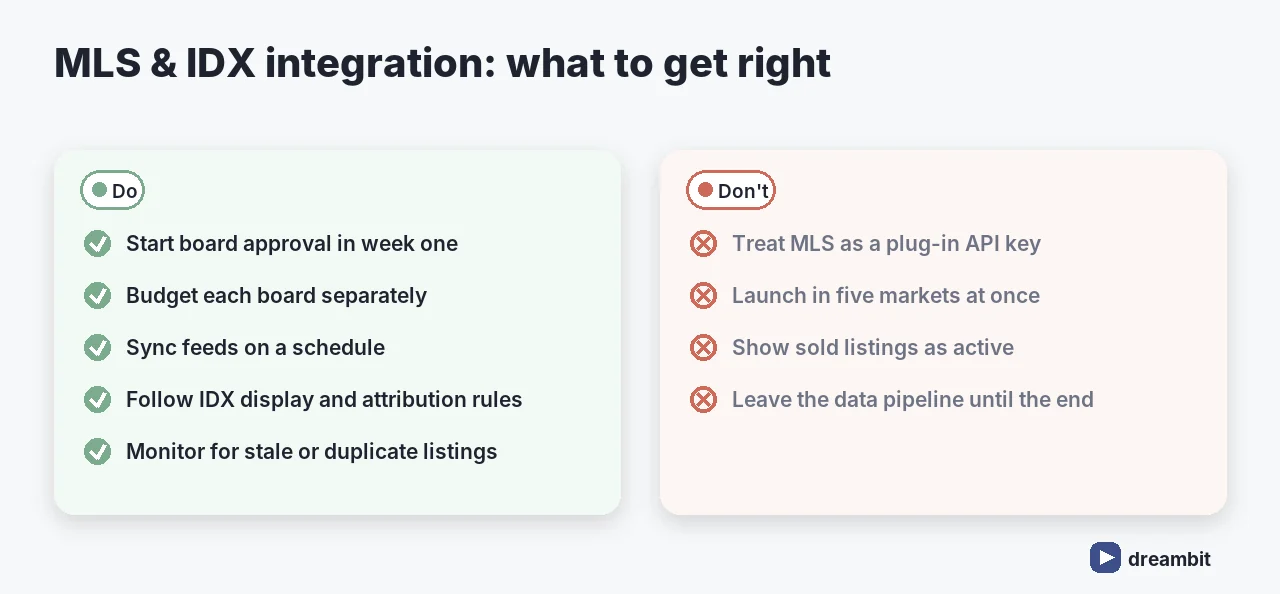
MLS (Multiple Listing Service) data is how a property app gets real inventory, and IDX is the framework that lets you display it. Four realities to plan for:
- Every board is separate. Rules, fees, and approval timelines differ per MLS.
- Approval takes time. Access is granted to licensed parties under agreements — start early, not at the end.
- Display rules are strict. Attribution, refresh frequency and what you may not show are all governed.
- Data hygiene is ongoing. Stale or duplicated listings destroy trust faster than any UI flaw.
The National Association of Realtors’ IDX rules are the reference point for US display requirements.
How long does it take?
A realistic timeline is 4–9 months from discovery to launch. An API-only single-MLS integration can be done in 1–3 months on its own; a multi-MLS aggregation platform with AI-native features stretches to 9–12. The critical path is rarely the app — it’s MLS approval and the data pipeline, which is exactly why they should start in week one.
Must-have features for a property app
- Map-based search with real filters — price, beds, area, commute; the core of the product
- Fast, rich listing pages — photos, floor plans, virtual tours
- Saved searches & alerts — property hunting takes months, so retention lives here
- Enquiry & lead routing — the moment revenue happens; never let it fail
- Agent profiles & messaging — trust signals before contact
- Mortgage / affordability calculator — keeps decisions inside your app
Virtual tours, media and the trust problem
Property is a high-consideration purchase made largely on photos. Rich media — good photography, floor plans, 3D or video tours — measurably increases enquiry rates, but it’s also the heaviest part of your app. Plan for a CDN, aggressive image optimisation, and progressive loading, because a listing page that stalls on mobile is a lost lead. Design chaos hurts here too: we wrote about that in why chaos in design destroys trust.
AI in real estate apps
AI has moved from novelty to expectation in PropTech, and the useful applications are narrow and concrete:
- Personalized recommendations — surfacing the next listing a buyer is likely to enquire on, based on real behaviour rather than declared filters.
- Natural-language search — “two beds near a park under $500k” instead of eight dropdowns.
- Automated valuation and yield estimates — useful for investor-facing products, dangerous if presented as fact without a confidence range.
- Listing description generation — a real time-saver for agents, provided a human still approves it.
- Lead scoring — routing the enquiries most likely to close to the right agent first.
The discipline matters more than the model: AI output that looks authoritative but is wrong is worse than no feature at all, which is why we build these spec-first with verification — see how Dreambit builds with AI.
How property apps make money
- Lead generation — agents pay per enquiry or per month; the dominant marketplace model.
- Featured / promoted listings — visibility upsells to sellers and agents.
- Subscription — SaaS pricing for agent and property-management tools.
- Transaction fees — a cut of rent, deposits or application fees on rental platforms.
Pick the model before design, because it dictates what the product optimises for: a lead-gen app is built around the enquiry, a SaaS tool around daily agent workflow.
Where property apps lose leads
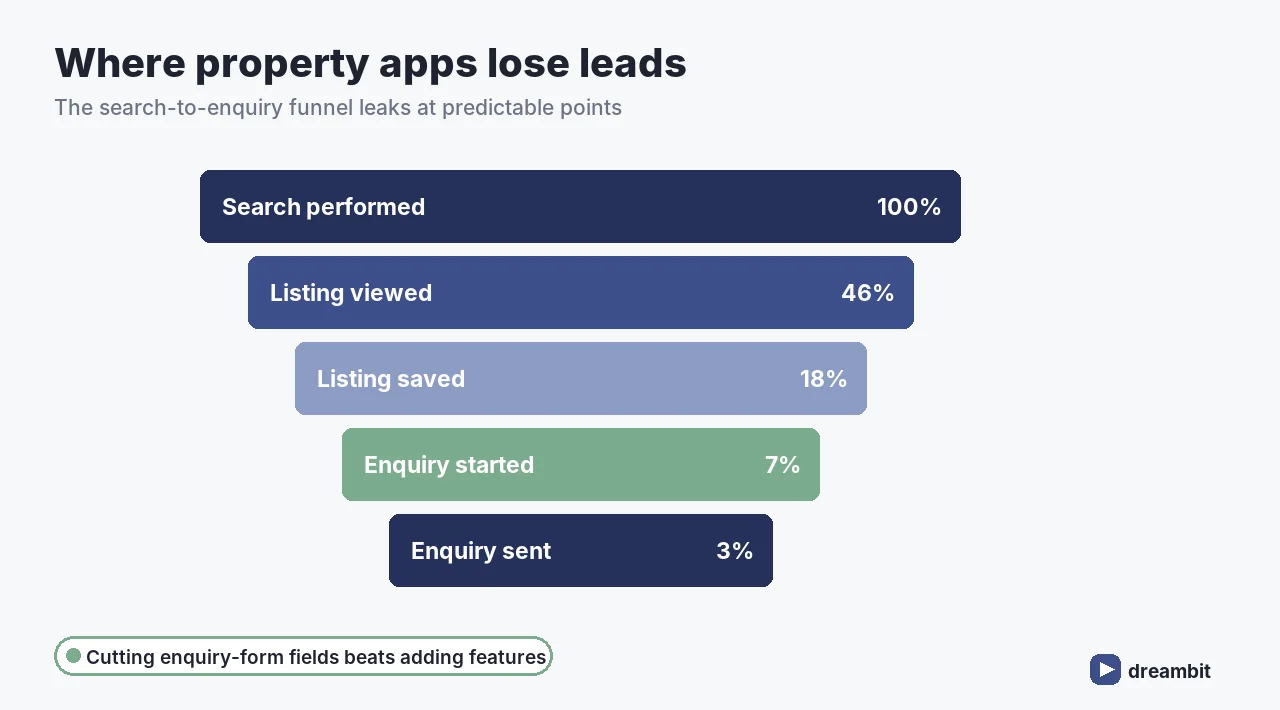
Search-to-enquiry is a funnel, and most PropTech platforms leak at the same predictable points: filters that don’t match how people actually search, listing pages that load too slowly on mobile data, and an enquiry form that asks for too much too soon. Each of those is fixable — but only if you can see it.
In our experience the highest-leverage change in a property app is almost never a new feature: it’s cutting fields from the enquiry form and making map search feel instant. Teams that instrument the search-to-enquiry funnel before building anything new consistently find their biggest win in a flow they already shipped (Dreambit delivery experience, 2026).
Instrument every step — search performed, listing viewed, saved, enquiry started, enquiry sent — before adding features. We made the wider case in how poor navigation kills conversion and how progressive UX saves users at onboarding.
The right tech stack for PropTech
- Apps: Flutter or React Native — one codebase across iOS and Android; see lessons from 60+ builds.
- Search: a dedicated search engine (Elasticsearch/Typesense) — SQL alone won’t do map + facet search at speed.
- Backend: Node.js or Python (Django), with a scheduled sync pipeline for MLS feeds.
- Maps: a mapping platform with geocoding and polygon search — watch per-request pricing.
- Media: a CDN for heavy photo and tour assets.
Our real estate app development process
- Discovery (1–2 weeks) — market, data sources, monetization, success metric.
- Start MLS access early — paperwork runs in parallel with design.
- Design search first — it’s the product; everything else supports it.
- Build & sync — iterative sprints, feed pipeline early not last.
- Launch in one market — prove conversion before adding boards.
- Expand board by board — each with its own budget line.
Common real estate app development mistakes
- Treating MLS as a plug-in. It’s a workstream with legal approval, not an API key.
- Launching in five markets at once. Each board multiplies cost and complexity.
- Weak search. If filters and map don’t feel instant, users leave for the portals.
- Heavy enquiry forms. Every extra field costs leads.
- Ignoring data freshness. Sold-but-still-listed is the fastest way to lose trust.
- Building agent tools nobody asked for. Shadow a working agent for a day before designing their CRM.
- No plan for media weight. Photos and tours will dominate your bandwidth bill and your load times.
Key Takeaways
- Real estate app development costs $35,000–$65,000 for a listing MVP, $65,000–$150,000 mid, $150,000–$300,000+ for a full marketplace.
- MLS integration is $20,000–$40,000 for one board, plus $10,000–$20,000 per additional board.
- Expect 4–9 months; start MLS approval on day one, not at the end.
- Search and map experience is the product — invest there first.
- Launch in one market, prove the search-to-enquiry funnel, then expand board by board.
- Timeline is 4–9 months; MLS approval and the data pipeline are the critical path, not the app.
- Decide monetization (leads, promoted listings, subscription, transaction fees) before design.
Frequently Asked Questions
A basic listing MVP runs $35,000–$65,000, a production platform with map search and lead routing $65,000–$150,000, and a full marketplace with MLS/IDX and AI recommendations $150,000–$300,000+. Multi-MLS aggregation platforms can exceed $400,000. Maintenance adds 15–20% of build cost per year.
A single-board MLS/IDX API integration typically costs $20,000–$40,000, and each additional MLS board adds roughly $10,000–$20,000. Every board has its own rules, fees and approval process, so multi-market coverage multiplies both cost and timeline — budget each board as a separate line item.
Expect 4–9 months from discovery to launch. An API-only single-MLS integration can take 1–3 months on its own, while multi-MLS platforms with AI features stretch to 9–12 months. MLS approval and the data pipeline — not the app itself — are usually the critical path.
Map-based search with filters people actually use, fast listing pages with photos, floor plans and virtual tours, saved searches and alerts, reliable enquiry and lead routing, agent profiles and messaging, and a mortgage or affordability calculator. Search quality is the product; everything else supports it.
Three predictable leaks: filters that don’t match how buyers search, listing pages that load slowly on mobile, and enquiry forms that ask too much too soon. Instrumenting the search-to-enquiry funnel usually reveals the biggest win is in a flow you already shipped, not in a new feature.
Logistics app development is the process of building the software that moves goods — customer tracking apps, driver apps, dispatch dashboards, and the integrations that tie them to your warehouse and carriers. The costly misconception is treating it as one app: a working logistics product is really four connected products. Budget $30,000–$300,000+ depending on scope, and expect real-time tracking and an offline-capable driver app to matter more than any feature list.
Dreambit has shipped 150+ products over 14 years (5M+ downloads, 4.9★ across 114 reviews), including operations-heavy platforms where uptime and data accuracy are non-negotiable. Here’s what logistics app development actually involves, what it costs to build and run, and the mistakes that quietly wreck delivery operations.
What is a logistics app — and why it’s four products
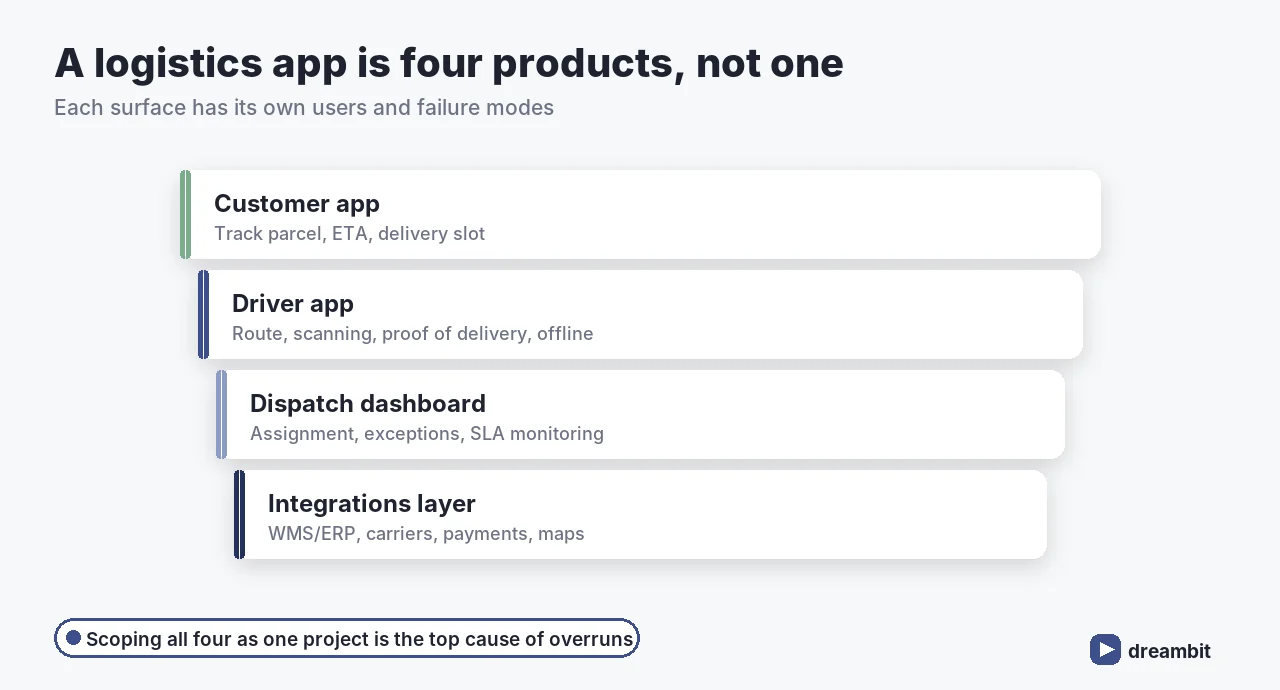
Most logistics platforms need four distinct surfaces, each with its own users and failure modes:
- Customer app — track a parcel, see an ETA, pick a delivery slot.
- Driver app — route, scanning, proof of delivery, and it must work offline.
- Dispatch dashboard — assignment, exceptions, SLA monitoring.
- Integrations layer — WMS/ERP, carriers, payments, maps.
Scoping them as one project is the single most common reason logistics builds overrun. This is where MVP scoping discipline pays for itself: pick the surface that proves the business case first.
How much does logistics app development cost in 2026?
Realistic ranges by scope: a basic tracking app runs $15,000–$50,000; a moderately complex platform with route optimization and inventory sits at $50,000–$120,000; and full enterprise logistics platforms reach $150,000–$300,000+. Fleet management alone is typically $25,000–$75,000, warehouse apps $30,000–$100,000.
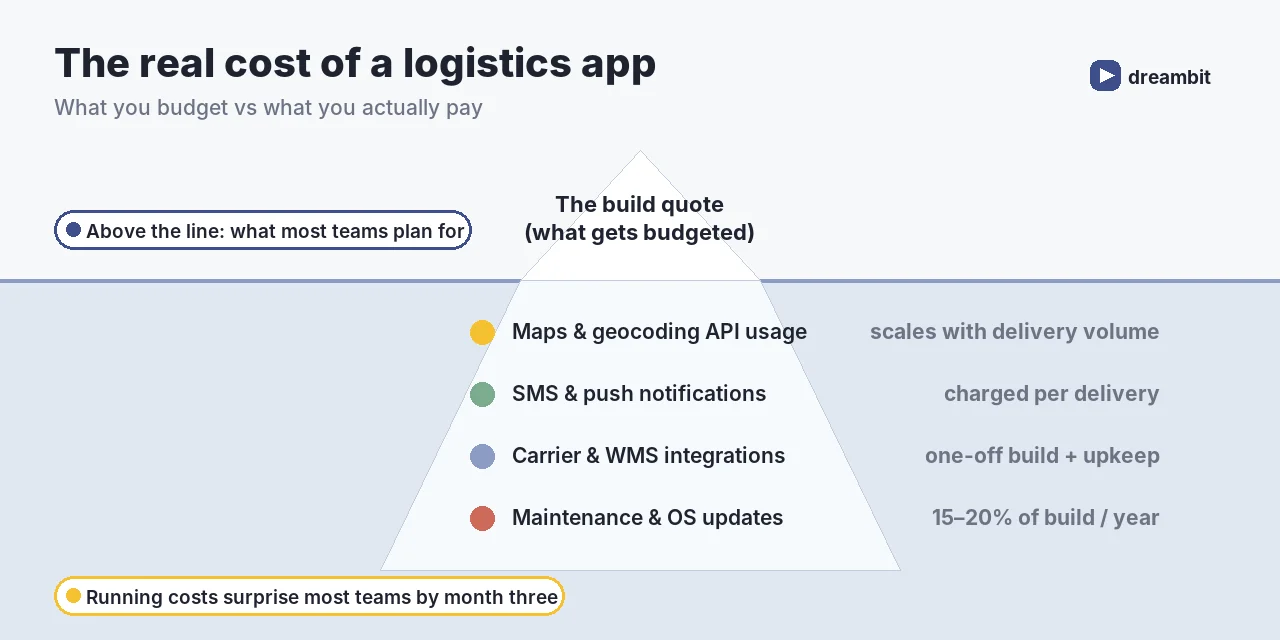
The build is only part of the bill. Logistics apps carry unusually high running costs — maps and geocoding API usage that scales with delivery volume, per-delivery SMS and push notifications, carrier and WMS integration upkeep, plus 15–20% of build cost per year in maintenance (industry benchmarks, 2026).
Plan those running costs from day one alongside ongoing maintenance — they’re the line items that surprise teams in month three.
Must-have features for a logistics app
Feature depth varies, but the non-negotiable core is consistent:
- Real-time GPS tracking & ETAs — the feature customers actually judge you on
- Route optimization — fewer miles, more drops per shift
- Offline-first driver app — warehouses and rural routes lose signal constantly
- Barcode/QR scanning & proof of delivery — the chain of custody
- Dispatch & exception handling — what happens when a delivery fails
- Notifications — proactive updates cut inbound support volume
- Analytics — on-time rate, failed attempts, cost per drop
Offline capability isn’t a nice-to-have here — we made the wider case in why an app that works without Wi-Fi works for your clients.
The metrics a logistics app is judged on
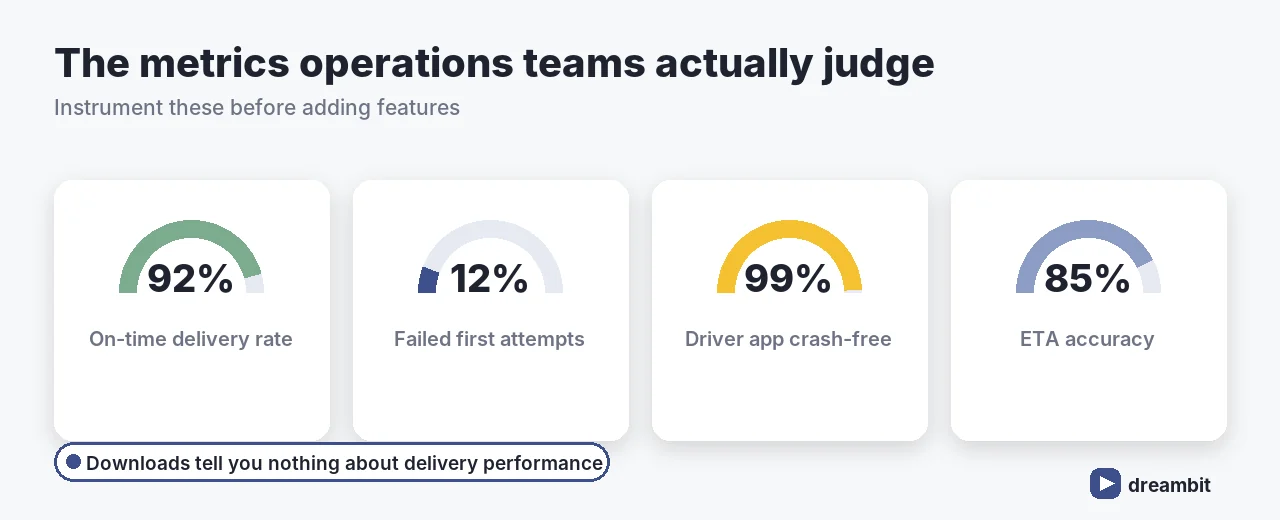
Operations teams don’t care about downloads. They care about on-time delivery rate, failed first attempts, ETA accuracy, and driver-app stability. Instrument these before you add features — they tell you which feature is actually worth building next.
The right tech stack for logistics
Our default for operations software is a cross-platform front end with a resilient, integration-friendly back end:
- Apps: Flutter or React Native — one codebase for customer and driver apps, 30–40% lower build cost. See lessons from 60+ Flutter/Firebase builds.
- Backend: Node.js or Python (Django) with a queue for dispatch events.
- Data: PostgreSQL, plus local storage on the driver app for offline sync.
- Maps & routing: a mapping platform with routing and geocoding — watch per-request pricing.
- Integrations: standards-based where possible; GS1 barcode standards keep scanning interoperable.
Our logistics app development process
- Discovery (1–2 weeks) — map the real operation, not the ideal one.
- Prioritize one surface — usually driver or dispatch, whichever unblocks the most.
- Design for the field — gloves, sunlight, one hand, poor signal.
- Build & integrate — iterative sprints, integrations early not last.
- Pilot with real routes — a handful of drivers before the full fleet.
- Scale & monitor — instrument the operational metrics above.
Common logistics app development mistakes
- Assuming connectivity. An online-only driver app fails on day one.
- Leaving integrations until the end. WMS/ERP work always takes longer than planned.
- Ignoring API running costs. Maps and SMS scale with volume, not with your budget.
- Designing for the office, not the van. Field UX is a different discipline.
- Skipping the pilot. Real routes reveal what no spec captured.
Key Takeaways
- Logistics app development costs $15,000–$50,000 basic, $50,000–$120,000 mid, $150,000–$300,000+ enterprise.
- Treat it as four products: customer app, driver app, dispatch, integrations.
- Offline-first on the driver app and accurate ETAs matter more than feature count.
- Budget the running costs — maps/geocoding, SMS, integration upkeep, 15–20%/yr maintenance.
- Pilot with real routes and instrument on-time rate, failed attempts, and ETA accuracy.
Frequently Asked Questions
A basic tracking app runs $15,000–$50,000, a mid-complexity platform with route optimization and inventory $50,000–$120,000, and full enterprise logistics platforms $150,000–$300,000+. Fleet management alone is typically $25,000–$75,000. Add 15–20% of build cost per year for maintenance, plus maps and SMS usage.
Real-time GPS tracking with accurate ETAs, route optimization, an offline-capable driver app, barcode or QR scanning with proof of delivery, dispatch and exception handling, proactive notifications, and analytics on on-time rate and failed attempts. Offline capability is essential, not optional.
Because it needs four distinct surfaces: a customer app for tracking and slots, a driver app for routes and scanning, a dispatch dashboard for assignment and exceptions, and an integrations layer for WMS/ERP, carriers and maps. Each has different users and failure modes — scoping them as one project is the top cause of overruns.
The build quote is only part of it. Maps and geocoding API usage scales with delivery volume, SMS and push notifications are charged per delivery, carrier and WMS integrations need ongoing upkeep, and maintenance runs 15–20% of build cost per year. These usually surprise teams by month three.
A focused single-surface app — usually driver or dispatch — can ship in 3–5 months. Full multi-surface platforms with WMS/ERP integrations and route optimization typically take 6–12 months. Starting with one surface and piloting on real routes is far faster than building all four at once.