Dmytro Vashchuk
Mobile app testing services — and the quality audit that usually starts them — are how you find out whether your app actually works before your users do. In practice it means checking an app across real devices, load, edge cases, and security, then reporting what to fix and how urgently. A one-time app quality audit typically costs $2,000–$8,000; ongoing managed QA runs $1,500–$5,000+/month. The point isn’t to chase a coverage number — it’s to stop the bugs that cost you installs and trust.
Quality is something Dreambit treats as non-negotiable — across 14 years and 150+ shipped products (5M+ downloads, 4.9★) every release passes the same scrutiny. Here’s what a mobile app quality audit covers, when you need one, what it costs, and how manual and automated testing fit together.
What is a mobile app quality audit?
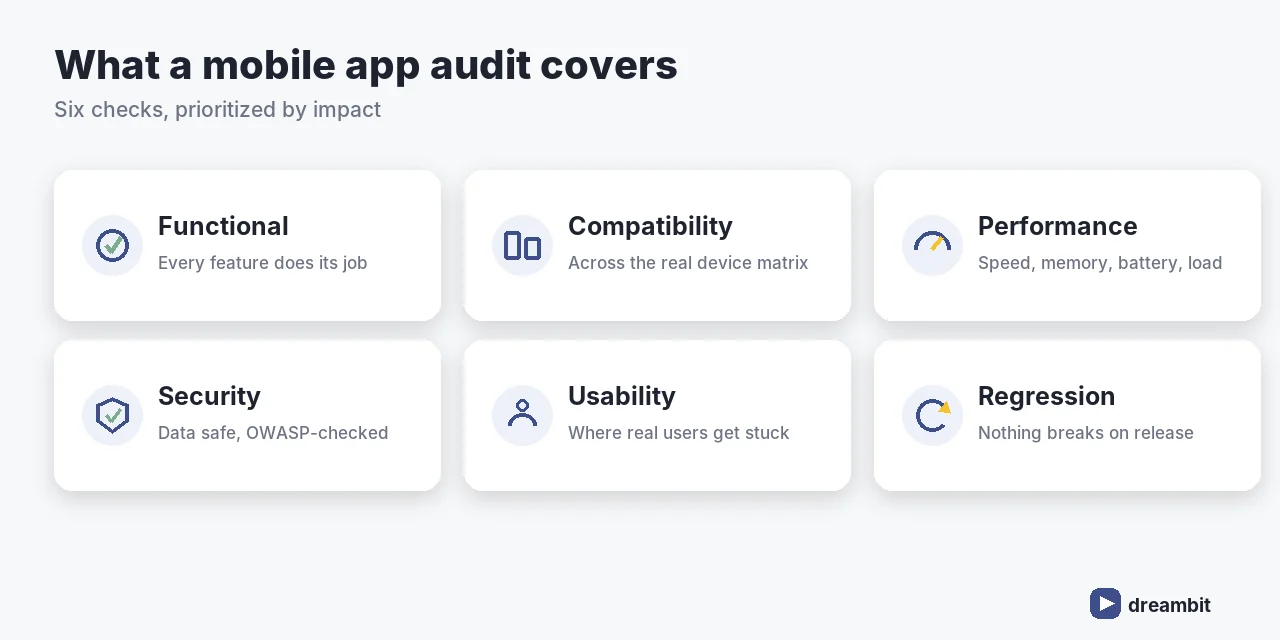
A quality audit is a structured assessment of your app’s health that produces a prioritized list of issues and fixes. Full mobile app testing services then cover the ongoing work. The main testing types:
- Functional — does every feature do what it should?
- Compatibility — behavior across the real device/OS matrix
- Performance — speed, memory, battery, and load
- Security — data protection and common vulnerabilities
- Usability — the flows where real users get stuck
- Regression & automation — nothing breaks when you ship again
We go deeper on our approach in how we approach quality assurance.
When do you need an app audit?
Some signals are hard to ignore:
- Rising crash rates or app freezes and slowdowns
- Falling store ratings and reviews mentioning bugs
- You’re about to launch, raise, or scale to more users
- You inherited a codebase and don’t know its real state
- Releases keep breaking things that used to work
How much do mobile app testing services cost in 2026?
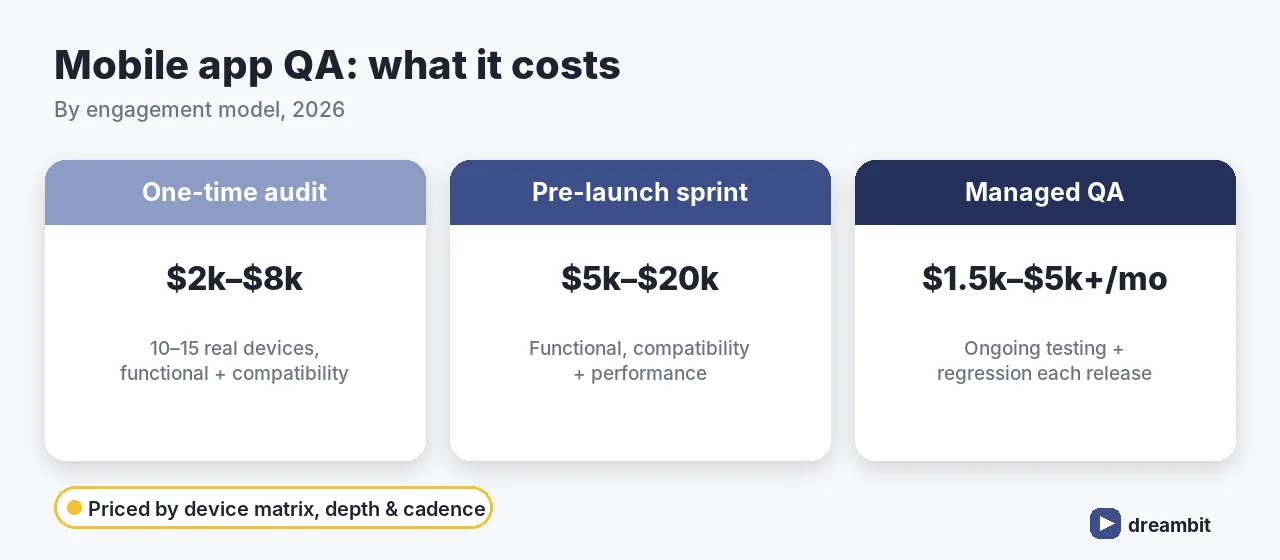
Cost depends on scope — device matrix, depth, and whether it’s one-time or ongoing:
A one-time compatibility and functional audit across 10–15 real devices typically costs $2,000–$8,000; a full pre-launch sprint (functional + compatibility + performance) runs $5,000–$20,000; ongoing managed QA is $1,500–$5,000+/month depending on team size and release cadence (industry benchmarks, 2026).
The drivers are platform coverage, device matrix, test depth, integrations, and reporting needs — the same forces behind overall software cost.
What a mobile app quality audit covers
A credible audit doesn’t just list bugs — it prioritizes them by impact and gives you a fix plan. Expect: a device/OS compatibility matrix, functional defect log, performance and stability findings, a security review against OWASP mobile standards, and usability observations — each rated by severity so you fix what matters first.
Manual vs automated testing
You need both, for different jobs:
- Manual testing — exploratory, usability, and anything that needs human judgment.
- Automated testing — fast, repeatable regression across builds and devices.
A warning we live by: coverage is not quality. AI and automation can hit 90% coverage while verifying nothing meaningful — which is why we demand behavior- and edge-case tests. More on that discipline in how Dreambit builds with AI.
Our QA process
- Audit (3–5 days) — assess, reproduce, prioritize by severity.
- Test plan — device matrix, cases, and automation targets.
- Execution — manual + automated, on real devices.
- Report — prioritized findings with a fix plan.
- Regression & monitoring — keep it fixed release after release.
Common QA mistakes to avoid
- Chasing coverage numbers. 90% coverage that tests nothing is theater.
- Testing only on emulators. Real devices reveal real bugs.
- Skipping performance and security until something breaks in production.
- No regression suite. Every release quietly re-breaks old features.
- Treating QA as a final gate instead of a continuous practice.
Key Takeaways
- Mobile app testing services span functional, compatibility, performance, security, usability, and regression/automation.
- A one-time audit is $2,000–$8,000; a pre-launch sprint $5,000–$20,000; ongoing managed QA $1,500–$5,000+/month.
- Get an audit before launch, before scaling, or when crashes/ratings slip.
- Use manual and automated testing together — and remember coverage ≠ quality.
- A good audit prioritizes issues by impact and hands you a fix plan, not just a bug list.
Frequently Asked Questions
In 2026, a one-time quality audit across 10–15 real devices typically costs $2,000–$8,000; a full pre-launch sprint (functional, compatibility, performance) runs $5,000–$20,000; and ongoing managed QA is $1,500–$5,000+/month. Cost scales with platform coverage, device matrix, test depth, and release cadence.
A quality audit covers functional testing, device/OS compatibility, performance and stability, a security review against OWASP mobile standards, and usability. Crucially, it prioritizes issues by severity and hands you a fix plan — not just a raw bug list — so you fix what actually costs you users first.
Get one before a launch, before raising or scaling, when crash rates climb or store ratings slip, or when you’ve inherited a codebase and don’t know its real state. If recent releases keep breaking features that used to work, that’s a strong signal you need an audit and a regression suite.
Both. Manual testing handles exploratory, usability, and judgment-heavy checks; automated testing gives fast, repeatable regression across builds and devices. Beware coverage theatre — high automated coverage can still verify nothing meaningful, so demand behaviour- and edge-case tests, not just line coverage.
A focused audit usually takes 3–5 days to assess, reproduce, and prioritize issues, followed by a test plan and execution. Ongoing managed QA then runs continuously alongside your releases, with regression checks each time you ship so fixed issues stay fixed.
AI is only worth it when it solves a real problem. We don’t bolt “AI” onto a product to put it on a slide — we build features that earn their place: faster workflows, lower costs, things that simply weren’t possible before. Here’s what our AI integration services look like in practice.
AI integration services in your product
We embed AI where it creates real value for your users, not where it looks impressive in a demo.
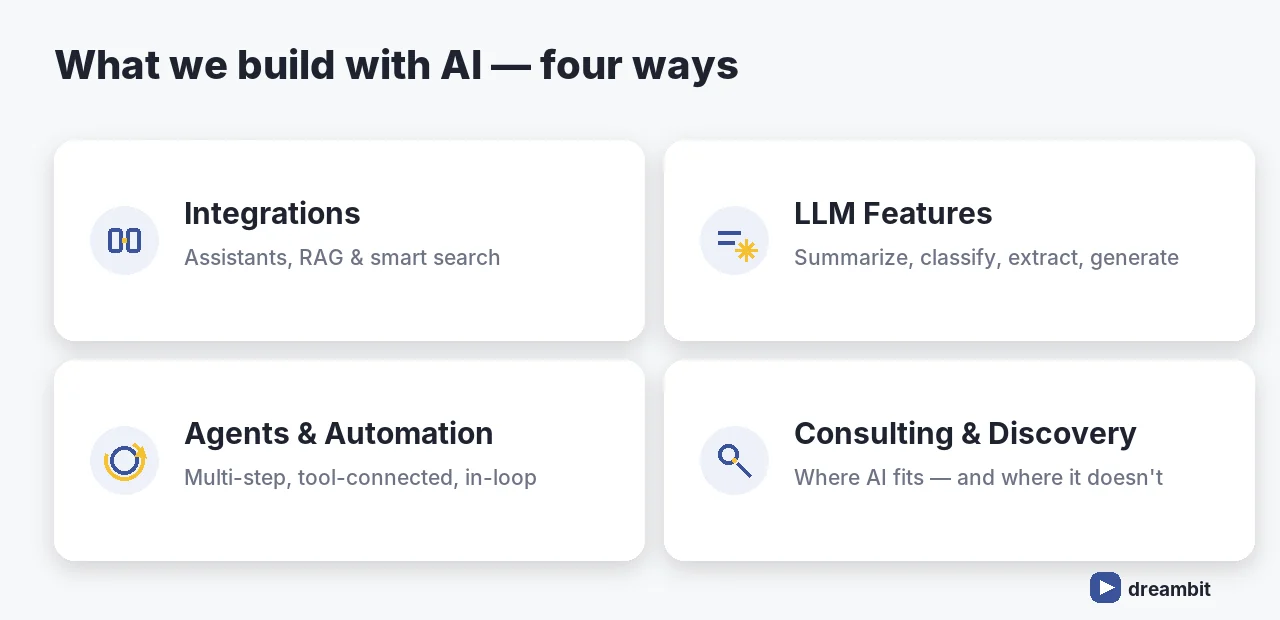
- Assistants & chatbots — conversational interfaces that actually understand your domain, not generic bots
- RAG over your data — answers grounded in your documents, knowledge base, and policies, with sources — not the model making things up
- Smart search — natural-language search across content that used to be impossible to navigate
Example: for a B2B SaaS client we built a support assistant grounded in their docs that cut average first-response time by ~40% and deflected around 30% of routine tickets.
LLM-powered features
The building blocks that quietly make a product smarter:
- Summarization — long documents, threads, calls turned into the part that matters
- Classification & routing — tagging, triage, and sorting at scale, automatically
- Extraction — pulling structured data out of messy, unstructured input
- Generation — drafting content, replies, and reports inside your workflow
Example: an extraction pipeline for a logistics client that replaced roughly 15 hours of manual data entry per week.
AI agents & automation
Beyond single calls — systems that carry out multi-step work on their own.
- Workflow automation — agents that handle routine operational processes end to end
- Tool-connected agents — AI that acts across your stack (databases, APIs, internal tools) instead of just talking
- Human-in-the-loop where it matters — automation with the right checkpoints, not a black box
Example: an agent that automates invoice processing end to end, freeing the team from about 8 hours of manual reconciliation a week.
AI consulting & discovery
Sometimes the most valuable thing we do is tell you where not to use AI.
- Opportunity discovery — we map where AI will genuinely move the needle for your business, and where it would just burn budget
- Feasibility & architecture — a realistic plan: what’s possible now, what it costs, what the risks are
- From idea to prototype — a working proof, fast, so decisions are made on evidence not hype

How we build it — and why it holds up
The difference between an AI demo and an AI product is everything that happens after the demo. We build with the same discipline we apply to all our work:
- Spec-driven — we define correct behavior before we build, so the AI’s output is predictable
- Tested & verified — full coverage on real behavior, plus an AI verification layer; nothing ships unchecked
- Secure by default — your code and data aren’t used to train models; sensitive work runs under a separate access regime.
- Built to scale — we design around AI’s real limits, so it holds up in production, not just in the pitch
Why clients work with us
- We build AI every day, on our own work — so our advice comes from practitioners, not theory
- We’re honest about where AI fits and where it doesn’t
- You get a battle-tested system, not an experiment — shipped 2–3× faster, at the same level of quality
Frequently Asked Questions
Dreambit’s AI integration services cover four areas: AI integrations in your product (assistants, RAG, smart search), LLM-powered features (summarization, classification, extraction, generation), AI agents and automation, and AI consulting and discovery — all built into real products, not demos.
Retrieval-Augmented Generation grounds AI answers in your own documents, knowledge base, and policies, and cites sources — instead of the model making things up. It’s how we make assistants and smart search reliable enough to put in front of your users.
Your code and data aren’t used to train models, and sensitive work runs under a separate access regime. Generated code goes through the same reviews and checks as human code, plus a dedicated AI vulnerability pass — AI gets no bypass.
Yes. We build tool-connected agents that act across your stack — databases, APIs, and internal tools — to carry out multi-step work end to end, with human-in-the-loop checkpoints where the cost of error is high, not a black box.
That’s what our AI consulting and discovery is for. We map where AI will genuinely move the needle versus where it would just burn budget, give a realistic feasibility and architecture plan, and build a fast prototype so decisions are made on evidence, not hype.
What is fintech app development?
Fintech app development covers any software that moves, stores, or analyses money or financial data. In practice it splits into a handful of product categories, each with its own compliance and UX expectations:- Digital banking & neobanks — accounts, cards, transfers, statements.
- Payments & wallets — P2P transfers, QR payments, merchant checkout.
- Lending & BNPL — credit scoring, loan origination, repayment flows.
- WealthTech & investing — brokerage, robo-advisors, crypto.
- InsurTech — quotes, claims, policy management.
- Personal finance & budgeting — account aggregation, analytics, alerts.
How much does fintech app development cost in 2026?
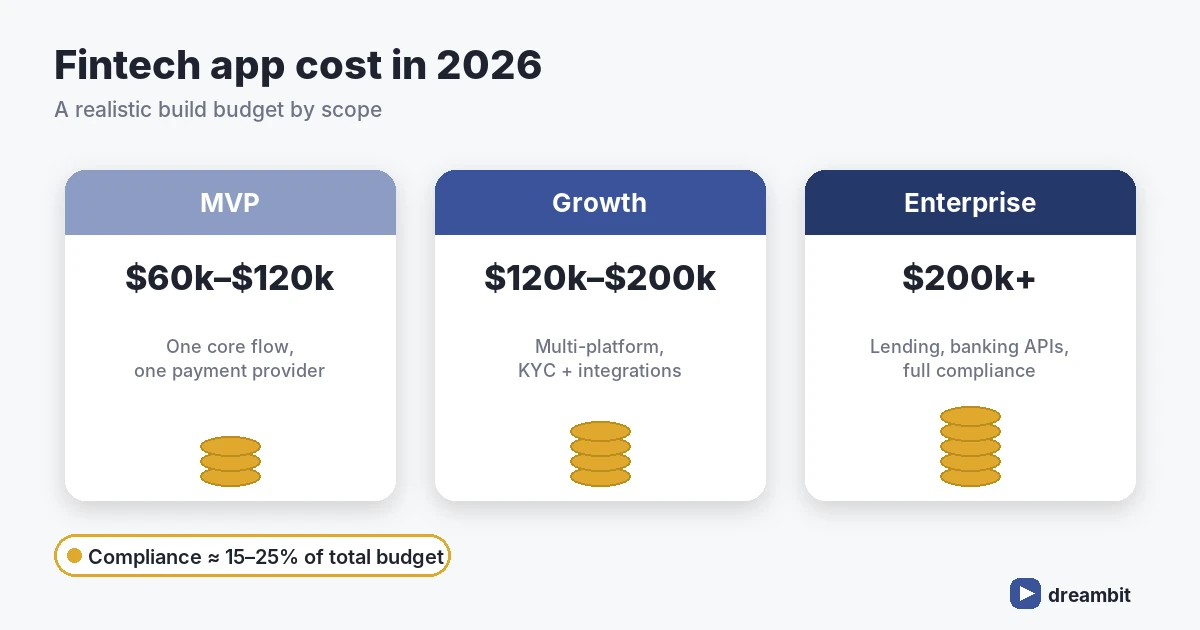
A realistic range for a custom fintech app in 2026 is $60,000–$250,000+, depending on scope, compliance, and integrations. A lean, single-platform MVP with one core flow and one payment integration usually lands at the lower end; a multi-platform product with lending logic, KYC, and bank integrations sits at the top.A fintech MVP with secure authentication, one payment provider, KYC onboarding, and a single core flow typically costs $60,000–$120,000 and reaches the app stores in 4–7 months — compliance work alone accounts for 15–25% of that budget (Dreambit project benchmarks, 2026).The main cost drivers are predictable:
- Compliance & security — audits, penetration testing, encryption, secure infrastructure.
- Third-party integrations — payment gateways, banking APIs, KYC/AML providers each carry setup and per-transaction fees.
- Platform choice — cross-platform (Flutter, React Native) versus two native codebases.
- Team seniority — fintech rewards experienced engineers who have shipped regulated products before.
Which regulations and compliance standards apply?
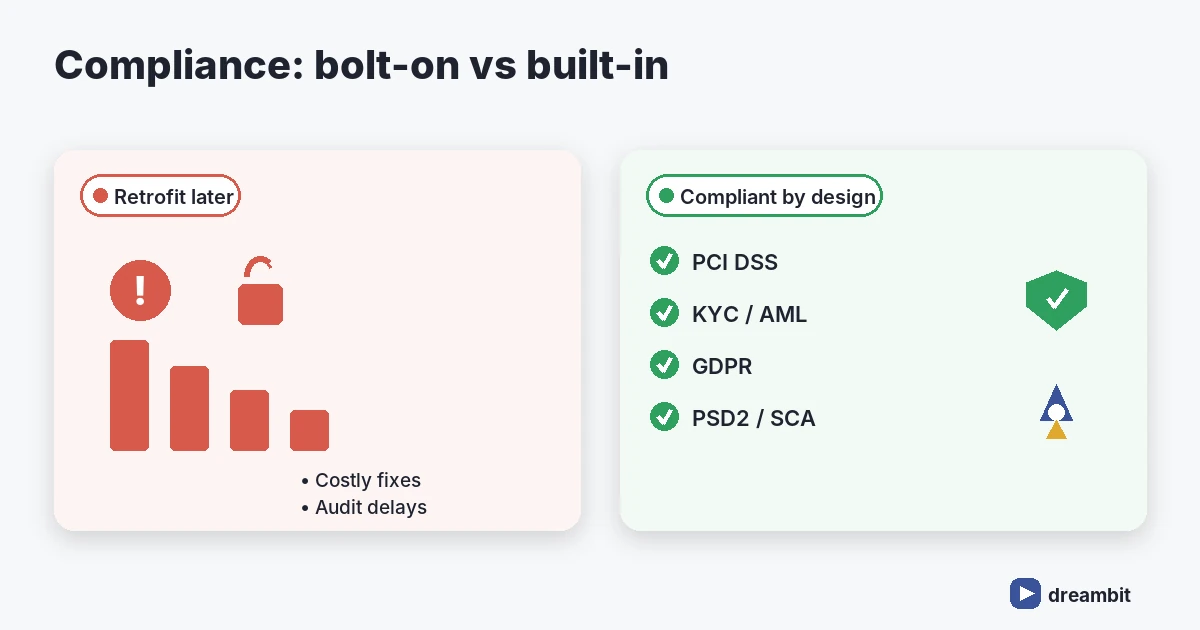
Compliance is not a feature you add later — it shapes your data model, your hosting, and your onboarding. The standards that most often apply to fintech app development are:- PCI DSS — mandatory if you store, process, or transmit card data. Using a tokenised gateway dramatically reduces your scope.
- KYC / AML — identity verification and anti-money-laundering checks, usually delivered through a specialist provider.
- PSD2 / Open Banking — strong customer authentication (SCA) and secure account access in the UK and EU.
- GDPR / CCPA — data privacy, consent, and the right to erasure.
- SOC 2 — increasingly expected by enterprise partners and investors.
The right tech stack for a fintech app
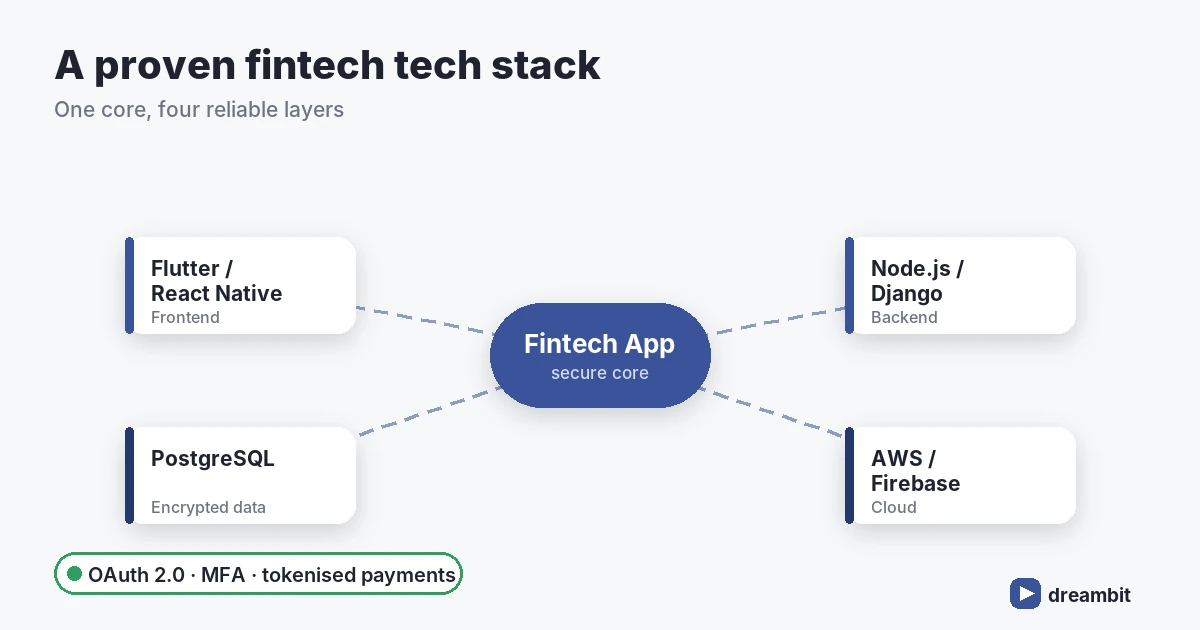
There is no universally “best” stack, but there is a sensible default for most products. After 60+ MVPs we lean toward a cross-platform front end paired with a strongly-typed, well-audited back end.Front end
Flutter and React Native let you ship iOS and Android from one codebase, cutting build cost by roughly 30–40% versus two native apps while keeping near-native performance. For finance UIs with heavy animations and consistent branding across platforms, Flutter is our usual recommendation — see why we use Flutter and Firebase for SaaS MVPs.Back end & infrastructure
- Languages: Node.js (Express/Koa) or Python (Django) for rapid, maintainable services.
- Data: PostgreSQL for transactional integrity; encrypted at rest and in transit.
- Cloud: AWS or Firebase with region controls for data residency.
- Auth: OAuth 2.0, biometric login, and multi-factor authentication by default.
Must-have features for a fintech app
Whatever the category, a credible fintech app ships with a non-negotiable core:- Secure onboarding with KYC and biometric/MFA login
- Real-time transactions and push notifications
- Encrypted data storage and tokenised payments
- Clear transaction history and exportable statements
- In-app support and fraud-alert flows
- Accessibility and a friction-light UX (finance users abandon fast)
Our fintech app development process
We run regulated builds in five stages, with compliance and security threaded through every one:- Discovery (1–2 weeks) — scope, regulations, and architecture decisions.
- UX/UI design (2–4 weeks) — flows, prototypes, and accessibility.
- Development (8–16 weeks) — iterative sprints with security reviews.
- QA & security testing (ongoing) — including penetration testing before launch.
- Launch & maintenance — monitoring, updates, and compliance upkeep.
Common fintech app development mistakes to avoid
- Treating compliance as a phase. It is an architecture constraint — bake it in from discovery.
- Storing card data you do not need to. Tokenise through a gateway and shrink your PCI scope.
- Over-building the MVP. Ship one core flow brilliantly before adding modules.
- Ignoring onboarding friction. Every extra KYC step costs conversions; sequence requests carefully.
- Skipping penetration testing. In finance, a single breach can end the product.
Key Takeaways
- Custom fintech app development in 2026 typically costs $60,000–$250,000+, with compliance taking 15–25% of the budget.
- Decide on PCI DSS, KYC/AML, PSD2, and GDPR scope before design begins.
- A cross-platform stack (Flutter/React Native + Node/Python + PostgreSQL on AWS) suits most products.
- Security — encryption, MFA, tokenisation, penetration testing — is the baseline, not a bonus.
- Ship a focused MVP in 4–7 months, then expand based on real usage.
Frequently Asked Questions
A focused fintech MVP usually takes 4–7 months from discovery to app-store launch. The variable is compliance: products needing full KYC/AML, lending logic, or bank integrations sit at the longer end, while a single-flow payments or budgeting app can launch faster.
Most custom fintech apps cost between $60,000 and $250,000+ in 2026. A lean single-platform MVP starts around $60,000–$120,000, while multi-platform products with lending, KYC, and banking integrations run higher. Compliance and security typically account for 15–25% of the total.
It depends on what you handle. PCI DSS applies if you touch card data, KYC/AML if you onboard users for financial services, PSD2/Open Banking in the UK and EU, and GDPR/CCPA for personal data. Define the applicable standards before design — retrofitting compliance is far more expensive.
Both are solid cross-platform choices that cut build cost versus native. We usually recommend Flutter for finance apps because of its consistent UI across platforms and strong performance with rich, animated interfaces. React Native is an excellent fit when a team already has deep JavaScript expertise.
Yes, provided the agency has shipped regulated products and treats security as a first-class concern. Look for experience with PCI DSS and KYC, a documented security testing process, and verifiable client results. Dreambit has delivered 150+ apps with a 4.9★ average rating across 114 client reviews.
Build your fintech app with Dreambit
Fintech app development rewards teams that understand regulation, security, and user trust in equal measure. With 14 years of delivery experience, 150+ launched products, and an AI-first approach, Dreambit helps founders and CTOs ship secure financial products that pass audits and win users. Book a free consultation and let us scope your fintech app together.
If you are budgeting for custom software development cost in 2026, you’ve probably seen quotes that vary by 2–3x for what appears to be “the same” scope. Meanwhile, you keep hearing that the real cost is not the initial build but everything that comes after.
This article breaks down what you are actually paying for when you hire a dev team, why “cheap” builds often become the most expensive, and how to structure your budget so your product stays financially healthy over its entire lifecycle.
How Much Does Custom Software Development Cost in 2026?
Most projects in 2026 fall into five budget tiers depending on complexity, team size, and how much infrastructure work is involved.
| Product type | Approximate budget | What it usually includes |
|---|---|---|
| Prototype / clickable MVP | $5,000–$15,000 | UX concept, limited screens, basic user flow validation |
| Simple custom app / MVP | $12,000–$40,000 | Core functionality, backend, basic integrations, QA, first release |
| Growth-stage mobile or web product | $40,000–$125,000+ | Scalable architecture, analytics, payments, admin panel, advanced UX |
| Complex SaaS / marketplace / AI platform | $75,000–$250,000+ | Multi-role systems, integrations, automation, AI features, DevOps, security |
| Enterprise-grade system | $150,000+ | Complex workflows, compliance, integrations, high availability, long-term support |
The important point: the development invoice is only one part of the product’s total cost. The real cost includes discovery, architecture, UX, development, QA, integrations, cloud infrastructure, release management, analytics, maintenance, and post-launch optimization.
What Are You Actually Paying For When You Hire a Dev Team?
You are paying for far more than coding hours — the largest cost drivers are architectural decisions, team seniority, and the scope of your platform strategy.
When founders compare custom software development cost, they often focus on hourly rates. That is understandable, but misleading.
The main cost drivers that sit behind any proposal include:
-
Scope and complexity. The more complex your product (real-time features, AI, heavy analytics, multi-tenant permissions, deep integrations), the more hours you are buying across engineering, QA, DevOps, and product. A basic MVP might land in the lower tens of thousands, while complex SaaS or enterprise platforms can easily run into the hundreds of thousands or more.
-
Team location and rate bands. In 2025–26, software development rates range from roughly 25–60 USD/hour for many offshore regions up to 100–300+ USD/hour for premium onshore consultancies, depending on specialization and seniority.
-
Platform strategy. Maintaining separate native iOS, Android, and web codebases significantly increases both build and maintenance costs; cross-platform frameworks like Flutter let one team ship to all platforms from a single codebase, which can meaningfully reduce timelines and ongoing maintenance.
-
Team structure and seniority mix. Hourly rates jump as you move from junior to mid-level to senior and architect roles, but senior people unlock better architecture, faster decisions, and fewer costly reworks later. How you balance that mix has a major impact on the total cost of ownership.
-
Lifecycle, not just launch. Total cost of ownership (TCO) includes the full lifecycle: build, run, maintain, improve, and eventually retire or rebuild the system. For most serious products, your ongoing operating and change costs over several years will exceed what you spent on the initial build.
1. What Does Discovery and Product Shaping Cover?
Good teams start by clarifying business goals, user journeys, and constraints instead of jumping straight to Jira tickets. This includes stakeholder interviews, process mapping, user story workshops, and prioritization. Done well, this phase cuts out wasteful features that would otherwise eat a big chunk of your budget later.
Dreambit works more as a technology partner rather than a pure coding company: we help businesses clarify the product vision and define an MVP that can be shipped in a 2–3 month window. That reduces time-to-market and avoids building features nobody uses.
2. What Does UX/UI Design Contribute to Your Budget?
You’re paying for people who can translate business flows into usable interfaces, states, and interactions that work across devices. This includes wireframes, hi-fi designs, design systems, and interaction patterns. Poor UX is expensive: it leads to abandoned sign-ups, higher support overhead, and slower adoption — costs that rarely show up in the initial quote but hit your P&L later.
For example, in healthcare products Dreambit has worked on, design decisions around flows for appointments were critical to adoption and engagement, not just aesthetics. That has direct revenue and retention implications.
3. Why Do Architecture and Technical Decisions Drive So Much Cost?
You are also paying for someone to choose your tech stack, design system boundaries, and decide how modular, scalable, and testable your codebase will be. These early choices drive:
- How quickly new features can be added.
- How hard it is to swap vendors or grow your team.
- How often you hit scaling or reliability limits that require expensive refactors.
Total cost of ownership frameworks consistently show that architectural shortcuts and accumulated technical debt are some of the biggest hidden cost drivers over a system’s lifetime. Dreambit’s cross-platform focus aims to keep architecture unified, so you are not paying for parallel stacks that drift apart.
4. What Is Included in Development and Integration Work?
This is the actual “writing code” part, covering:
- Implementing features across mobile and web.
- Integrating external APIs (payments, messaging, analytics, identity).
- Handling edge cases, data validation, and error states.
Rates vary significantly by region and firm size. Small to mid-market custom development companies around the world typically charge 90–250 USD/hour in 2026 for mixed teams, while specialized offshore teams in Eastern Europe can deliver strong work at 25–75 USD/hour, depending on seniority and complexity.
5. What Does Quality Assurance and Test Automation Add to Your Budget?
You’re also paying for the invisible work that makes your app actually reliable:
- Manual testing across devices and platforms.
- Automated tests (unit, integration, end-to-end).
- Performance and security checks.
Companies that skimp on QA often “save” in the short term but incur higher bug-fixing costs, downtime, and reputational damage later. In regulated or trust-sensitive domains (healthcare, fintech, dating), that can be catastrophic.
6. Why Do DevOps, Infrastructure, and Observability Matter?
Finally, you are paying for pipelines and infrastructure that keep your product shippable:
- CI/CD pipelines.
- Cloud infrastructure setup (compute, storage, networking).
- Monitoring, logging, and alerting.
TCO analyses highlight that ongoing hosting, monitoring, and operations regularly dwarf one-time setup costs over the lifetime of the system. A solid DevOps foundation means smaller incremental changes are cheaper and less risky to deploy, which matters once you reach the optimization phase.
Why Does “Cheap” Offshore Development Often Cost More in the Long Run?
Cheap builds become expensive because low hourly rates don’t account for architectural shortcuts that compound into technical debt — and that debt eventually consumes a massive share of your ongoing IT budget.
Technical debt is the gap between the system you have and the system you should have built if you had more time, better skills, or fewer shortcuts. It includes tangled architectures, missing tests, outdated dependencies, and “temporary” workarounds that never got fixed.
Fact: According to Software Improvement Group, technical debt can consume up to 40% of an IT department’s budget, and 10–20% of budgets intended for new product development may be redirected to dealing with it instead. Average tech stacks contain 20–40% pure technical debt — meaning nearly half your codebase can be working against you, not for you.
A small feature takes weeks because the codebase is fragile. A payment integration breaks after an API update. The app crashes on specific devices. The admin panel cannot support new business logic. Developers are afraid to touch old modules because one change creates five bugs. Eventually, the company faces a painful choice: keep patching a weak foundation or rebuild the product.
For a startup, technical debt delays growth. For a scaling business, it increases the total cost of ownership. For an enterprise, it can become a serious operational and security risk.
In custom software development, cheap code often becomes expensive code when it lacks:
- clean architecture;
- automated testing;
- documentation;
- security thinking;
- scalable backend structure;
- analytics;
- maintainable integrations;
- senior code review.
Dreambit’s App Quality Audition service is built around this exact issue. The audit evaluates app performance, usability, security, code, architecture, integrations, code quality, and potential technical debt.
That is the smarter way to manage cost: not by ignoring technical debt, but by detecting it early enough to fix it before it becomes a rewrite.
How Does Seniority Mix Affect Your Total Cost of Ownership?
A senior-heavy team costs more per hour but typically reduces total cost of ownership by preventing the architectural mistakes and rework that inflate budgets later.
The hourly price is not the same as the total cost.
A junior-heavy team may look cheaper on paper, but complex products need senior people to make decisions that affect the entire future of the system: architecture, database structure, security model, cloud setup, code standards, integration strategy, and scalability.
A senior-heavy team can often reduce waste because it needs fewer people to make better decisions faster. Senior developers are also more likely to prevent rework, spot risks early, and design the system so that future features are easier to add.
This matters even more in 2026 because AI tools are now part of everyday development. Stack Overflow’s 2025 Developer Survey found that “84% of respondents use or plan to use AI tools in their development process, while 51% of professional developers use them daily.”
But AI does not remove the need for senior oversight. DORA’s 2025 research found that AI can accelerate code generation, but the saved time is often reallocated to auditing and verification. DORA also warns that AI acts as an amplifier: strong teams benefit from it, while teams with fragmented tooling or fragile infrastructure may generate technical debt faster.
In other words, AI can make a good team faster. It can also make a weak architecture messy at scale.
A healthy team structure usually includes:
- a senior tech lead or architect;
- one or more middle/senior developers;
- QA engineer;
- UX/UI designer;
- project/product manager;
- DevOps or cloud specialist when needed.
For early MVPs, a lean team is often enough. For marketplaces, SaaS platforms, fintech products, healthcare apps, AI-powered tools, or systems with many integrations, seniority becomes a cost-control mechanism, not a luxury.
You pay more for senior judgment upfront, so you do not pay more for rework later.
Are You Budgeting for the Post-Launch Phase — or Just the Build?
Most teams budget for launch and almost nothing for what comes after — which is where a large portion of real software costs actually live.
Most sales conversations focus on getting you to launch: features, timelines, and the initial project budget. But the real financial risk often hides in what comes after: the optimization phase.
Why is “launch” not the finish line?
From a TCO perspective, your costs don’t stop when version 1 goes live — they usually start accelerating. After launch, you will:
- Fix real-world bugs and UX friction that only surface with real users.
- Optimize performance as traffic grows.
- Add features to meet customer feedback or competitive pressure.
- Handle platform changes (OS updates, browser changes, third-party API shifts).
Dreambit’s Priority Maintenance Support service includes bug fixes, performance monitoring, compatibility updates, technical support, health checks, emergency support, UI/UX enhancements, and monthly reports.
This is not “extra.” It is part of the software lifecycle.
So, when planning custom software development cost in 2026, companies should not ask only, “How much does it cost to build version one?”
They should ask:
“How much should we reserve to make version one successful?”
A practical rule is to plan a post-launch budget from the beginning. For many products, this means reserving budget for at least three to six months of optimization after release.
How Should You Structure Your Optimization Budget?
Plan your post-launch budget as a line item from day one — not an afterthought — and tie it to measurable outcomes like retention, conversion, and reduced support load.
Instead of treating post-launch work as “we’ll figure it out later,” bake it into your financial model from day one:
-
Assume a meaningful optimization phase. Expect at least several months of follow-on work after launch for a serious product, focused on stability, UX refinements, and the first wave of feature improvements triggered by real usage.
-
Allocate ongoing capacity. Decide whether you want a small, continuous team (e.g., a retained squad that ships improvements every sprint) or periodic “burst” engagements (e.g., 2–3 focused sprints each quarter). The first option is gentler on your roadmap; the second gives more budget flexibility.
-
Track the right metrics. Tie optimization work to measurable outcomes: reduced support tickets, improved conversion, higher retention, lower infrastructure costs, or increased average order value. For example, in e-commerce and service apps, UX improvements after launch have been linked to higher order values and new customer growth in real projects.
In case studies of apps like HealthPoint (healthcare) and HeartMatch (dating), Dreambit’s work did not end with the initial version: ongoing collaboration focused on refining flows, improving reliability, and enhancing engagement features based on live usage. That kind of partnership mindset is what you want to budget for.
What should you ask a vendor about post-launch support?
When you discuss proposals, explicitly ask:
- How do you structure post-launch support and optimization?
- What does the team look like during that phase?
- How do you prioritize improvements based on data rather than opinions?
Vendors who talk confidently about TCO, technical debt management, and post-launch optimization are signaling that they are thinking beyond the initial invoice. This is where transparent communication and a long-term relationship — which Dreambit focuses on — become a real financial asset.
What Does It Take to Manage Custom Software Costs Successfully?
Managing custom software costs successfully means planning not just for the build, but for architecture quality, team seniority, and post-launch optimization from day one.
The difference between projects that deliver value and projects that spiral isn’t budget size — it’s preparation, architecture, and honest expectation-setting from day one.
The cheapest estimate may help you start faster. But the smartest estimate helps you build something that can survive real users, real growth, and real business pressure.
That is the difference between paying for code and investing in a product.
For companies planning a mobile app, SaaS platform, marketplace, AI-powered tool, or digital product ecosystem, the best cost-management strategy is simple:
- Build only what matters first.
- Build it on a strong foundation.
- Measure what users do.
- Improve continuously.
- Choose a development partner who can think beyond launch day.
Dreambit helps companies control total software cost by building scalable, cross-platform products, validating them through measurable releases, auditing quality, and supporting optimization after launch.
Key Takeaways
- Custom software cost ranges widely by complexity — from $5K–$15K for a prototype to $150K+ for enterprise systems. The initial invoice is only part of the picture.
- Hourly rate is not total cost — team seniority, architecture quality, platform strategy, and lifecycle planning all determine your real spend.
- Technical debt is a hidden cost multiplier — poor-quality builds can redirect 10–40% of your ongoing IT budget away from new development into maintenance.
- Senior engineers are a cost-control mechanism, not a luxury — they prevent expensive rework, especially on complex products, and are better positioned to work effectively alongside AI tooling.
- AI accelerates good teams; it amplifies weak architectures — senior oversight remains critical as AI tools become standard in development workflows.
- Post-launch optimization is a budget line, not an afterthought — plan for at least 3–6 months of follow-on investment after launch for any serious product.
- Ask your vendor about TCO from day one — a development partner who talks about technical debt, post-launch support, and lifecycle cost is one who’s thinking about your long-term success, not just the initial contract.
What Makes a Multi-Vendor Marketplace Fundamentally Different from a Regular E-Commerce App?
The biggest mistake founders make in multi-vendor marketplace development is thinking they are building a store with many sellers.
A regular e-commerce product has one merchant, one inventory logic, one pricing strategy, one fulfillment process, and one owner of the customer experience. A multi-vendor marketplace has many. That changes everything.
Your platform needs seller accounts, vendor dashboards, approval workflows, product moderation, commission logic, order splitting, dispute management, payout rules, buyer-seller communication, seller analytics, and admin visibility. Dreambit’s e-commerce development service reflects this difference: for marketplace development, the team highlights vendor onboarding flows, commission logic, dispute management, and analytics dashboards as core parts of the product scope.
This is why multi-vendor marketplace development should start with architecture, not screens.
Before you design the homepage, you need to define:
- Who owns the buyer relationship?
- How are sellers verified?
- What happens when one order includes products from multiple vendors?
- How are commissions calculated?
- When is money released to the seller?
- What makes one listing rank above another?
- How are fake, low-quality, or risky sellers detected?
- What data does the admin team need every day?
The marketplace that answers these questions early has a competitive advantage before the first user signs up.
Fact: Online marketplaces achieved 62% of global retail e-commerce sales in 2024, totaling USD 2.4 trillion, according to Euromonitor International. Third-party seller share rose from 72% to 81% of total marketplace sales over the last decade. Marketplaces are projected to drive 53% of all e-commerce growth by 2030, with the global digital marketplace sector expected to reach $1.06 trillion by that year — up from $580 billion in 2024. (Euromonitor, 2025)
How Do You Solve the “Chicken and Egg” Problem with Technology?
The answer is product mechanics — not marketing spend alone.
Every multi-vendor marketplace development project faces the same uncomfortable question: how do you attract buyers without enough sellers, and how do you attract sellers without enough buyers?
In practice, many founders try to solve it with marketing spend alone: they run ads, recruit vendors manually, offer discounts, and hope liquidity appears. But mature marketplaces solve this with product mechanics.
The goal is not simply to “get more sellers.” The goal is to shorten the distance between seller interest and seller activation, then make every new seller improve the buyer experience instead of making the catalog messier.
Why Should Automated Seller Onboarding Be Your Primary Growth Lever?
Because seller onboarding shouldn’t be just admin work — it should be your supply growth engine.
A strong onboarding flow should move a seller through five stages:
Does Your Identity Verification Process Handle Compliance Requirements?
Yes — and it needs to be designed that way from the start.
The platform should collect the right seller information based on seller type, geography, risk level, and payout method. This matters not only for fraud prevention but also for marketplace transparency. In the U.S., the INFORM Consumers Act requires online marketplaces to collect, verify, and disclose certain information about high-volume third-party sellers, including bank account, tax ID, and contact information. In the EU, the Digital Services Act adds marketplace transparency obligations, including seller contact information and reasonable efforts to check products or use traceability technologies.
This means seller onboarding should not be treated as a generic registration form. It should be designed as a compliance-aware workflow.
Can Sellers Complete Storefront Setup Without Contacting Support?
They should be able to — and if they can’t, you’ll pay for it in support tickets.
The seller should be able to create a storefront, add brand information, set return rules, define shipping areas, and connect payout details without contacting support. A guided setup checklist can show exactly what remains before the seller can go live.
Is Your Product Import Flow Where Marketplace MVPs Break?
This is one of the most common failure points — and it’s fixable.
If every seller must manually create each listing, your catalog will grow too slowly. A stronger platform allows product uploads through CSV, API, Shopify/WooCommerce import, ERP integration, or AI-assisted listing creation. The system should map products to categories, validate attributes, detect missing images, flag suspicious duplicates, and suggest improvements before the listing reaches moderation.
Dreambit’s e-commerce development approach already includes custom product catalogs, advanced search and filtering, optimized checkout flows, and payment gateway integrations such as Stripe, PayPal, and LiqPay.
Are Marketplace Rules Built Into the Product Flow or Hidden in a PDF?
Build them into the flow — hidden rules become support tickets.
If sellers need to understand packaging rules, refund policies, service-level agreements, commission tiers, shipping cutoffs, or payout schedules, show this information at the moment it matters. When a seller adds a fragile product, the platform can display packaging requirements. When a seller enables international shipping, the platform can show customs and return implications.
What Is the Real Onboarding Milestone?
Not “seller approved.” It’s “seller received the first order and fulfilled it successfully.”
That is why the seller dashboard should include performance tips, listing quality scores, visibility recommendations, inventory alerts, and early sales analytics. Dreambit’s Giftmall marketplace case shows how important post-purchase utility can be: the app allows users to place orders, manage and track gift cards, and receive notifications and alerts. The same principle applies to sellers: once they join, the platform must keep guiding them toward successful activity.
The best KPIs for seller onboarding are not vanity metrics like “number of registered vendors.” Track:
- Time to first approved listing
- Time to first sale
- Seller activation rate
- Listing rejection rate
- Percentage of sellers with complete payout setup
- Percentage of products with complete structured data
- Early cancellation or refund rate
- Seller support tickets per onboarding step
According to industry research, 40% of online businesses already operate some form of marketplace, and the average cost to build a custom multi-vendor MVP ranges from $100k–$300k — making onboarding optimization one of the highest-ROI investments in early-stage marketplace development. (Shipturtle, 2025)
When onboarding becomes measurable, it becomes optimizable. And when it becomes optimizable, it becomes your primary growth lever.
How Should Search Algorithms Prioritize User Trust Over Simple Keyword Matching?
A marketplace search should rank by relevance AND trust — not just keywords.
A marketplace with thousands of products can still feel empty if the search does not work. In multi-vendor marketplace development, search is not the same as store search. In a regular e-commerce store, you rank your own products. In a marketplace, you rank products from many sellers with different quality levels, fulfillment reliability, review history, image quality, pricing logic, and risk profiles.
If your search algorithm only matches keywords, it may push the wrong products to the top.
A buyer searching for “black leather backpack” does not simply want a listing that contains those words. They want the most relevant, available, trustworthy, fairly priced, and deliverable option. That means marketplace search should combine relevance with trust.
A stronger ranking model includes:
- Query relevance
- Category match
- Product attribute completeness
- Seller verification status
- Seller rating and review quality
- Fulfillment speed
- Cancellation rate
- Return and refund rate
- Stock accuracy
- Price competitiveness
- Listing freshness
- Buyer behavior signals
- Personalization signals
- Fraud or policy risk score
This is where data integrity becomes a competitive advantage. Search should not be treated as a standalone feature. It should be connected to the entire marketplace data model.
Dreambit has already successfully utilized AI to enhance e-commerce experiences: personalized recommendations, photo-based product search, and a chatbot that helps users choose clothing sizes. In one case, the result was a 28% increase in conversion and a 15% increase in average order value.
What Does Scalable Marketplace Payout Infrastructure Actually Require?
It requires configurable commission logic, flexible payout schedules, reserve handling, multi-currency support, and full reconciliation — not just “stripe the seller after checkout.”
Many founders think marketplace payments are simple: buyer pays, platform takes a commission, seller receives the rest. In reality, marketplace payouts are one of the most complex parts of the business.
Sellers care about three things:
- When will I get paid?
- How much will I receive after fees?
- Can I trust the platform to handle money correctly?
If the answer is unclear, sellers will not prioritize your marketplace.
A scalable payout system should include:
Clear commission logic
The platform should support fixed commissions, category-based commissions, seller-tier commissions, subscription plans, promotional rates, and manual overrides. Sellers should see estimated net earnings before they accept or fulfill an order. Industry data shows that 80% of product marketplaces rely on commission-based monetization, with typical rates ranging from 10–30%. (SQ Magazine, 2026)
Configurable payout schedules
Some marketplaces pay instantly. Others pay after delivery confirmation, after a return window closes, weekly, monthly, or after a minimum balance threshold. The right model depends on your risk level, product category, refund policy, and seller relationship.
Reserve and dispute handling
If a category has high return rates or fraud risk, the platform may need to hold part of the seller’s balance temporarily. This should be transparent and rule-based, not random.
Multi-currency and local payment rails
If your marketplace expands globally, sellers may expect payouts in their local currency through local rails. A robust payout API should automate payments to hundreds or thousands of suppliers, support multi-currency payments, handle local rails, improve compliance, and maintain audit trails.
Reconciliation and reporting
Finance teams need transaction IDs, payout statuses, fee breakdowns, refunds, tax data, and audit history. Without this, the marketplace will eventually drown in spreadsheets.
What Does It Mean to Build a Marketplace as an Operating System, Not a Feature List?
It means the foundation matters more than the homepage — and it must cover four connected layers.
Many weak marketplace products look good on day one and fail on day 180 because they were designed as a storefront, not an operating system. They have a homepage, product pages, and checkout, but no serious seller lifecycle, no ranking logic, no payout architecture, no admin intelligence, and no way to handle growth without manual chaos.
A strong marketplace is built around four connected layers.
Does Your Buyer Experience Layer Reduce Decision Anxiety?
That’s the only job it has.
This includes search, filters, product pages, reviews, checkout, order tracking, support, returns, and notifications. For marketplaces, buyer UX should reduce decision anxiety. Buyers need to quickly understand:
- Is this seller verified?
- Is this product available?
- When will it arrive?
- What happens if something goes wrong?
- Why is this result recommended?
- Are reviews trustworthy?
- Are there better alternatives?
The goal is not to show everything. The goal is to help buyers choose with confidence.
Does Your Seller Experience Layer Drive Supply Growth?
It should — because seller UX determines how fast your catalog scales.
A seller experience that works well includes onboarding, listing tools, inventory control, order management, and payout visibility. Without these, good vendors leave. Poor tools also attract only those willing to tolerate chaos, which damages platform quality over time.
Is Your Admin Panel Where Marketplace Quality Is Actually Controlled?
Yes — and most early-stage marketplaces underinvest here until it’s too late.
Admins need dashboards for seller approvals, product moderation, disputes, refunds, payouts, suspicious activity, category health, search performance, inventory gaps, and support load. Without this, the team operates blindly.
Dreambit’s marketplace development scope includes analytics dashboards, and its e-commerce deliverables include admin panels for inventory and order management, analytics, conversion tracking, CRM/payment integrations, and scalable infrastructure.
How Does Your Technical Infrastructure Layer Support Cross-Platform Scale?
By treating cross-platform development as a strategic advantage, not an afterthought.
This includes the backend, APIs, database architecture, payment integrations, cloud infrastructure, monitoring, analytics, mobile/web apps, and third-party services.
Dreambit’s cross-platform development approach is especially relevant here because marketplaces usually need to serve buyers and sellers across mobile and web platforms without unnecessarily multiplying development costs. Cross-platform development delivers faster time-to-market, consistent user experience, easier maintenance, wider reach, scalability, and improved performance.
For marketplace founders, speed is strategic. The faster you test supply, demand, search, payouts, and retention loops, the faster you learn where your competitive advantage actually is.
How Can Dreambit Help You Build a Marketplace That Scales?
By covering every layer — from architecture and discovery through post-launch performance monitoring.
Dreambit’s e-commerce development process covers discovery, architecture, design, development, QA/testing, launch, and support. For marketplace platforms and heavily customized solutions, Dreambit estimates a typical development timeline of 4–8 months, depending on integration scope.
This is the right mindset for marketplace development because the biggest risks are not always visible in the UI. They live in flows like:
- Seller onboarding
- Product data validation
- Search relevance
- Commission rules
- Payment splitting
- Refund handling
- Admin moderation
- Analytics
- Infrastructure scalability
- Post-launch performance monitoring
Dreambit also offers app quality audits and maintenance support, including performance monitoring, compatibility updates, health checks, UI/UX improvements, feature updates, and monthly reporting. For marketplaces, this matters because the product does not become “finished” at launch. It becomes more complex with every seller, category, country, and transaction type.
What Does It Actually Take to Build a Marketplace That Keeps Growing?
The answer is simple: build for trust, not just for volume.
The future of multi-vendor marketplaces belongs to platforms that reduce uncertainty.
Buyers do not want endless options. They want the right option from a seller they can trust.
Sellers do not want another channel that creates operational work. They want a platform that helps them get discovered, sell faster, and get paid without confusion.
Marketplace owners do not want manual chaos hidden behind a beautiful interface. They need infrastructure that can scale supply, protect quality, automate payouts, and surface the data needed to make better decisions.
At Dreambit, we help you build multi-vendor marketplaces that people trust and return to.
Key Takeaways
- Architecture before screens. A multi-vendor marketplace requires seller accounts, commission logic, order splitting, payout rules, and dispute management — decisions that must be made before any UI is designed.
- Solve the chicken-and-egg problem with product mechanics. Automated onboarding shortens seller activation time and directly drives supply growth, where marketing spend alone cannot.
- First-sale activation is the real onboarding milestone. Track time to first approved listing, time to first sale, and seller activation rate — not vanity counts of registered vendors.
- Search is a trust layer, not just a feature. Ranking should factor in seller verification status, fulfillment speed, cancellation rate, and fraud risk — not only keyword relevance.
- Payout complexity is underestimated. Configurable commission logic, payout schedules, reserve handling, multi-currency support, and reconciliation are non-negotiable for a marketplace that scales globally.
- Marketplaces are a dominant and growing channel. Online marketplaces accounted for 62% of global retail e-commerce sales in 2024, and that share is projected to grow — making execution quality the primary differentiator.
- The four-layer operating system is the product. Buyer experience, seller experience, admin/operations, and technical infrastructure must all be designed intentionally from day one, not bolted on after launch.